📩 Complaints
The Complaints page allows you to view all complaints and reports submitted by users from within the app. When a user encounters a problem or wants to report something, they can submit a complaint directly from the app, and it will appear here in the dashboard for review and action.
How to Access:
Sidebar Menu ← Users ← Complaints
Page Contents:
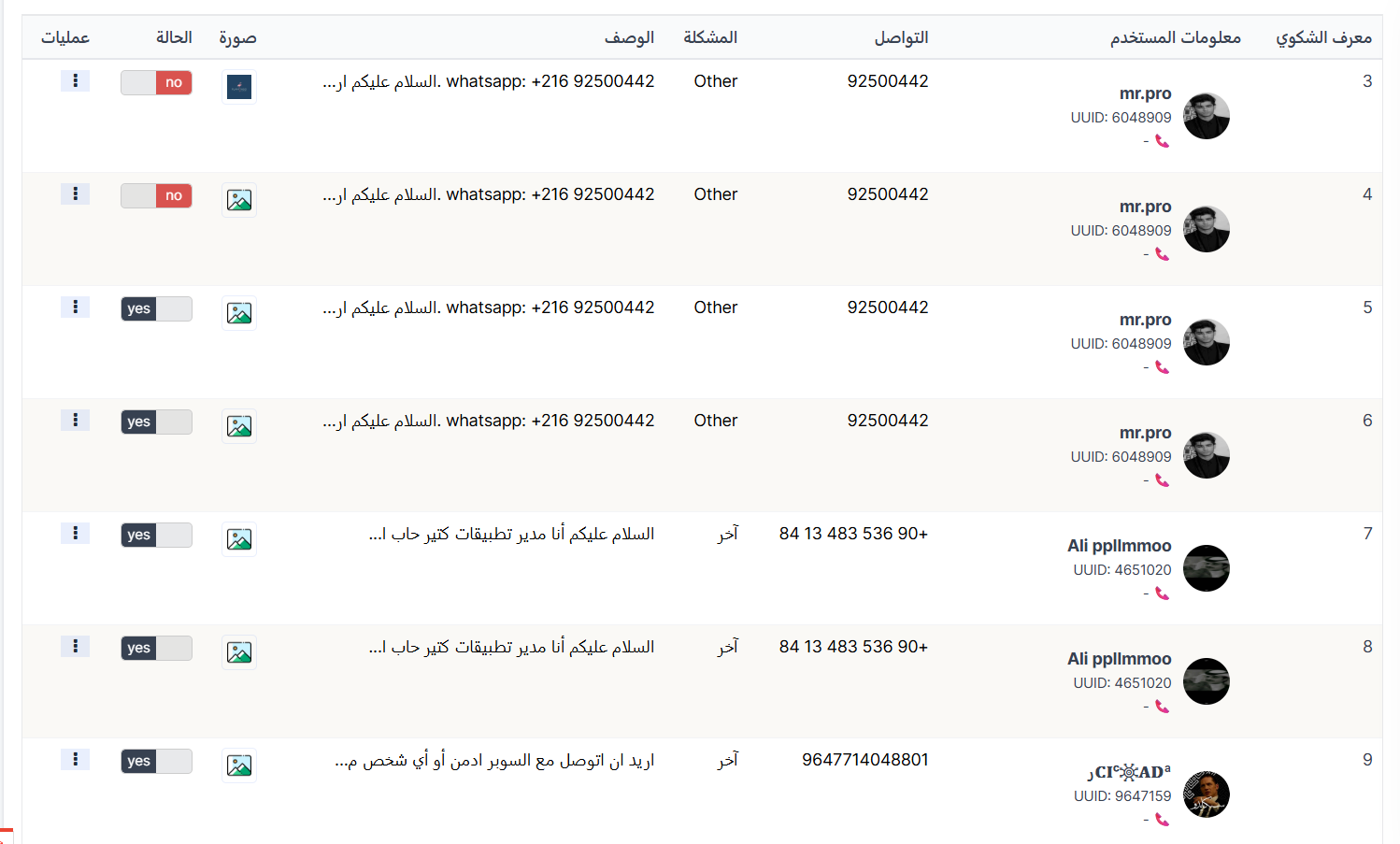
Complaints Table:
| Column | Description |
|---|---|
| Complaint ID | Unique sequential identifier for the complaint |
| User Information | Complainant's data: name, photo, UUID, and phone number 📞 |
| Contact | Contact number entered by the user |
| Problem | Problem category/type (e.g., Other) |
| Description | Detailed problem description as written by the user |
| Image | Attached image as evidence |
| Status | yes 🟢 (reviewed) or no 🔴 (not yet reviewed) |
| Actions | Options menu (⋮) |
Complaint Status:
| Status | Color | Meaning |
|---|---|---|
| no | 🔴 Red | Complaint not yet reviewed |
| yes | 🟢 Green | Complaint reviewed |
शिकायत विवरण देखें:
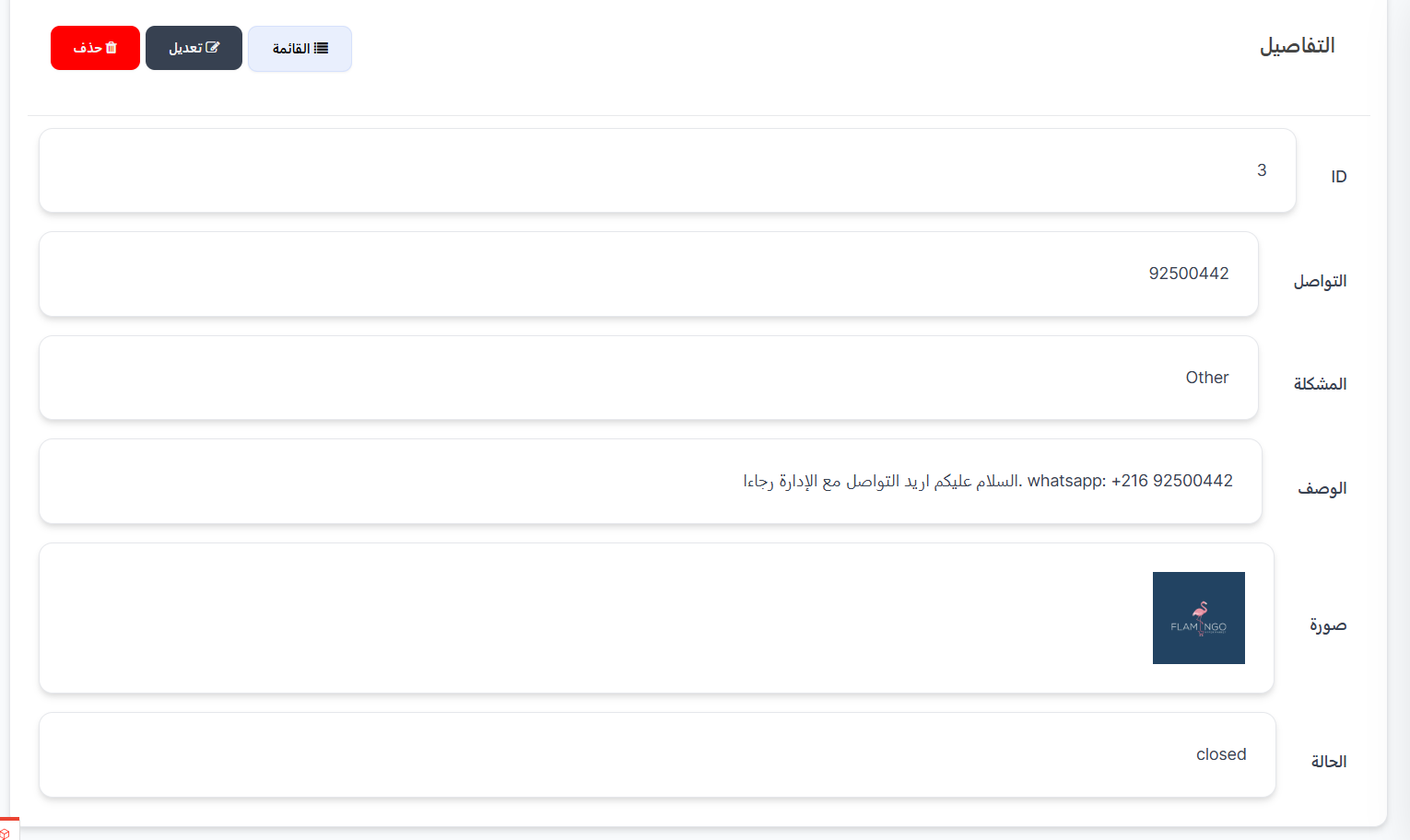
कार्रवाई कॉलम (⋮) से, शिकायत का पूरा विवरण पेज खोलने के लिए देखें पर क्लिक करें। पेज सभी जानकारी अलग-अलग फ़ील्ड में प्रदर्शित करता है:
| फ़ील्ड | विवरण |
|---|---|
| ID | शिकायत की अद्वितीय पहचान संख्या |
| संपर्क | उपयोगकर्ता द्वारा दर्ज किया गया संपर्क नंबर (फ़ोन / व्हाट्सएप) |
| समस्या | समस्या प्रकार वर्गीकरण (उदाहरण: Other) |
| विवरण | उपयोगकर्ता द्वारा लिखित शिकायत का पूरा पाठ |
| छवि | समस्या के प्रमाण के रूप में संलग्न छवि (यदि कोई हो) |
| स्थिति | वर्तमान शिकायत स्थिति (open / closed) |
उपलब्ध बटन:
| बटन | विवरण |
|---|---|
| 📋 सूची | सभी शिकायतों की सूची पर वापस जाएं |
| ✏️ संपादित करें | स्थिति या डेटा अपडेट करने के लिए शिकायत संपादन पेज खोलें |
| 🗑️ हटाएं | शिकायत को स्थायी रूप से हटाएं |
Steps to Review a Complaint:
- Open the Complaints page — Users ← Complaints.
- Review new complaints — Look for no 🔴 status.
- Read the description — Review the problem details.
- View the attached image (if any).
- Contact the user — Use the contact number or UUID/phone.
- Change status to yes 🟢 — After handling the complaint.
Quick Summary:
| Action | Steps |
|---|---|
| View complaints | Users ← Complaints |
| Review a complaint | Read description ← View image ← Contact user |
| Change complaint status | Click the status toggle (no → yes or yes → no) |