💎 Ringkasan Hadiah
# 💎 Gift Records
Introduction
The Gift Records page displays the total diamonds each user has received from gifts since they first started using the app. You can view the accumulated diamond count for each user, with the ability to filter by date, room, or user ID.
How to Access
Sidebar Menu → Gifts → Gift Records
Or via direct link:
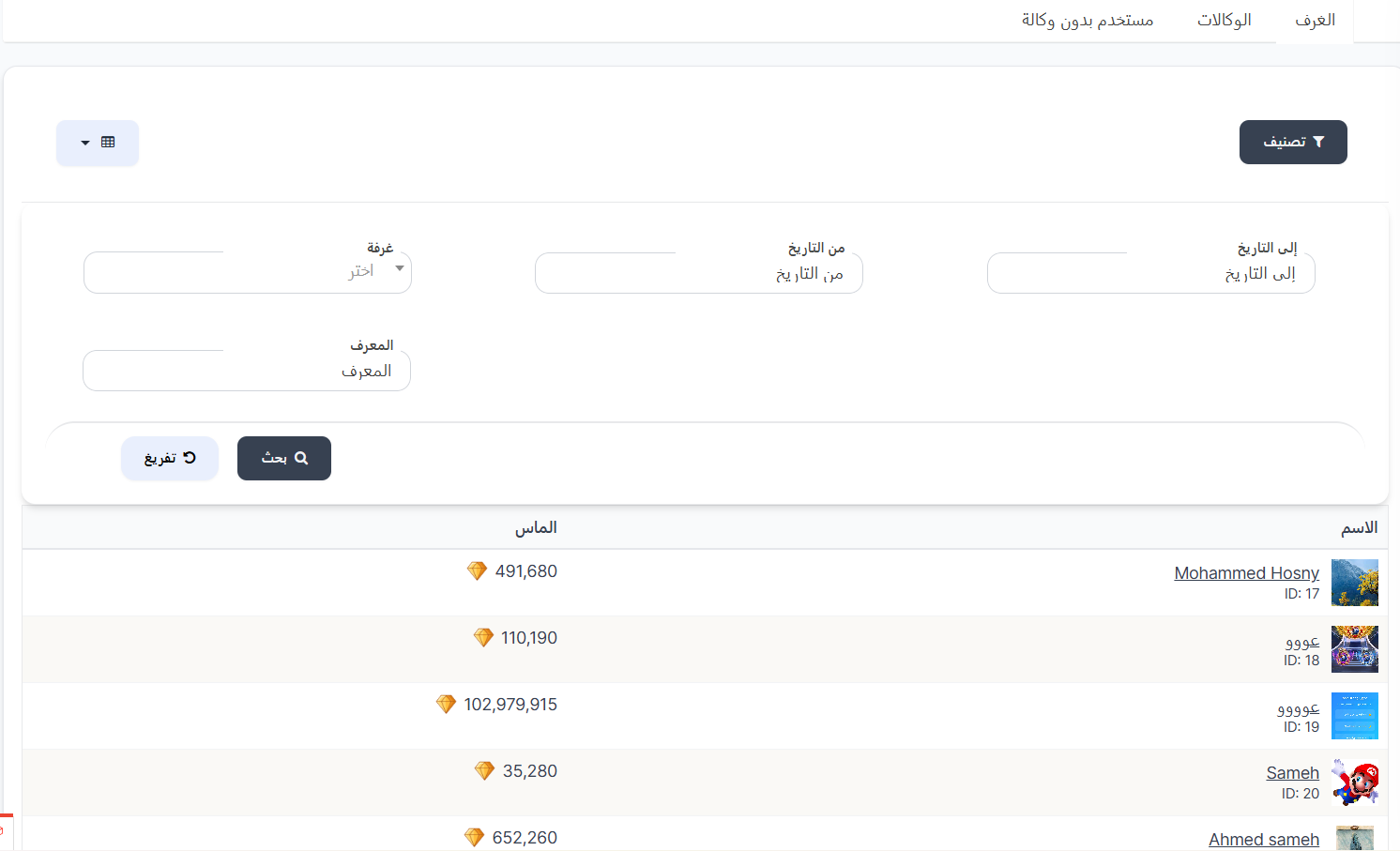
Page Tabs
The page contains 3 tabs to display data by source:
| Tab | Description |
|---|---|
| Rooms | Display total diamonds accumulated from gifts inside rooms |
| Agencies | Display total diamonds accumulated from gifts through agencies |
| User Without Agency | Display total diamonds for users who are not linked to any agency |
Search Filters
When clicking Filter, the following search fields appear:
| Field | Description |
|---|---|
| To Date | Set the end date for the search period |
| From Date | Set the start date for the search period |
| Room | Select a specific room from the dropdown list (appears in the Rooms tab) |
| ID | Search by user ID |
Search Buttons:
| Button | Description |
|---|---|
| 🔍 Search | Execute search with the selected filters |
| 🔄 Clear | Clear all filters and reset them |
Gift Records Table
| Column | Description |
|---|---|
| Name | Username with their photo and ID number |
| Diamonds 💎 | Total number of diamonds the user received from gifts |
Use Cases
1. Find Users with Most Diamonds
- Open the Gift Records page
- The table displays users with their total diamonds
2. Search for a Specific User
- Click Filter
- Enter the user's ID
- Click Search
3. View Diamonds in a Specific Time Period
- Click Filter
- Set From Date and To Date
- Click Search
4. View Diamonds in a Specific Room
- Select the Rooms tab
- Click Filter
- Select the Room from the dropdown list
- Click Search
Important Notes
Information
- The diamonds displayed are a cumulative total since the start of app usage (or based on the period specified in the filter).
- You can switch between tabs (Rooms / Agencies / User Without Agency) to know the source of diamonds.
Tip
Use the date filter to check user performance in a specific period (e.g., current month or last week).