🌍 Charging Country
The Charging Country page allows you to manage the countries available for charging operations in the agency system. You can view registered countries, add new countries, and edit or delete existing countries.
Access:
Sidebar → Agency System → Charging Agencies → Charging Country
Page Content:
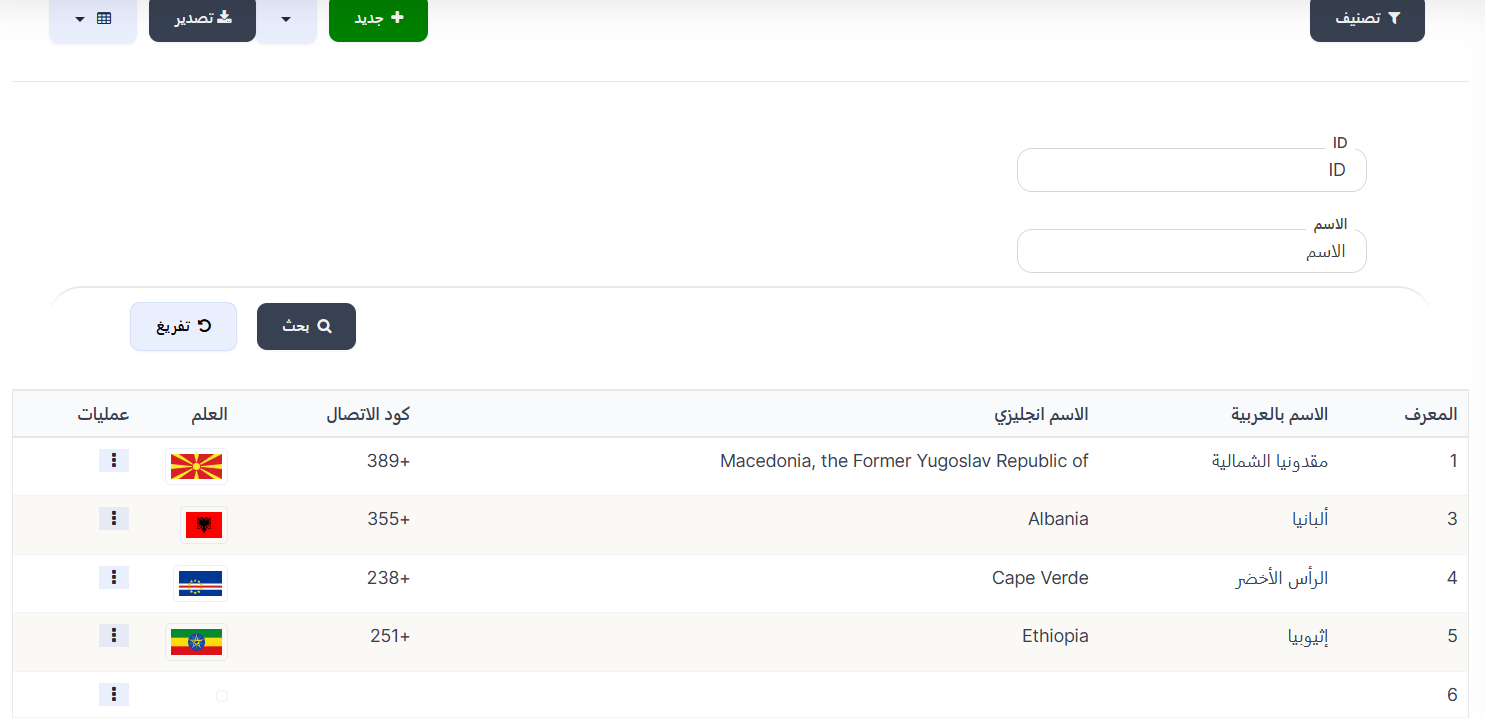
When opening the page, you'll find a search filter at the top and a + New button to add a new charging country, and below the charging countries table displaying all registered countries.
Search Filter:
| Filter | Description |
|---|---|
| ID | Search by country ID |
| Name | Search by country name |
After entering data, press 🔍 Search to display results, or 🔄 Clear to reset the filter.
Charging Countries Table:
| Column | Description |
|---|---|
| ID | Country identification number (ID) |
| Arabic Name | Country name in Arabic |
| English Name | Country name in English |
| Calling Code | International calling code (e.g., +389, +355) |
| Flag | Country flag |
| Actions | Available actions (edit, delete) |
Add New Charging Country:
To add a new charging country, click the + New button at the top of the page.

Creation Fields:
| Field | Description | Required |
|---|---|---|
| Manager ID | ID of the manager responsible for this country | ✅ Yes |
| Country | Select country from dropdown list | ✅ Yes |
Creation Steps:
- Click the + New button
- Enter the Manager ID responsible for the charging country
- Select the Country from the dropdown list
- Click Submit to save the charging country
Available Actions:
From the Actions column in the table, click the ⋮ icon to show the menu:
| Action | Description |
|---|---|
| Edit | Edit charging country data (manager, country) |
| Delete | Permanently delete the charging country |
Quick Summary:
| Action | Steps |
|---|---|
| View all charging countries | Agency System → Charging Agencies → Charging Country |
| Search for a country | Enter ID or Name → Search |
| Add new charging country | Click + New → Enter Manager ID → Select Country → Submit |
| Edit charging country | Click ⋮ in Actions column → Edit |
| Delete charging country | Click ⋮ in Actions column → Delete |