📩 Official Messages
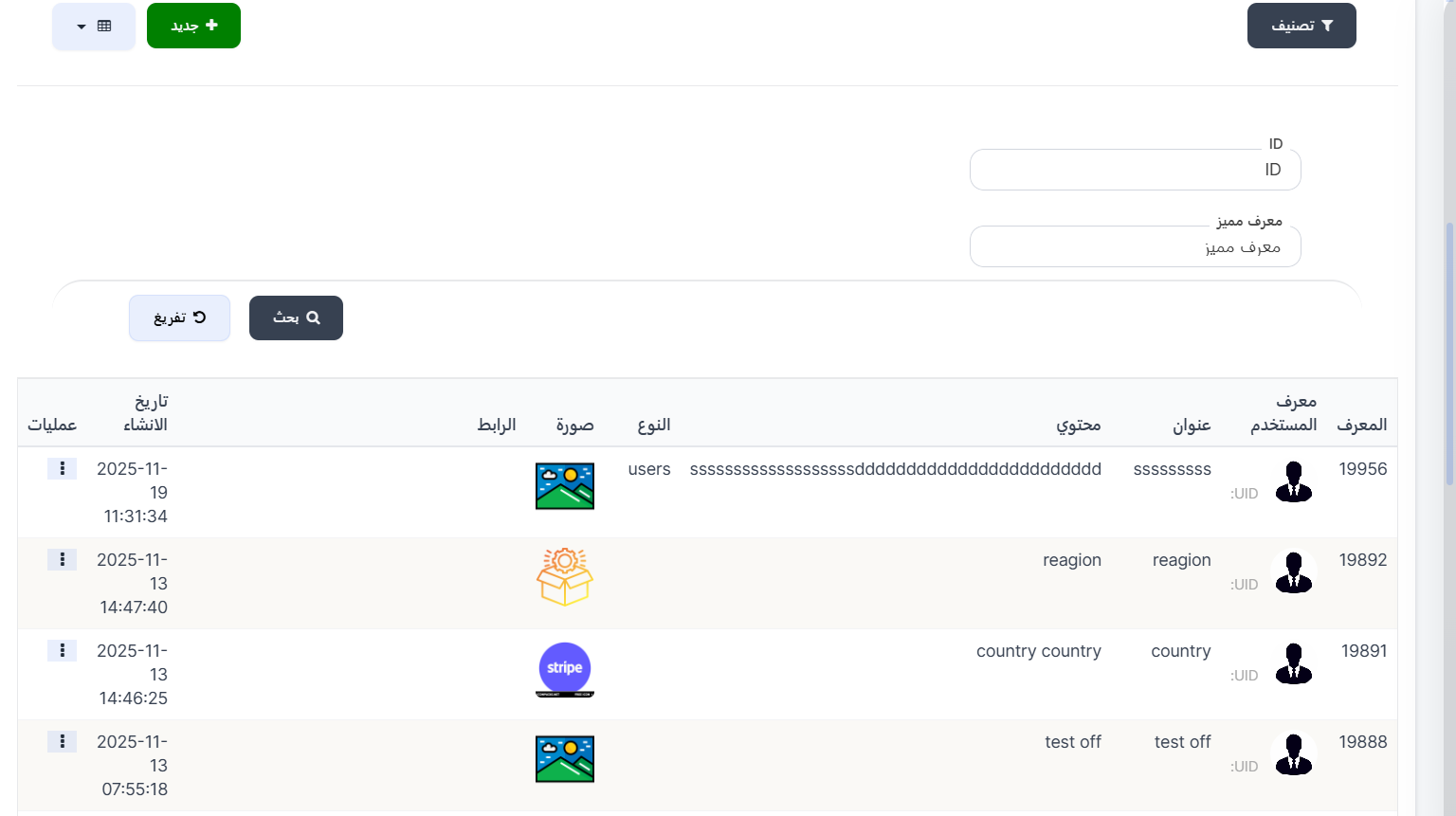
The Official Messages page displays details of all official messages sent to users in the app. You can create new messages and precisely define recipients (by country, region, specific groups, etc.).
Access:
Sidebar → Advertisements → Official Messages
Top Buttons:
| Button | Description |
|---|---|
| 🔽 Filter | Sorting and filtering options |
| ➕ New | Create a new official message |
Search Filter:
| Filter | Description |
|---|---|
| ID | Search by message ID |
| Unique ID | Search by user's unique ID |
Messages Table:
| Column | Description |
|---|---|
| ID | Unique message identifier |
| User ID | User image with UID |
| Title | Message title |
| Content | Message body text |
| Type | Recipient type (e.g., users, region, country) |
| Image | Image attached to the message |
| Link | Link attached to the message (if any) |
| Created At | Message send date and time |
| Actions | Additional actions (⋮) |
Create a New Official Message:
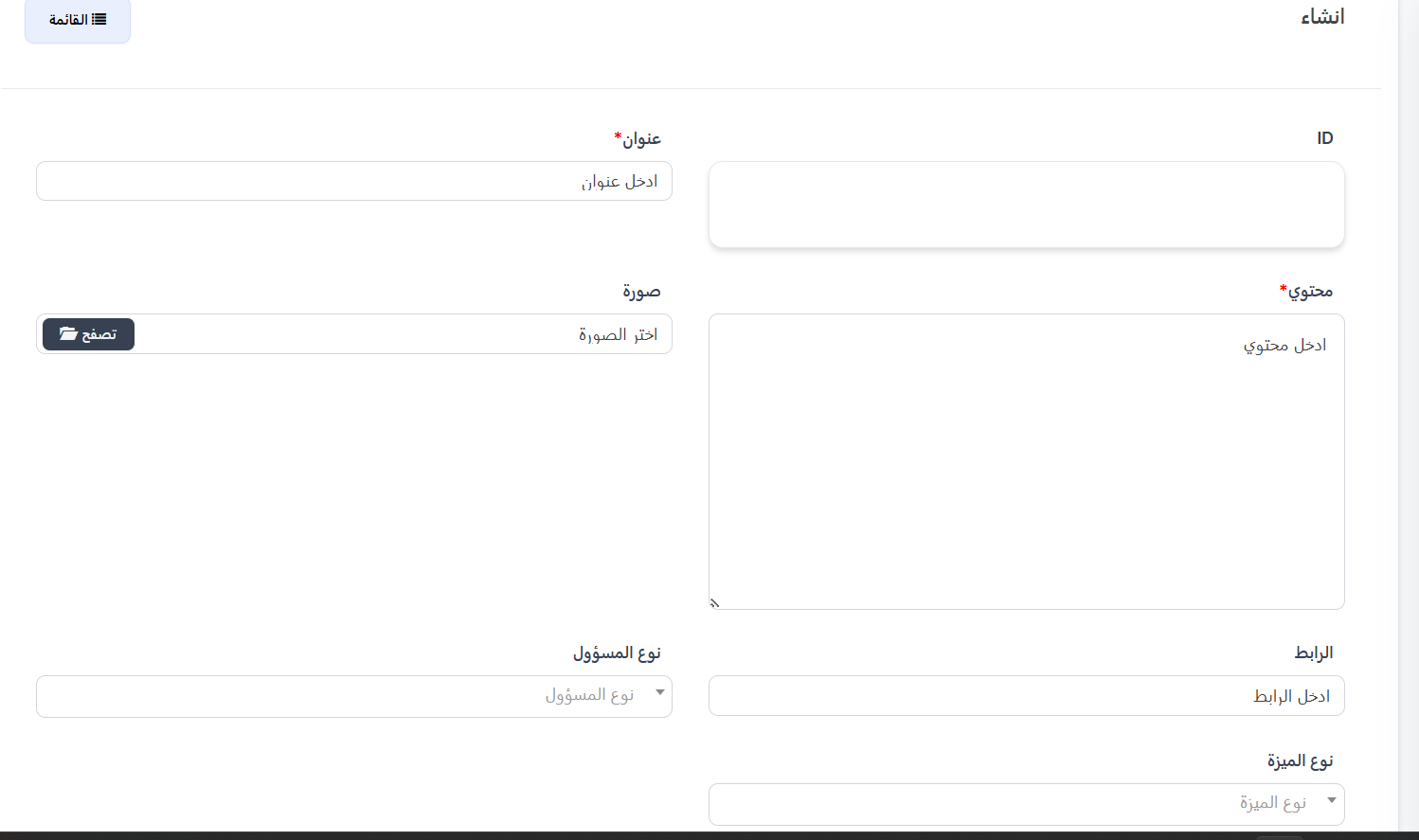
Click ➕ New to create a new message.
Basic Fields:
| Field | Description | Required |
|---|---|---|
| ID | Message identifier (automatic) | — |
| Title | Message title | ✅ Yes |
| Content | Message body text | ✅ Yes |
| Image | Attached image — click 📂 Browse to select | ❌ No |
| Link | Link attached to the message | ❌ No |
| Admin Type | Define the recipient admin type — controls targeting options | ❌ No |
| Feature Type | Define feature type (single select / multi select) | ❌ No |
Targeting Scenarios:
Based on your selection in the Admin Type or Send To field, additional fields appear to define recipients:
1️⃣ Country Manager
When selecting Country Manager as admin type:
| Field | Description |
|---|---|
| Country | Select the country — message is sent to all users in this country |
2️⃣ Area Manager
When selecting Area Manager as admin type:
| Field | Description |
|---|---|
| Region | Select the region — message is sent to all users in this region |
3️⃣ Business Developers (BDs)
When selecting Business Developers (BDs) in Send To:
| Field | Options |
|---|---|
| Type | All Business Developers (BDs) — or — Business Developers in a specific country |
| Country | Appears when selecting "specific country" — select the country |
4️⃣ Agency
When selecting Agency in Send To:
| Field | Options |
|---|---|
| Type | All agencies — or — All agencies in country — or — Specific agency by ID |
| Country | Appears when selecting "in country" |
| Agency ID | Appears when selecting "specific agency" |
5️⃣ Charge Agency
When selecting Charge Agency in Send To:
| Field | Options |
|---|---|
| Type | All charge agencies — or — Charge agencies in a specific country |
| Country | Appears when selecting "specific country" |
6️⃣ Family
When selecting Family in Send To:
| Field | Description |
|---|---|
| Families | Click 📂 Select to choose family from table (ID, Name, Image) |
| Member | Define who receives within family: Owner / Admins / Members |
7️⃣ Users
When selecting Users — message is sent to all regular users.
Feature Type — Single or Multi Select:
| Option | Description |
|---|---|
| Single Select | Send message to one group only |
| Multi Select | Send message to multiple groups at the same time |
When Multi Select — Available Groups:
| Group | Description |
|---|---|
| All | All users |
| Regular Users | Regular users only |
| Hosts | Hosts only |
| Host Agencies | Host agencies |
| Charge Agencies | Charge agencies |
| Families | Families |
| VIPs | VIP users |
| BDs | Business Developers (BD) |
Example
You can select VIPs + BDs + Host Agencies together to send one message to all these groups at the same time.
Post-Creation Options:
| Option | Description |
|---|---|
| View | View the message after creation |
| Continue Creating | Stay on the creation page to create another message |
| Continue Editing | Go to the edit page |
Quick Summary:
| Action | Steps |
|---|---|
| View Messages | Advertisements → Official Messages |
| Create Message | ➕ New → Fill fields → Submit |
| Send to Country | Admin Type: Country Manager → Select country |
| Send to Region | Admin Type: Area Manager → Select region |
| Send to Single Group | Feature Type: Single Select → Send To → Select group |
| Send to Multiple Groups | Feature Type: Multi Select → Select groups |