🔧 Quick Start — Admin
Welcome as an admin to the dashboard! This guide will introduce you to the most important sections and administrative tasks you'll need in your daily work.
🔑 Log In
- Open the dashboard link: Open Dashboard
- Enter your credentials
- After logging in, the main page will appear with the full side menu
🔴 Admin vs Super Admin
| Feature | Admin | Super Admin |
|---|---|---|
| User Management | ✅ | ✅ |
| Gifts & Store Management | ✅ | ✅ |
| VIP & Levels Management | ✅ | ✅ |
| Room Management | ✅ | ✅ |
| Content Management | ✅ | ✅ |
| System Settings | ⚠️ Based on permissions | ✅ |
| Admin & Role Management | ❌ | ✅ |
| Payment Gateway Settings | ⚠️ Based on permissions | ✅ |
| Pusher/Zego Settings | ⚠️ Based on permissions | ✅ |
Note
Your permissions depend on the role assigned to you by the Super Admin. You may see some sections unavailable in the side menu based on your permissions.
📋 Side Menu — Your Main Guide
The side menu is the primary navigation tool in the dashboard. Here are the key sections:
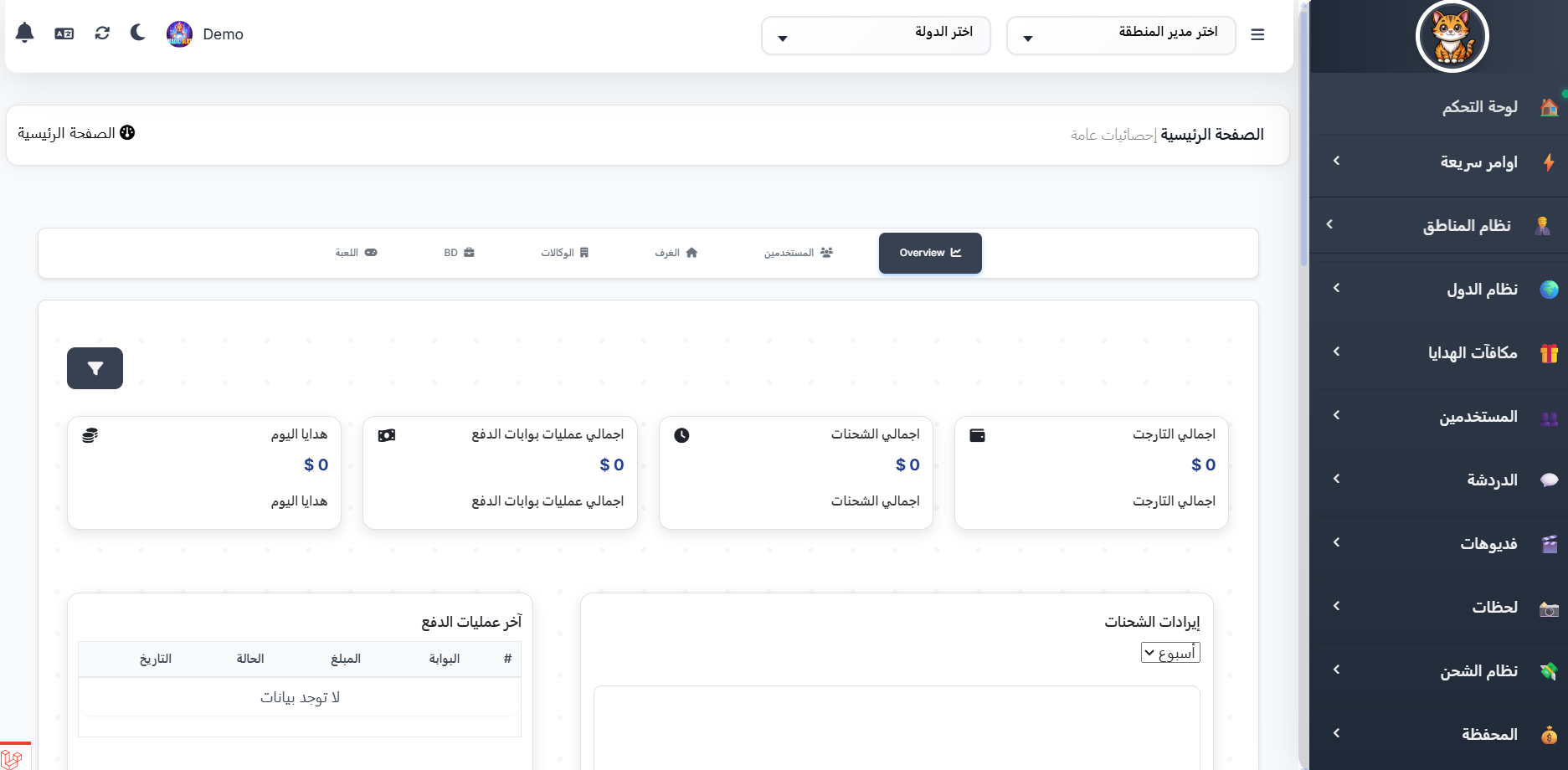
Core Sections (You'll use these daily):
| Section | What It Does | Menu Location |
|---|---|---|
| 👥 Users | Search users, view profiles | Users |
| 📩 Complaints | Review user complaints | Users → Complaints |
| 🚫 Bans | Ban violating users | Users → Bans |
| 💰 Charging | Top up coins for users | Charging System → User Charges |
| 🏠 Rooms | Monitor and manage rooms | Room → Rooms |
Content Management Sections:
| Section | What It Does | Menu Location |
|---|---|---|
| 🎁 Gifts | Create and manage gifts and categories | Gifts |
| 💎 VIP | Manage VIP tiers and benefits | VIP |
| 📊 Levels | Manage user levels | Level |
| 🦾 Targets | Set monthly host targets | Targets |
| 👨👩👧👦 Families | Manage families and their levels | Families |
Advanced Management Sections:
| Section | What It Does | Menu Location |
|---|---|---|
| 🏢 Agencies | Manage agencies and hosts | Agency System |
| 📍 Area Manager | Manage area managers | Regions System |
| 🌍 Country Manager | Manage country managers | Countries System |
| 📢 Advertisements | Banners and official messages | Advertisements |
| ⚙️ Settings | App and system settings | Settings |
🎯 Core Admin Tasks
1. User Management
Your most important task as an admin is managing the user base:
- Search for a user: Users → Search by UID, name, or country
- View user profile: Click on username → You'll find all tabs (Info, Balance, VIP, Level, Earnings, Charges, Gifts, Agency)
- Edit user data: From actions menu → Edit
- Ban a user: Users → Bans → Create new ban
📖 Learn more: 👥 Users | 👤 Profile
2. Gift Management
Gifts are the primary interaction tool in the app:
- View all gifts: Gifts → Gifts
- Create a new gift: Gifts → Create → Choose type (Normal, Lucky, VIP)
- Manage gift categories: Gifts → Gift Categories
- Lucky gift settings: Gifts → Lucky Gift Setting
📖 Learn more: 🎁 Gifts | Create Gift
3. VIP Management
The premium membership system:
- View VIP tiers: VIP → VIPs
- Create a new VIP tier: VIP → Create
- Manage benefits per tier: VIP → VIP Privileges
Important Clarification
The dashboard shows 3 items under the VIP section:
- VIPs (
/admin/ovip) = VIP tier catalog (available tiers) - VIP Privileges (
/admin/vip_privilege) = Benefits associated with each tier - VIP Settings (
/admin/soon) = ⚠️ Placeholder page, not yet active
📖 Learn more: 💎 VIP | Privileges
4. Room Management
Monitor and manage voice rooms and live broadcasts:
- View all rooms: Room → Rooms (with tabs: All, Popular, New, VIP, Closed)
- Pin a room: From Rooms → Click the pin icon
- Manage categories: Room → Room Categories
- Manage backgrounds: Room → Backgrounds
📖 Learn more: 🏠 Rooms
5. Settings & Configuration
Key settings pages you'll need:
| Setting | Location | What It Does |
|---|---|---|
| Brand | Settings → Settings → Brand | App name, logo, description |
| Time | Settings → Settings → Time | Timezone |
| Work | Settings → Settings → Work | XP rates, currency exchange |
| Theme | Settings → Settings → Theme | Dark mode, colors |
| Payment | Settings → Settings → Payment | Stripe, Fawry |
| Languages | Settings → Language | Add/edit app languages |
| Countries | Settings → Countries | Enable/disable countries |
| Add-ons | Add-ons | Enable/disable app features |
📖 Learn more: ⚙️ Settings
🔄 Suggested Daily Tasks
1️⃣ Review new complaints
    ↓
2️⃣ Handle ban cases (new or expired)
    ↓
3️⃣ Monitor voice rooms (check for violations)
    ↓
4️⃣ Check charging requests and financial operations
    ↓
5️⃣ Review agency requests (if any)
    ↓
6️⃣ Update content (gifts, banners, announcements)
⚡ Fast Orders (Quick Actions)
The Fast Orders section in the side menu allows you to execute quick actions without navigating to the user's page:
| Fast Order | What It Does | Route |
|---|---|---|
| Bans | Quickly ban a user | /admin/bans |
| Close Room | Close a user's room | /admin/bans-rooms |
| Gift from Store | Send a store item to a user | /admin/wares_dedicate |
| Gift VIP | Grant VIP to a user | /admin/vips_dedicate |
| Gift Badge | Grant a badge to a user | /admin/achievement-dedicate |
| Edit Level | Manually edit a user's level | /admin/levels/users |
📌 Important Pages for You
| Page | Link |
|---|---|
| Users | 👥 Users |
| Support & Moderation | 🛡️ Support & Moderation |
| Financial Operations | 💰 Financial Operations |
| Gifts | 🎁 Gifts |
| VIP | 💎 VIP |
| Rooms | 🏠 Rooms |
| Agencies | 🏢 Agency Management |
| Settings | ⚙️ Settings |