🎰 Lucky Boxes
Introduction
The Lucky Boxes page allows you to create and manage lucky boxes that are thrown inside rooms. There are two types of boxes:
- Normal: When the box is thrown in the room, users pick it up to win coins by luck. The box stays open for a specific duration (set in settings) and a limited number of users can win.
- Super: The box closes after a specific duration (set at creation), and after closing, prizes are automatically distributed to a specific number of users.
How to Access
Sidebar ← Lucky Boxes ← All Boxes
🎰 Open Lucky Boxes Page
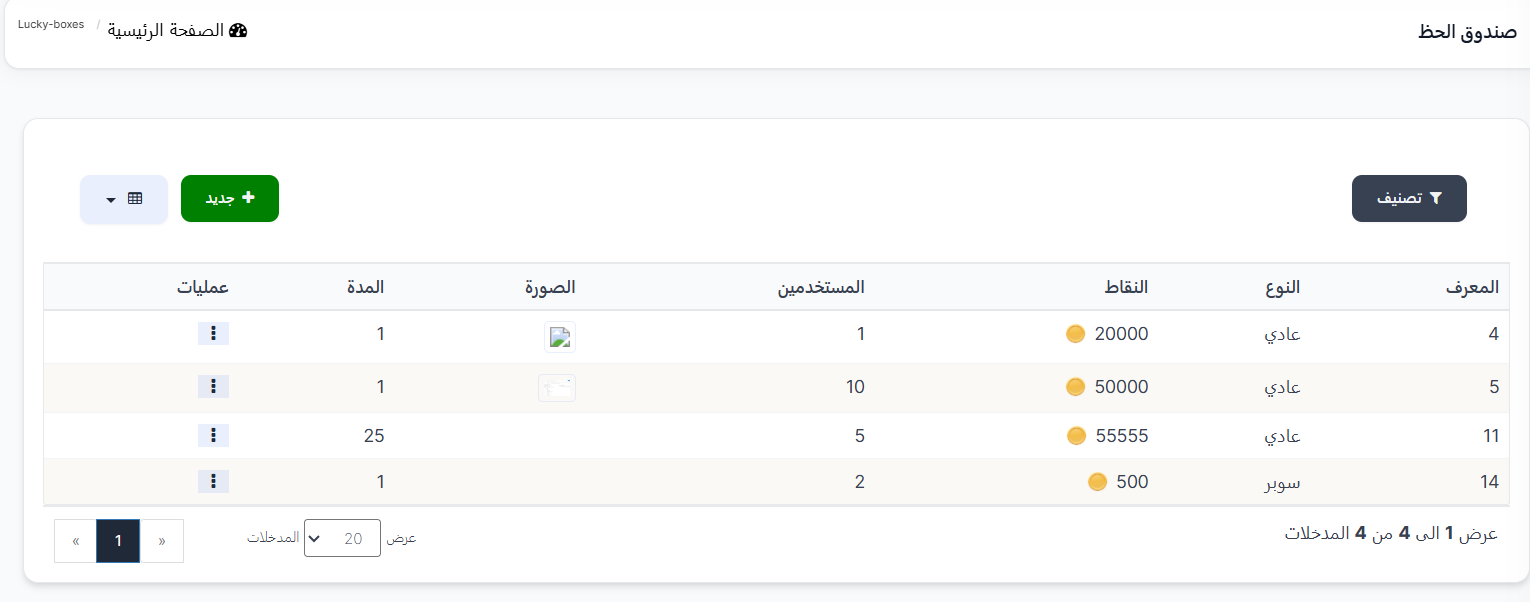
Lucky Boxes Table
The table displays all created lucky boxes:
| Column |
Description |
| ID |
Box identifier number (example: 4, 5, 11, 14) |
| Type |
Box type (Normal / Super) |
| Points |
Number of coins in the box (example: 20000, 50000, 55555, 500) |
| Users |
Number of users who can win (example: 1, 10, 5, 2) |
| Image |
Box image |
| Duration |
How long the box stays open (in minutes) (example: 1, 25) |
| Operations |
⋮ menu with edit and delete options |
| Button |
Description |
| 🔘 Filter |
Open search filters |
| ➕ New |
Create a new lucky box |
Difference Between Normal and Super Types
┌─────────────────────────────────────────────────────────┐
│  📦 Normal                                              │
│  ─────────                                              │
│  1. The box is thrown in the room                       │
│  2. Users pick it up immediately                        │
│  3. Winners earn coins by luck                          │
│  4. Stays open for a set duration (from settings)       │
│  5. Number of winners is pre-determined                 │
├─────────────────────────────────────────────────────────┤
│  ⭐ Super                                               │
│  ─────────                                              │
│  1. The box is thrown in the room                       │
│  2. Stays open for a set duration (set at creation)     │
│  3. After the duration ends, the box closes             │
│  4. Prizes are automatically distributed to winners     │
│  5. Number of winners is set at creation                │
└─────────────────────────────────────────────────────────┘
Creating a New Lucky Box
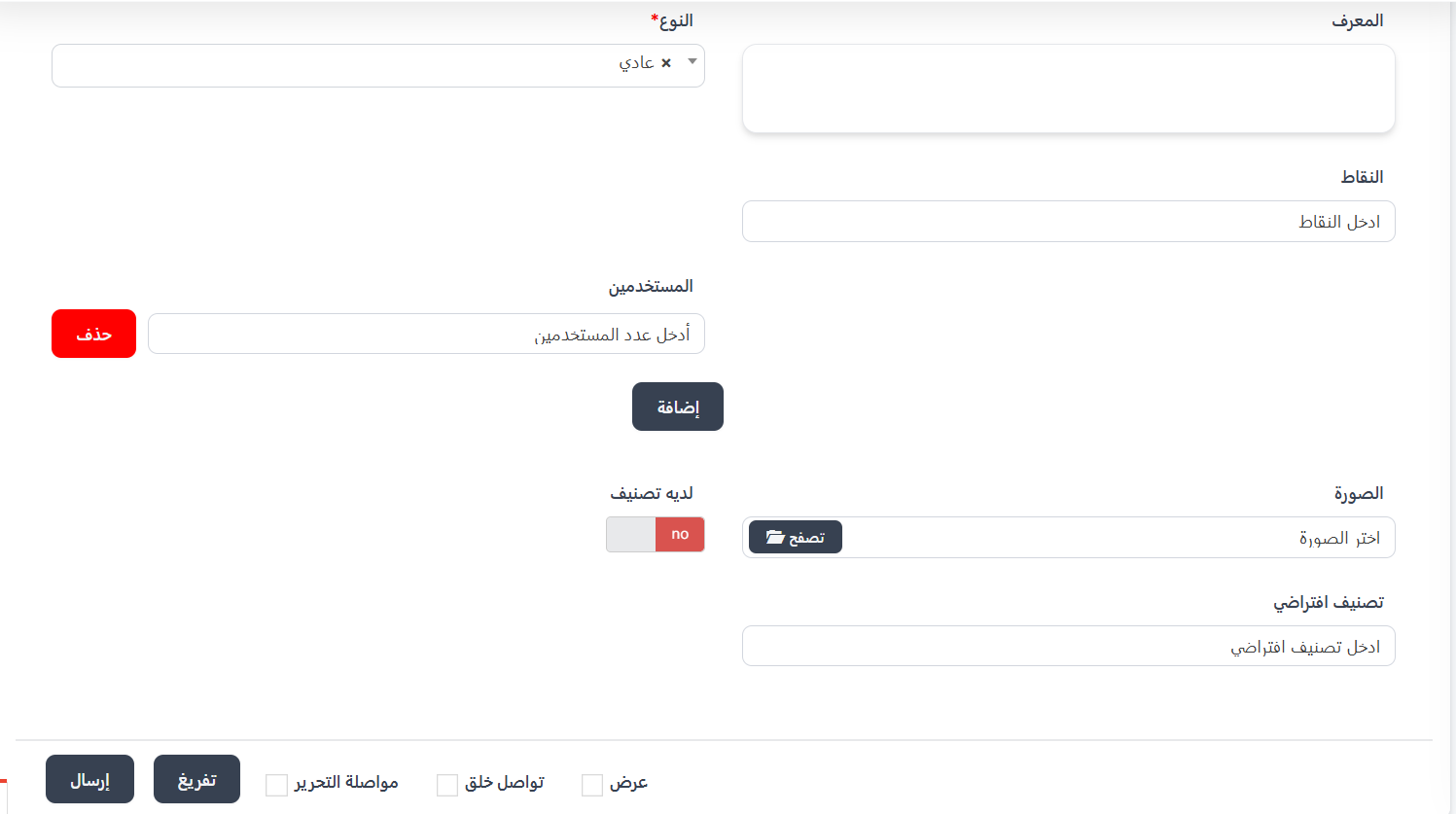
When clicking ➕ New, the creation page appears.
Common Creation Fields:
| Field |
Description |
| ID |
Box identifier number (automatic) |
| Type ⭐ |
Box type from dropdown (Normal / Super) (required) |
| Points |
Number of coins in the box |
| Image |
Upload box image (📂 Browse) |
| Has Category |
Enable/disable category (yes / no) |
| Default Category |
Enter the default category |
Normal Type Fields:
| Field |
Description |
| Points |
Total number of coins in the box |
| Users |
Number of users who can win (you can add more levels by pressing Add and remove by pressing Delete) |
Super Type Fields:
| Field |
Description |
| Points |
Total number of coins in the box |
| Users |
Number of winning users |
| Duration |
How long the box stays open (in minutes) |
| Button/Option |
Description |
| Submit |
Save the lucky box |
| Clear |
Clear all fields |
| View |
View the box after saving |
| Continue Creating |
Continue creating other boxes |
| Continue Editing |
Stay on the edit page after saving |
Quick Summary
| Action |
Steps |
| View all boxes |
Lucky Boxes ← All Boxes |
| Create normal box |
➕ New ← Type: Normal ← Points + Users + Image ← Submit |
| Create super box |
➕ New ← Type: Super ← Points + Users + Duration + Image ← Submit |
| Edit box |
⋮ next to box ← Edit |
| Delete box |
⋮ next to box ← Delete |
📤 Thrown Boxes
Introduction
The Thrown Boxes page displays a log of all lucky boxes thrown by users in rooms. You can find out who threw the box, in which room, how many users picked it up, and how many didn't.
How to Access
Sidebar ← Lucky Boxes ← Thrown Boxes
📤 Open Thrown Boxes Page
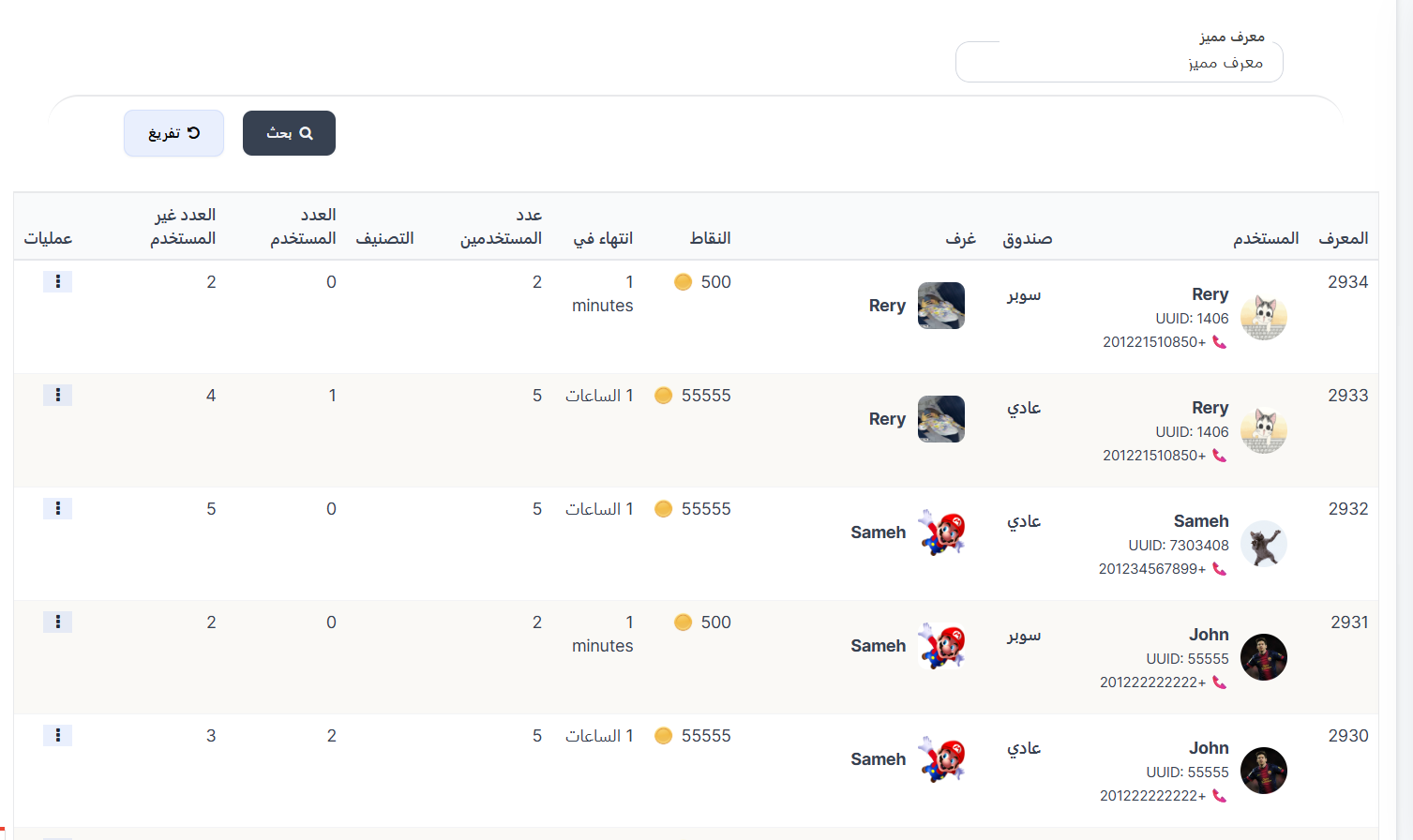
Search Filters
At the top of the page, filters are available to filter records:
| Filter |
Description |
| Special ID |
Search by the user's unique identifier (UID) who threw the box |
| Button |
Description |
| 🔍 Search |
Apply filters and display results |
| 🔄 Clear |
Clear all filters |
Thrown Boxes Table
The table displays all records of boxes thrown in rooms:
| Column |
Description |
| ID |
Record identifier number (example: 2934, 2933, 2932) |
| User |
The user who threw the box (name + image + UUID + phone number) |
| Box |
Box type (Normal / Super) |
| Rooms |
Name and image of the room where the box was thrown |
| Points |
Number of coins in the box (example: 500 🪙, 55555 🪙) |
| Expires In |
Duration the box stays open (example: 1 minutes, 1 hours) |
| Number of Users |
Number of users allowed to win (example: 2, 5) |
| Category |
Box category |
| Used Count |
Number of users who picked up the box and won (example: 0, 1, 2) |
| Unused Count |
Number of users who didn't pick up the box (example: 2, 3, 4, 5) |
| Operations |
⋮ menu with view options |
Quick Summary - Thrown Boxes
| Action |
Steps |
| View all thrown boxes |
Lucky Boxes ← Thrown Boxes |
| Search by Special ID |
Enter UID in Special ID field ← Search |
| View box details |
⋮ next to record ← View |
⚙️ Lucky Box Settings
Introduction
The Lucky Box Settings page allows you to configure general settings for lucky boxes, such as the app wallet percentage from super boxes and the normal box expiry duration.
How to Access
Sidebar ← Lucky Boxes ← Lucky Box Settings
⚙️ Open Lucky Box Settings
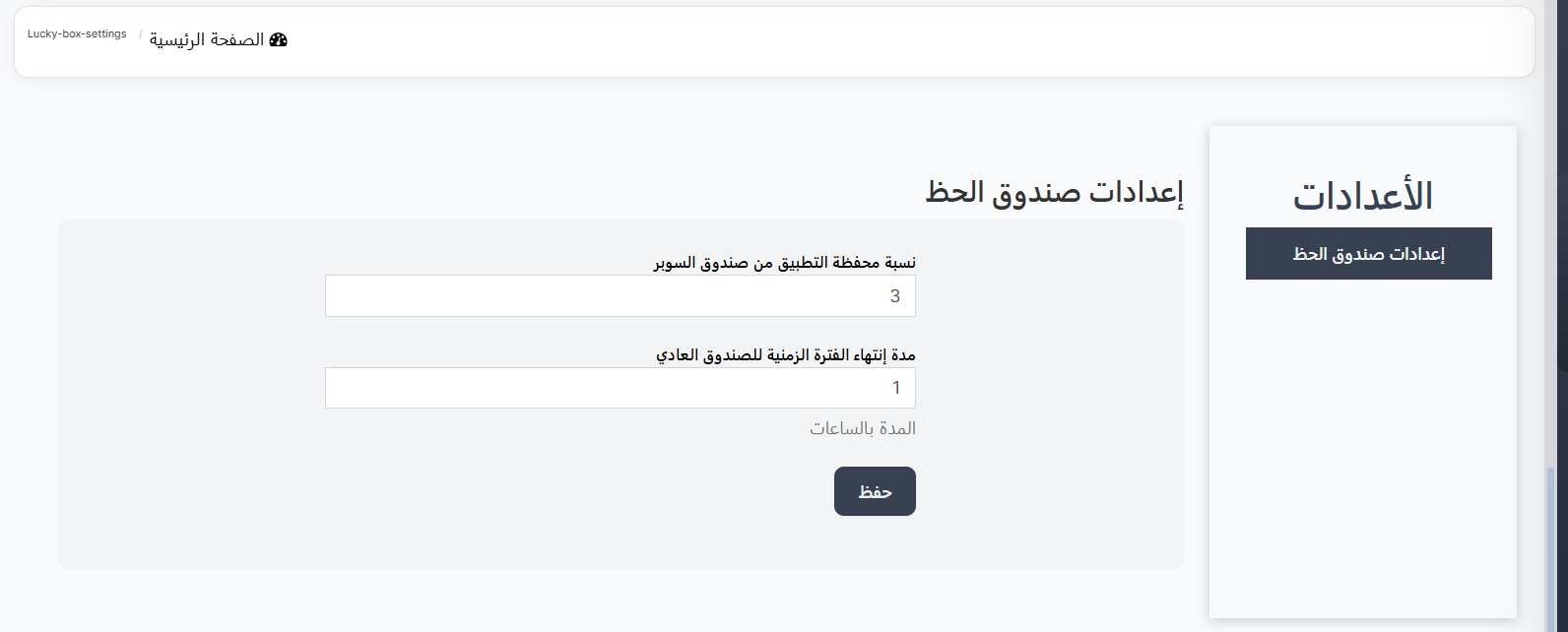
Settings Fields
| Field |
Description |
Default Value |
| App Wallet Percentage from Super Box |
The percentage the app takes from the super box |
3 |
| Normal Box Expiry Duration |
How long the normal box stays open (duration in hours) |
1 |
| Button |
Description |
| Save |
Save changes to settings |
Quick Summary - Lucky Box Settings
| Action |
Steps |
| Open settings |
Lucky Boxes ← Lucky Box Settings |
| Edit super percentage |
Change app wallet percentage value ← Save |
| Edit normal box duration |
Change expiry duration value (in hours) ← Save |
Next Step
🏅 Milestones