🎯 Host Targets Report
The Host Targets page allows you to view a comprehensive report of all hosts who have achieved their monthly targets or are on their way to achieving them. The report shows each host's performance details including broadcast hours, broadcast days, diamonds earned, as well as salary due, withdrawn amounts, net salary, and the agency's share that the host belongs to.
How to Access:
Sidebar ← Agency System ← Host System ← Host Targets
Page Contents:
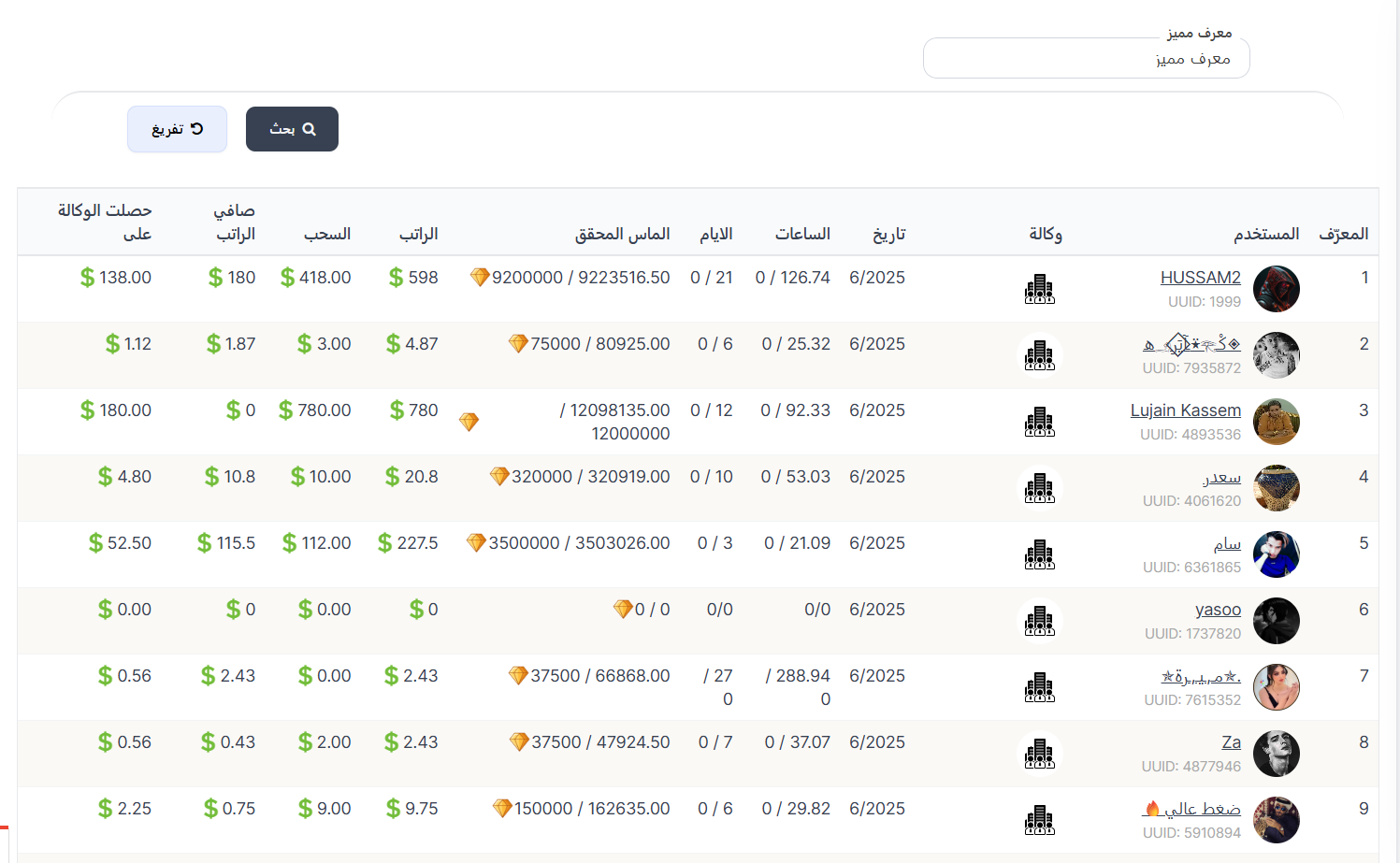
When opening the page, you'll find a search filter at the top, then the report table at the bottom showing each host's performance data in detail.
Search Filter:
| Filter | Description |
|---|---|
| UUID | Search for a specific host using their unique identifier (UUID) |
After entering the ID, press the 🔍 Search button to display results, or the 🔄 Reset button to clear the filter and show all hosts.
Report Table:
The table displays the performance report for all hosts with the following information:
| Column | Description |
|---|---|
| ID | Host's order number in the list |
| User | Host information: profile picture, name, and UUID |
| Agency | The agency the host belongs to — shows the agency icon. Clicking it takes you to agency details |
| Date | The month and year of this report (e.g., 6/2025 = June 2025) |
| Hours | Broadcast hours achieved / hours required (target). Example: 0 / 126.74 means the host broadcast 0 hours out of 126.74 required |
| Days | Broadcast days achieved / days required (target). Example: 0 / 21 means the host broadcast 0 days out of 21 required |
| Diamonds Earned | 💎 Diamonds required (target) / diamonds actually earned. Example: 💎 9200000 / 9223516.50 means target is 9,200,000 and actually earned 9,223,516.50 |
| Salary | 💰 Total salary due to the host in dollars based on performance |
| Withdrawal | 💸 Amount withdrawn (paid out) from salary in dollars |
| Net Salary | 💵 Remaining amount after deducting withdrawals (Salary - Withdrawal) |
| Agency Earned | 🏢 Amount the host's agency earned as commission in dollars |
Understanding Performance Columns:
Hours Column:
Shows actual broadcast hours vs. required hours in the target:
| Example | Meaning |
|---|---|
| 0 / 126.74 | Host broadcast 0 hours out of 126.74 hours required — target not met |
| 288.94 / 0 | Host broadcast 288.94 hours with no minimum hour requirement |
| 0/0 | No hour requirement and host didn't broadcast |
Days Column:
Shows actual broadcast days vs. required days in the target:
| Example | Meaning |
|---|---|
| 0 / 21 | Host broadcast 0 days out of 21 days required |
| 0 / 6 | Host broadcast 0 days out of 6 days required |
| / 27 0 | Host broadcast 27 days with no minimum requirement |
Diamonds Earned Column:
Shows diamonds required (target) vs. diamonds actually earned:
| Example | Meaning |
|---|---|
| 💎 9200000 / 9223516.50 | Target 9,200,000 diamonds — actually earned 9,223,516.50 ✅ (exceeded target) |
| 💎 75000 / 80925.00 | Target 75,000 diamonds — actually earned 80,925 ✅ (exceeded target) |
| 💎 0 / 0 | No diamond target and nothing earned |
Note
When diamonds earned are greater than or equal to diamonds required, this means the host has successfully achieved their target and is entitled to their salary.
Understanding Financial Columns:
Salary Column:
Total salary due to the host based on achieving their monthly targets. Calculated in dollars ($).
Withdrawal Column:
Amount withdrawn from the salary — amounts that have been actually paid out or transferred to the host.
Net Salary Column:
Remaining amount after deducting withdrawals from salary:
Net Salary = Salary - Withdrawal
Agency Earned Column:
Agency commission — the amount the host's agency earned as a percentage of the host's performance.
Practical Example
Host HUSSAM2 (UUID: 1999):
- Date: 6/2025 (June 2025)
- Hours: 0 / 126.74 (broadcast 0 hours out of 126.74 required)
- Days: 0 / 21 (broadcast 0 days out of 21 required)
- Diamonds Earned: 💎 9,200,000 / 9,223,516.50 (target achieved ✅)
- Salary: $598
- Withdrawal: $418.00
- Net Salary: $180 (598 - 418 = 180)
- Agency Earned: $138.00
Another Example
Host Sam (UUID: 6361865):
- Diamonds Earned: 💎 3,500,000 / 3,503,026.00 (target achieved ✅)
- Salary: $227.5
- Withdrawal: $112.00
- Net Salary: $115.5
- Agency Earned: $52.50
How Does the Host Targets System Work?
- Setting Targets — Monthly targets are set for each host including: required broadcast hours, required broadcast days, and required diamonds to earn.
- Host Performance — During the month, the host broadcasts live and receives gifts (diamonds) from viewers.
- Salary Calculation — At month's end or upon achieving targets, salary is calculated based on performance.
- Profit Distribution — Salary is distributed between the host and their agency.
- Withdrawal — The host can withdraw their salary; the withdrawn amount appears in the "Withdrawal" column and the remainder in "Net Salary".
Note
- This report is monthly — each row represents a host's performance during a specific month (shown in the Date column).
- The host belongs to an agency, and the agency earns a commission from the host's performance.
- You can search for a specific host using their UUID.
- To manage targets themselves (create/edit/delete), go to Targets ← Create Target.
Quick Summary:
| Action | Steps |
|---|---|
| View all hosts report | Agency System ← Host System ← Host Targets |
| Search for a host | Enter UUID ← Search |
| Check if host achieved target | Look at "Diamonds Earned" column — if earned ≥ target, target achieved ✅ |
| Check host's net salary | Look at "Net Salary" column = Salary - Withdrawal |
| Check agency's share | Look at "Agency Earned" column |