⚔️ PK Events
⚔️ PK Events
Introduction
The PK Events system is a weekly competition system linked to the PK (battle) system inside rooms. Gift points sent and received during PK activation in rooms are calculated, and at the end of the week, winners are rewarded in 3 different categories:
- 👑 PK King: Top 3 users who sent gifts during PK
- ⭐ PK Star: Top 3 users who received gifts during PK
- 🏠 PK Room: Top 3 rooms that received gifts during PK (room owner gets the prize)
How Does the System Work?
- Create Event: The admin sets the start date of the week.
- Event Period: The event starts from Monday 00:00 to Sunday 23:59:59 (Saudi Arabia time).
- Points Calculation: When sending or receiving gifts during PK activation in a room, points are calculated (1 gold coin = 1 point).
- Three Categories: The system ranks users in 3 different categories based on activity type.
- Prize Distribution: Prizes are distributed every Monday at 00:00, and points are reset for a new week.
PK Events Rules
Official Rules
- Event timing starts from Monday 00:00 to Sunday 23:59:59 (Saudi Arabia time).
- King ranking is based on gift points sent by the user in PK; 1 gold coin = 1 point.
- Star ranking is based on gift points received by the user in PK; 1 gold coin = 1 point.
- Room ranking is based on gift points sent by users in the PK room; 1 gold coin = 1 point.
- Prizes are distributed every Monday at 00:00, and event points are reset every week.
- The platform has the rights of intervention and final decision.
How to Access
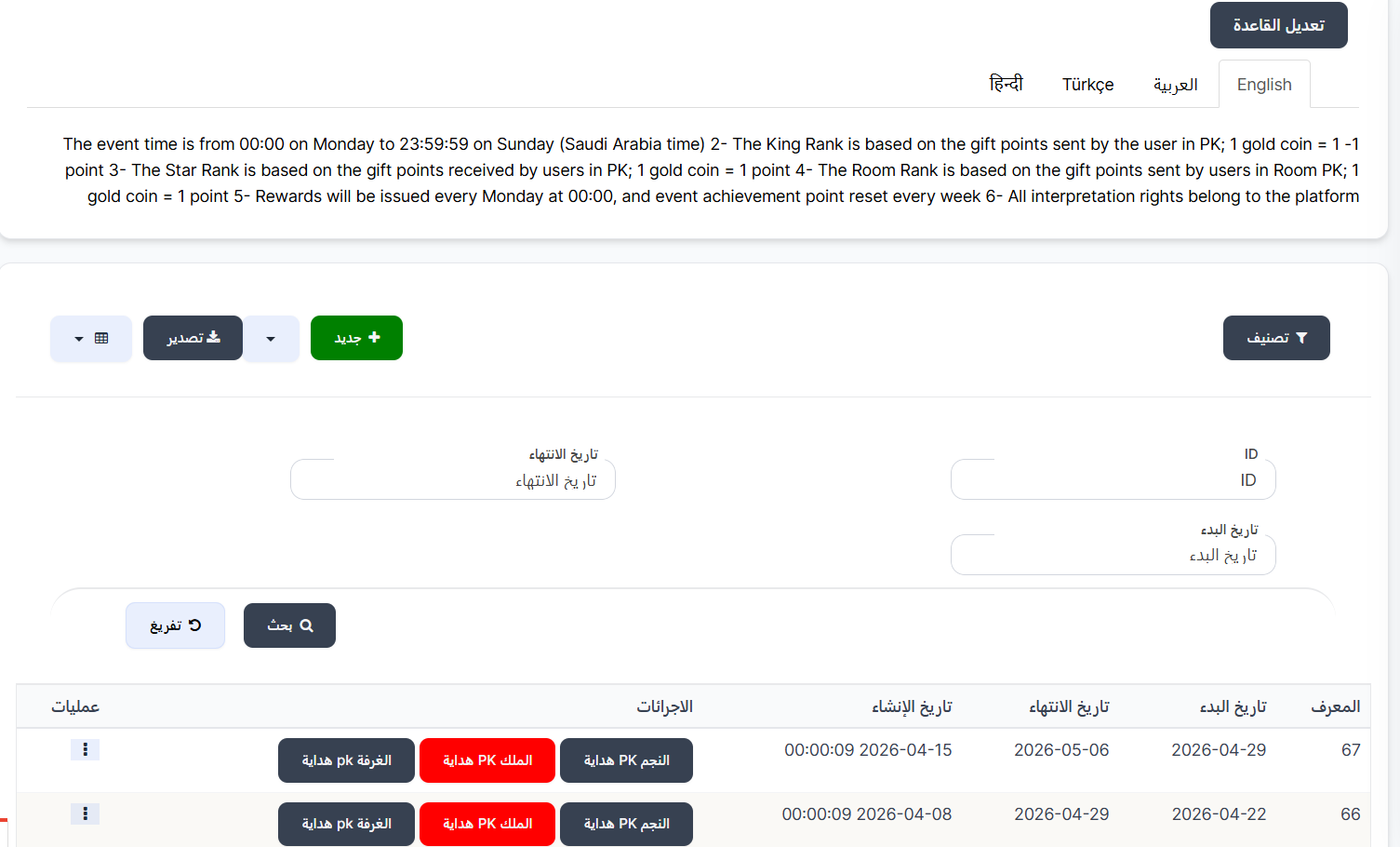
Sidebar Menu → Events → PK Events
Or via direct link:
PK Events Page
Edit Rules
At the top of the page, there's an "Edit Rules" button to modify the rules text shown to users. The system supports multiple languages:
- English - English
- العربية - Arabic
- Türkçe - Turkish
- हिन्दी - Hindi
Search and Filter Tools
| Field | Description |
|---|---|
| ID | Search by unique event identifier |
| Start Date | Filter by event start date |
| End Date | Filter by event end date |
| Search 🔍 | Execute search with specified criteria |
| Clear 🔄 | Clear search criteria and reset |
Events Table
The table displays all PK events:
| Column | Description |
|---|---|
| ID | Unique event identifier (e.g., 66, 67) |
| Start Date | Event week start date (e.g., 2026-04-29) |
| End Date | Event week end date (e.g., 2026-05-06) |
| Created Date | Event creation date and time in the system |
| Actions | 3 buttons to manage prizes for each category (see below) |
| Operations | Actions menu (⋮) to edit or delete the event |
Action Buttons (3 Categories)
| Button | Color | Description |
|---|---|---|
| PK Star Gift | 🔵 Dark blue | Manage prizes for top 3 users who received gifts in PK |
| PK King Gift | 🔴 Red | Manage prizes for top 3 users who sent gifts in PK |
| PK Room Gift | 🔵 Dark blue | Manage prizes for top 3 rooms that received gifts in PK |
Main Control Buttons
| Button | Description |
|---|---|
| + New 🟢 | Create a new PK event |
| Filter 🔘 | Filter and sort displayed events |
| Export 🔵 | Export event data as a file |
Create New PK Event
To create a new event:
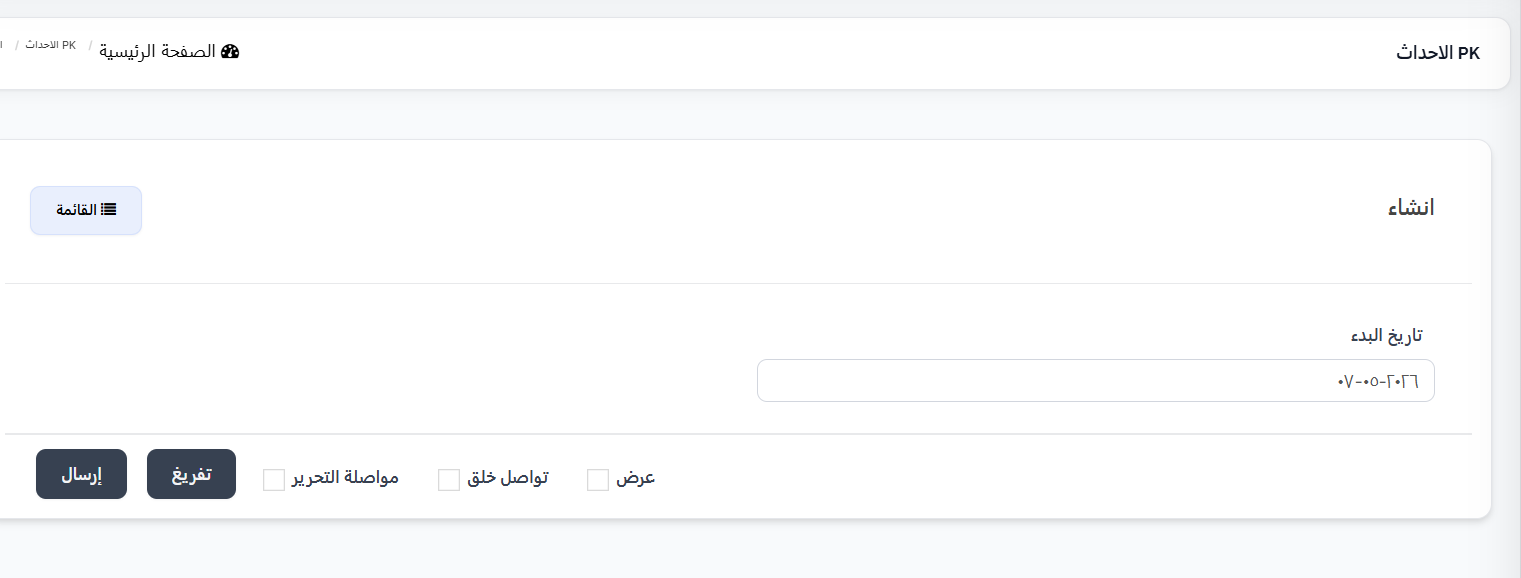
- Click the "+ New" 🟢 button
- The creation page will appear with the following fields:
| Field | Description | Example |
|---|---|---|
| Start Date | Week start date (Monday). The system will calculate end of week automatically (Sunday) | 2026-05-07 |
- Click "Submit" to save the event
Managing Prizes for Three Categories
After creating the event, you need to set winner prizes for each of the three categories.
👑 PK King Gifts (Senders)
Click the "PK King Gift" 🔴 button in the actions column.
These prizes are for the top 3 users who sent gifts during PK activation in rooms.
A page with 3 sections will appear:
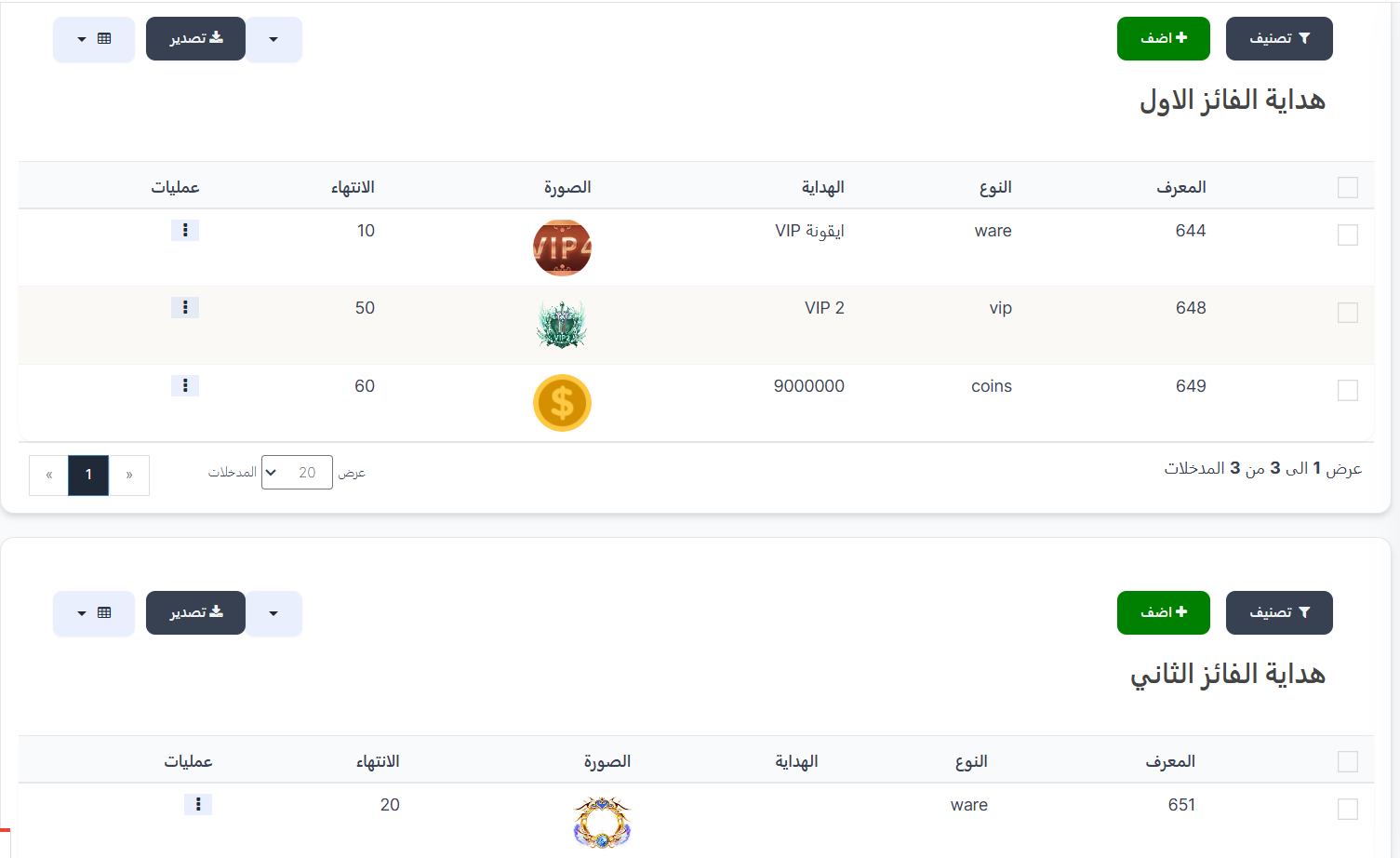
🥇 First Winner Gift (PK King)
| Column | Description |
|---|---|
| ID | Prize identifier (e.g., 644, 648, 649) |
| Type | Prize type (ware, vip, coins, badge, achievement) |
| Gift | Prize name/value (e.g., VIP Icon, VIP 2, 9000000) |
| Image | Prize image |
| Expiry | Prize validity period in days (e.g., 10, 50, 60) |
| Operations | Edit or delete actions |
🥈 Second Winner Gift (PK King)
Table with same columns for 2nd place winner prizes.
🥉 Third Winner Gift (PK King)
Table with same columns for 3rd place winner prizes.
⭐ PK Star Gifts (Receivers)
Click the "PK Star Gift" 🔵 button in the actions column.
These prizes are for the top 3 users who received gifts during PK activation in rooms.
Same table structure (3 sections: 1st, 2nd, 3rd winner) with same columns.
🏠 PK Room Gifts
Click the "PK Room Gift" 🔵 button in the actions column.
These prizes are for owners of the top 3 rooms that received gifts during PK activation.
Same table structure (3 sections: 1st, 2nd, 3rd winner) with same columns.
Adding a Prize to a Winner in Any Category
- From the desired winner section (1st, 2nd, or 3rd), click "+ Add" 🟢
- Fill in the following fields:
Type Field
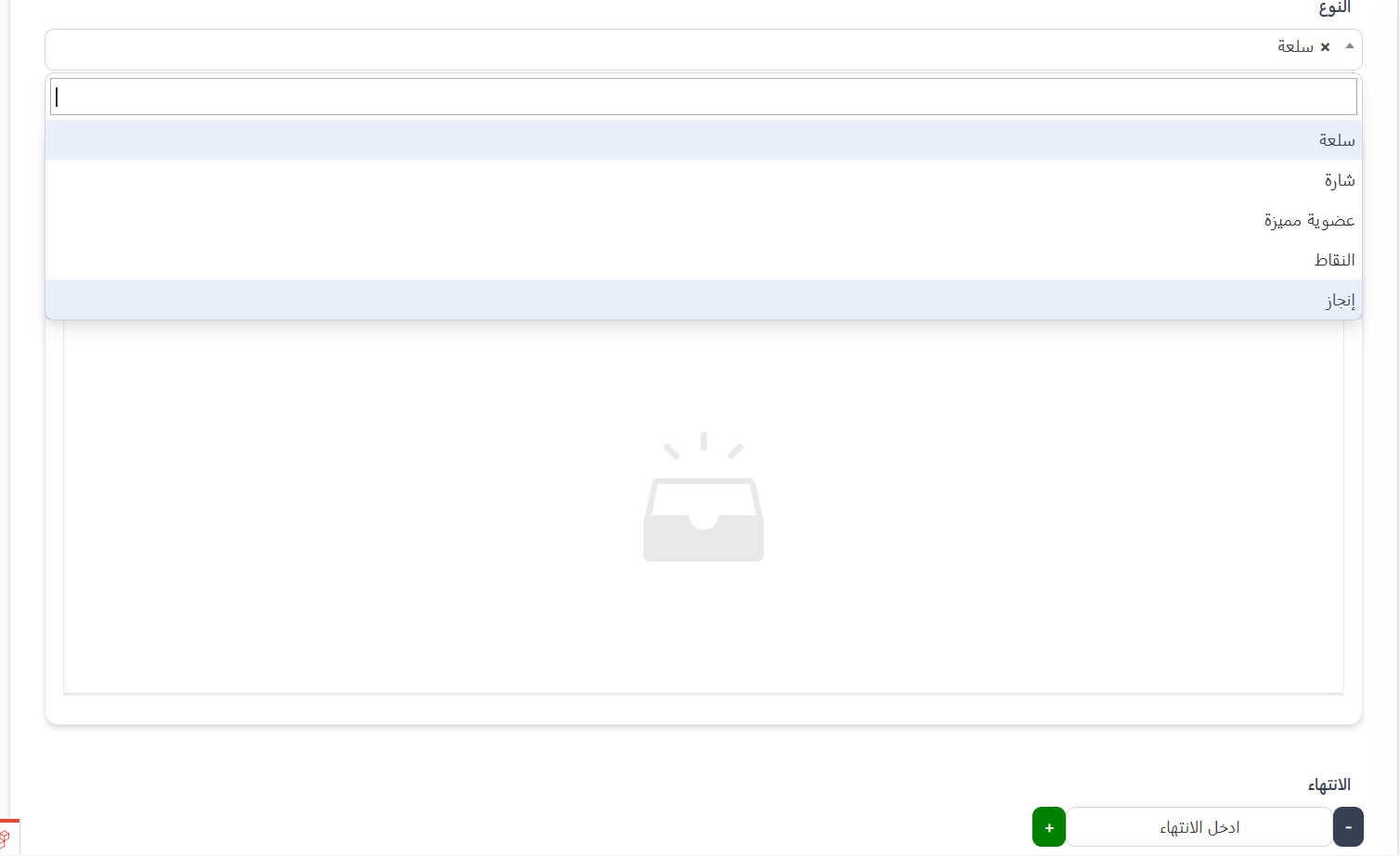
Choose the prize type from the dropdown:
| Type | Description |
|---|---|
| Item (ware) | Store item such as VIP Icon |
| Badge (badge) | Badge displayed on user's profile |
| VIP Membership (vip) | VIP membership at a specific level |
| Points (coins) | Coins/points added to user's balance |
| Achievement (achievement) | Achievement added to user's record |
Gift Field
After selecting the type, choose the specific prize from the list.
Expiry Field
| Field | Description |
|---|---|
| Expiry | Prize validity period in days. Use + and - buttons or enter the number manually |
- Click "Submit" to save the prize
Tip
You can add more than one prize to the same winner. For example: PK King 1st gets VIP Icon (10 days) + VIP 2 (50 days) + 9,000,000 coins (60 days).
Practical Example
Scenario: Creating a Weekly PK Event
Step 1: Create the event
- Start Date: 2026-04-29 (Monday)
- Automatic End Date: 2026-05-06 (Sunday)
Step 2: Set prizes for the three categories
👑 PK King Prizes (Top Gift Senders)
| Rank | Prize | Type | Expiry |
|---|---|---|---|
| 🥇 1st | VIP Icon + VIP 2 + 9,000,000 coins | ware + vip + coins | 10 + 50 + 60 days |
| 🥈 2nd | Special item | ware | 20 days |
| 🥉 3rd | Badge | badge | 7 days |
⭐ PK Star Prizes (Top Gift Receivers)
| Rank | Prize |
|---|---|
| 🥇 1st | VIP + coins |
| 🥈 2nd | Special item |
| 🥉 3rd | Badge |
🏠 PK Room Prizes (Top Rooms Receiving Gifts)
| Rank | Prize |
|---|---|
| 🥇 1st | Item + coins |
| 🥈 2nd | Item |
| 🥉 3rd | Badge |
How It Works for the User?
⚔️ Start of the week (Monday 00:00)
    ↓
🎮 Users activate PK in rooms and send/receive gifts
    ↓
📊 System calculates points for each category:
    👑 PK King ← Sent gift points (1 gold coin = 1 point)
    ⭐ PK Star ← Received gift points (1 gold coin = 1 point)
    🏠 PK Room ← Room gift points (1 gold coin = 1 point)
    ↓
🏆 Top 3 ranked in each category
    ↓
📅 End of week (Sunday 23:59:59)
    ↓
🎉 Monday 00:00 → Prizes distributed automatically + Points reset
    ↓
🔄 New week begins
Important Notes
Warning
- Points are counted only when PK is activated in the room. Gifts sent outside PK mode are not counted.
- End date is calculated automatically (full week from Monday to Sunday).
- PK points are reset every week when prizes are distributed.
Information
- Prizes are distributed automatically every Monday at 00:00.
- Prizes for all three categories (PK King, PK Star, PK Room) must be set before the end of the week.
- The room owner receives the "PK Room" prize, not the users inside it.
- 1 gold coin = 1 point in all categories.
Warning
When deleting a PK event, all prizes for the three categories linked to it will be deleted. Make sure before proceeding.