🏆 Levels
Introduction
The Levels system is a ranking system based on experience points that users earn through their various activities within the app. The more experience points a user collects, the higher their level rises and they receive the corresponding level badge that appears next to their name.
How to Access:
Menu ← Level ← Levels
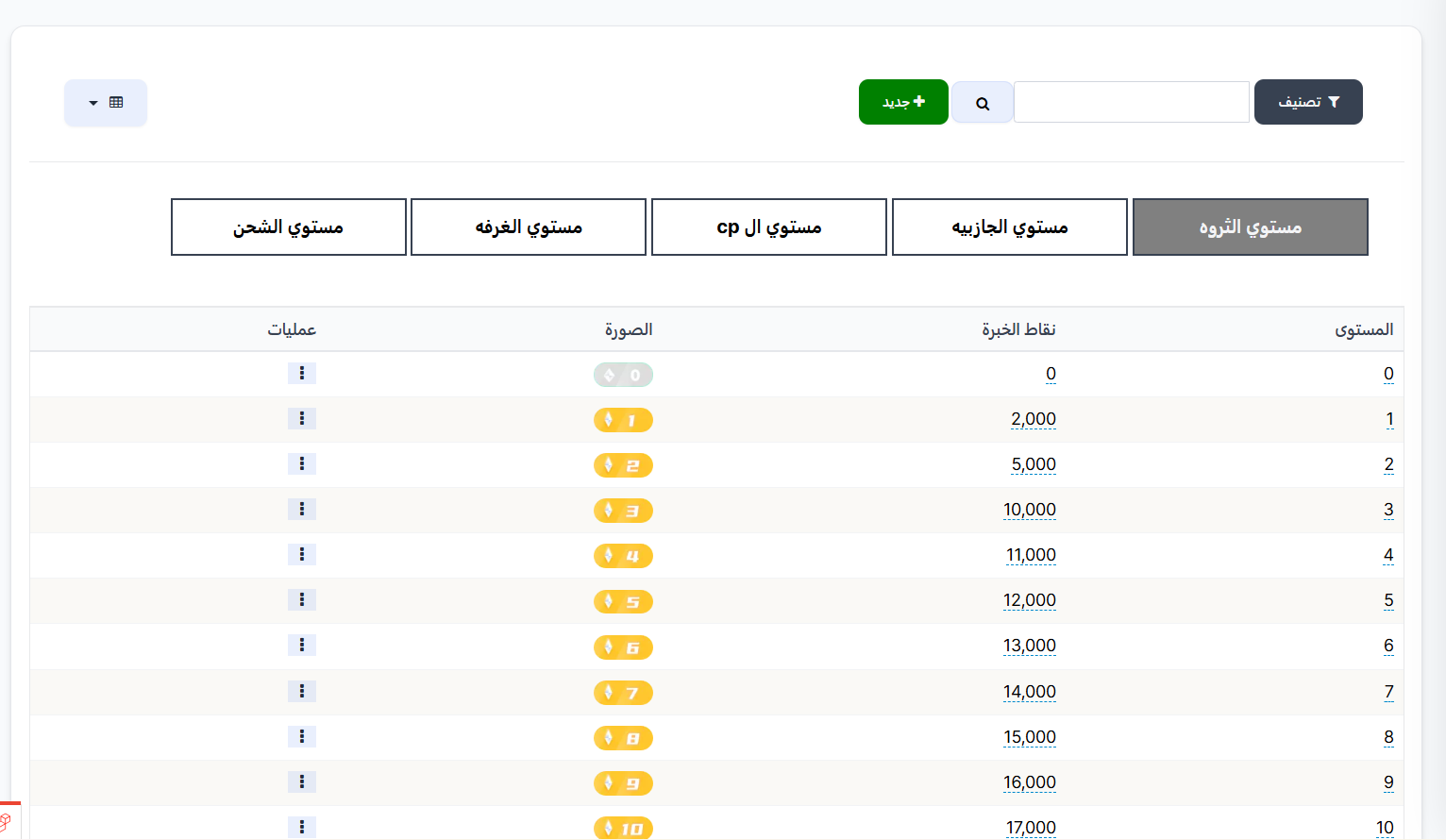
The Levels page contains several tabs, each representing a different type of level:
| Tab | Description |
|---|---|
| Wealth Level | Levels based on experience points from sending gifts |
| Charm Level | Levels based on experience points from receiving gifts |
| CP Level | Levels specific to the Couples (CP) system |
| Room Level | Levels specific to room activity |
| Recharge Level | Levels specific to recharge operations |
Wealth Level
What is Wealth Level?
Wealth Level reflects the total experience points a user earns when sending (throwing) gifts inside voice rooms or live streams. The more gifts a user sends, the more experience points they gain and the higher their Wealth Level rises.
How Does It Work?
- The user sends a gift to another user inside the room.
- The sender receives experience points for each gift they send.
- When the total experience points reach a certain threshold, the Wealth Level increases.
- The user receives the new level badge that appears next to their name in the app.
Charm Level
What is Charm Level?
Charm Level reflects the total experience points a user earns when receiving gifts from other users inside voice rooms or live streams. The more gifts a user receives, the more Charm experience points they gain and the higher their level rises.
How Does It Work?
- Another user sends a gift to the user inside the room.
- The receiver gets Charm experience points for each gift they receive.
- When the total experience points reach a certain threshold, the Charm Level increases.
- The user receives the new Charm Level badge.
Difference Between Wealth and Charm
- Wealth = Experience points from sending gifts (you send to others).
- Charm = Experience points from receiving gifts (others send to you).
🎁 Level Rewards (Level Gifts)
When a user reaches a specific level (whether in Wealth or Charm), they automatically receive rewards and gifts linked to that level! These gifts are pre-configured from the dashboard.
How Does the Level Rewards System Work?
- A level range is created (e.g., from level 3 to level 6).
- Specific gifts are linked to this range (coins, items, VIP membership, achievement badges).
- When any user reaches any level within this range ← they automatically receive the gifts! 🎉
Available Reward Types:
| Reward Type | Description |
|---|---|
| 🪙 Points/Coins | Grant user additional coins to their balance |
| 📦 Item | An item or product within the app (frame, special effect, etc.) |
| 💎 VIP Membership | Grant user free VIP membership |
| 🏅 Achievement/Badge | Grant user a special achievement badge |
Example
If a user reaches Wealth Level 10 and there's a level range (8 to 12) linked to gifts, the user will automatically receive those gifts such as: 500 coins + premium profile frame.
🎁 Click here to set up level gifts and add new rewards
Level Table Columns
All level tabs share the same columns:
| Column | Description |
|---|---|
| Level | Level number |
| Experience Points | Number of experience points required to achieve this level |
| Image | Level badge that appears next to the user's name in the app |
| Operations | Actions menu (⋮) to edit or delete the level |
Note
You can modify the required experience points for each level and change the badge image through the Operations menu (⋮) next to each level.
Create a New Level
How to Access:
Levels ← (Choose the appropriate tab) ← + New
When you click the "+ New" button, the creation page appears with the following fields:
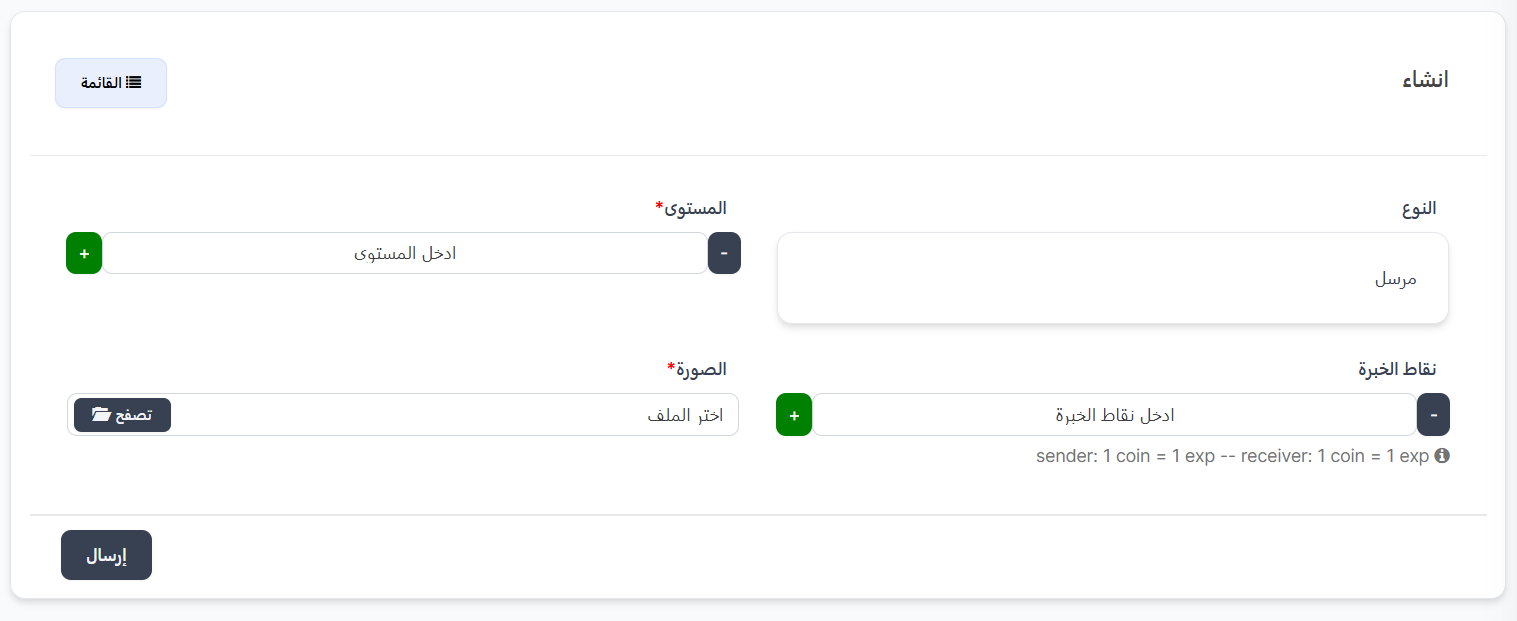
Creation Form Fields:
| Field | Description | Required |
|---|---|---|
| Type | Level type - appears automatically based on the selected tab (e.g., "Sender" for Wealth Level) | Automatic |
| Level* | New level number (use + and - to increase or decrease the number) | ✅ Yes |
| Experience Points | Number of experience points required to reach this level (use + and - to increase or decrease) | ✅ Yes |
| Image* | Level badge image that will appear next to the user's name (click "Browse" to choose the file) | ✅ Yes |
Type Values by Tab:
| Tab | Type |
|---|---|
| Wealth Level | Sender |
| Charm Level | Receiver |
| CP Level | CP |
| Room Level | Room |
| Recharge Level | Recharge |
⚙️ XP Rate Settings
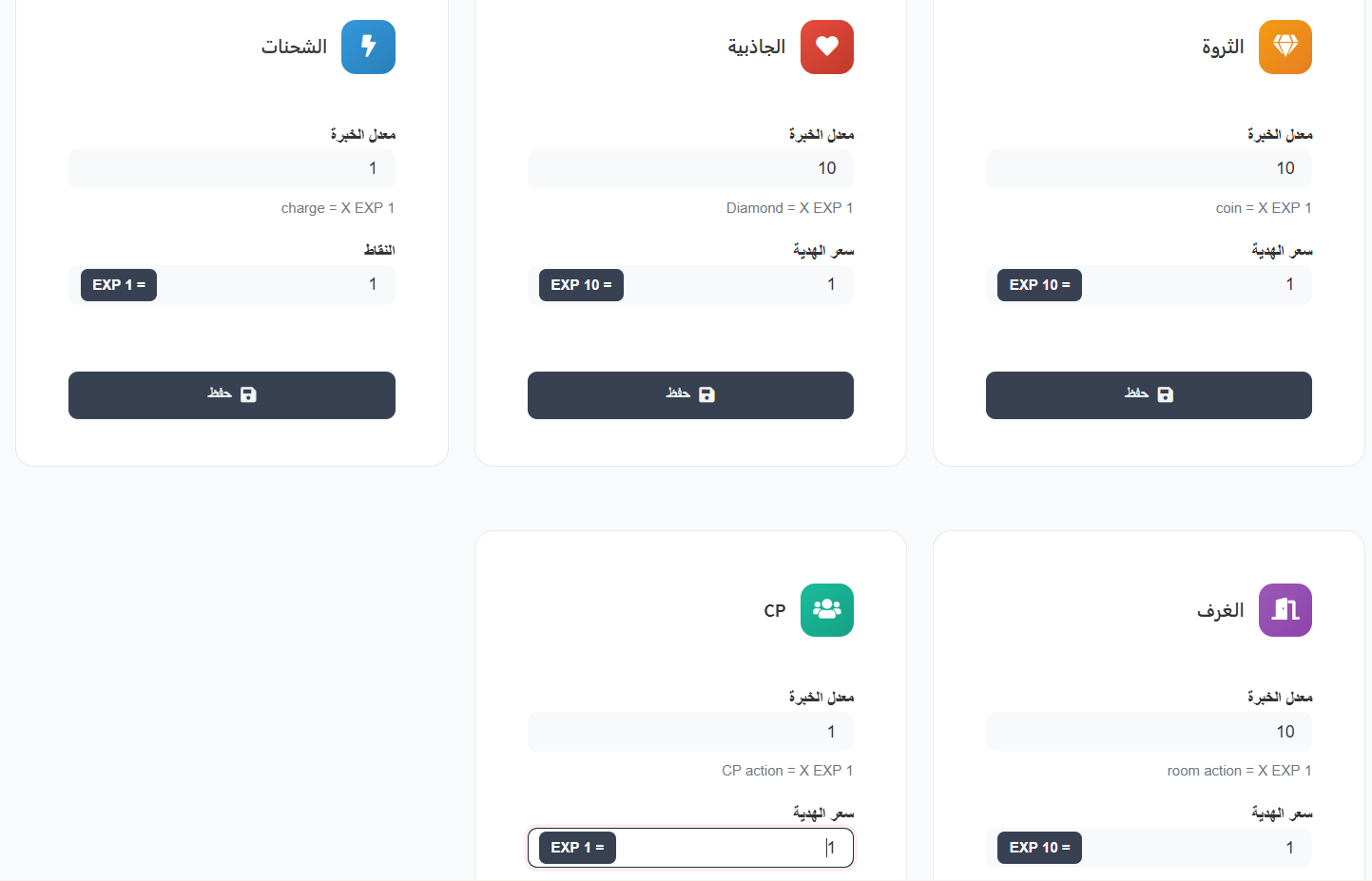
The experience points a user receives are calculated based on the XP Rate set in the settings page. This rate determines how many experience points a user gets for each action they perform.
How to Access XP Rate Settings:
Settings ← Work Settings
XP Rates per Type:
Each level type has its own settings card with two fields:
| Field | Description |
|---|---|
| XP Rate | Multiplier — how many times the base value is multiplied to get experience points |
| Gift Price | How many EXP the user gets per unit of action |
XP Rate Table:
| Type | Icon | XP Rate | Formula | Explanation |
|---|---|---|---|---|
| Wealth | 💎 | 10 | coin = X EXP 1 → EXP 10 = 1 |
Every 1 coin sent as gift = 10 XP |
| Charm | ❤️ | 10 | Diamond = X EXP 1 → EXP 10 = 1 |
Every 1 diamond received as gift = 10 XP |
| Recharge | ⚡ | 1 | charge = X EXP 1 → EXP 1 = 1 |
Every 1 recharge = 1 XP |
| CP | 👥 | 1 | CP action = X EXP 1 → EXP 1 = 1 |
Every 1 CP action = 1 XP |
| Room | 🏠 | 10 | room action = X EXP 1 → EXP 10 = 1 |
Every 1 room activity = 10 XP |
XP Calculation Example
Wealth Level Example (XP Rate = 10):
- User sent a gift worth 100 coins
- XP =
100 × 10= 1000 XP
Recharge Level Example (XP Rate = 1):
- User made a recharge
- XP =
1 × 1= 1 XP
Warning
Changing the XP rate in settings affects all users from the moment of change. Previously earned points are not affected.
Tip
- Increasing XP Rate makes users level up faster.
- Decreasing XP Rate makes leveling slower and harder.
- Adjust the rate according to the number of levels and XP required for each level.
Creation Steps:
- Go to Levels and choose the appropriate tab (e.g., Wealth Level).
- Click the "+ New" button.
- The Type will appear automatically (e.g., "Sender").
- Enter the level number using the (+) and (-) buttons.
- Enter the experience points required to reach this level.
- Upload the badge image by clicking "Browse" and selecting the file.
- Click "Submit" to save the new level.
Tips
- Make sure experience points progress logically between levels.
- Use distinctive and different badges for each level to motivate users to advance.
- You can edit any existing level through the Operations menu (⋮) next to each level.
✏️ Manual Level Editing
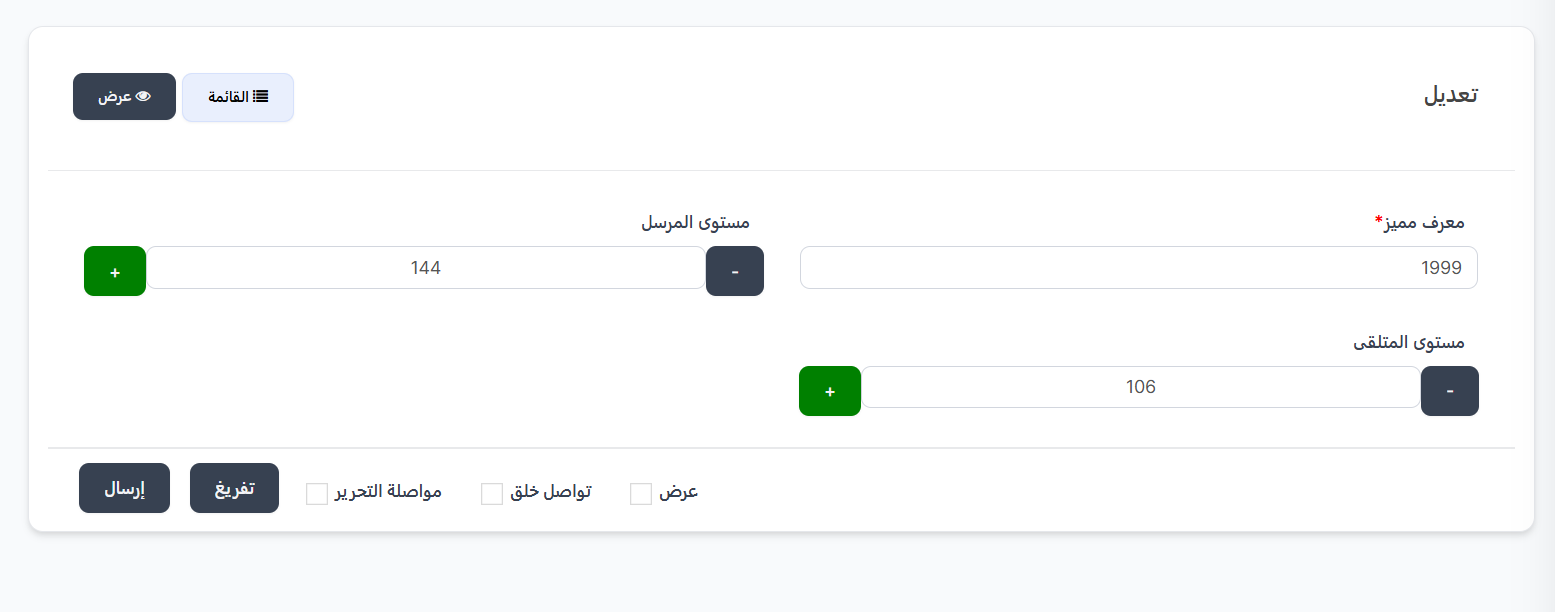
In addition to the automatic leveling system, you can manually edit any user's level through the level editing page. This feature is useful for correcting errors, compensation, or administrative reasons.
How to Access:
Fast Orders ← Edit Level
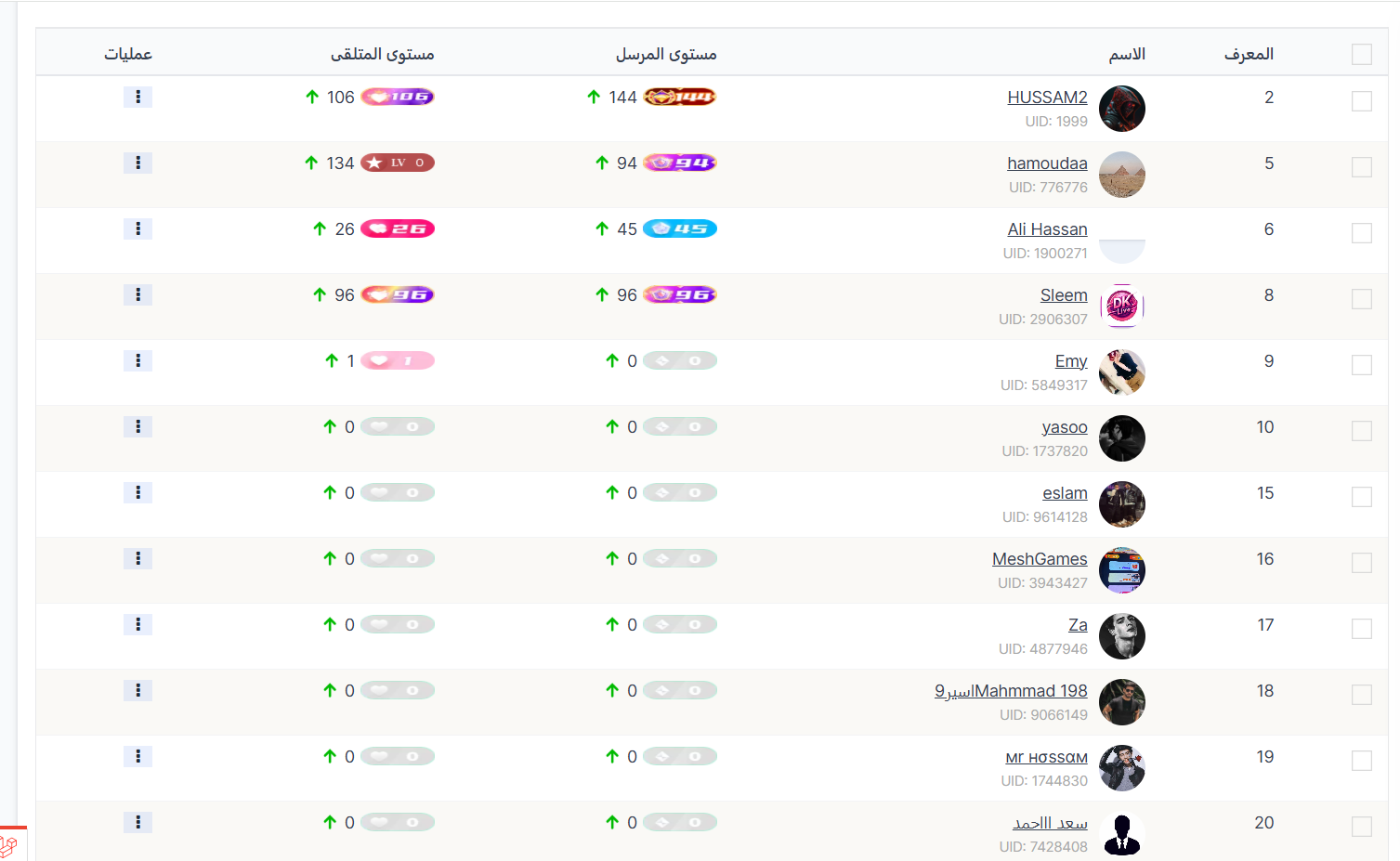
✏️ Open User Level Editing Page
User Table Columns:
| Column | Description |
|---|---|
| ID | User's unique system ID |
| Name | Username with profile picture and UID |
| Sender Level | Current Wealth level (sending gifts) — shows level number with badge ⬆️ |
| Receiver Level | Current Charm level (receiving gifts) — shows level number with badge ⬆️ |
| Operations | Actions menu (⋮) to edit user's level |
Manual Level Editing Steps:
| Step | Action |
|---|---|
| 1 | Go to Fast Orders ← Edit Level or open /admin/levels/users |
| 2 | Find the desired user in the table |
| 3 | Click the Operations menu (⋮) next to the user |
| 4 | Select Edit — the edit page will open |
| 5 | Edit the level using + and - buttons (see edit form below) |
| 6 | Click Submit to save changes |
Edit Form:
| Field | Description | Editable |
|---|---|---|
| Unique ID* | User's UUID — appears automatically | ❌ |
| Sender Level | Wealth level (sending gifts) — use + to increase or - to decrease | ✅ |
| Receiver Level | Charm level (receiving gifts) — use + to increase or - to decrease | ✅ |