✨ Charisma Levels
The Charisma Levels page allows you to manage the charisma level system for voice rooms. Charisma is a rating system based on points that users collect through their activity and interaction inside rooms — the more points collected, the higher the charisma level, and the user receives a distinctive badge reflecting their level.
How to Access:
Sidebar ← Rooms ← Charisma Levels
Page Contents:
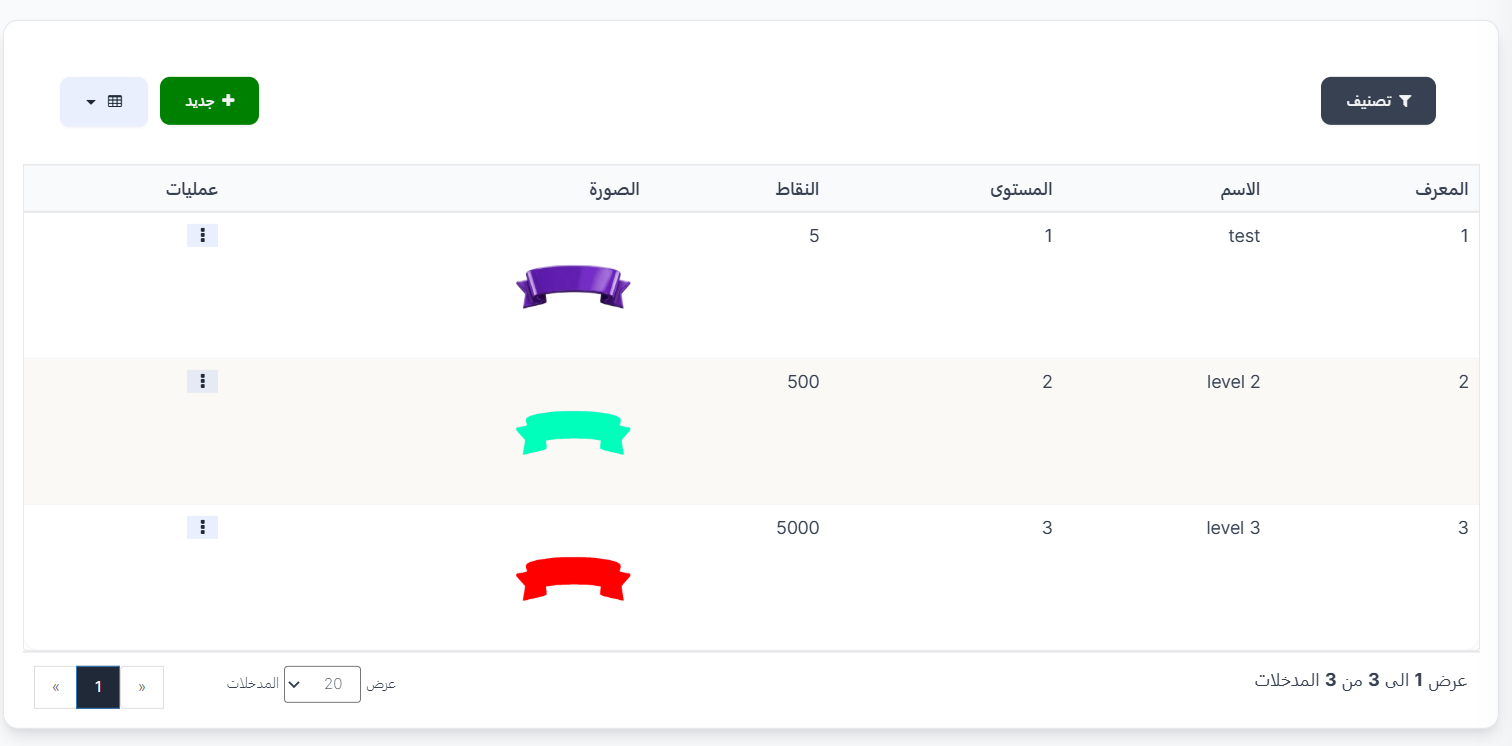
When you open the page, you'll find a toolbar at the top containing a filter button and an add new level button, then below a levels table with details of each level.
Toolbar:
| Element | Description |
|---|---|
| 🔍 Filter | Filter button to filter levels |
| + New | Green button to add a new charisma level |
| 📊 View | Toggle display mode (table or grid) |
Levels Table:
The table displays all available charisma levels with the following information:
| Column | Description |
|---|---|
| ID | The unique identifier for the level in the system |
| NAME | The name of the charisma level (e.g., test, level 2, level 3) |
| LEVEL | The level number (1, 2, 3, ... etc.) — the higher the number, the higher the level |
| POINTS | The number of points required to reach this charisma level |
| IMAGE | The level icon/badge displayed next to the user — each level has a distinctive badge with a different color |
| ACTION | Options menu (⋮) to edit or delete the level |
Available Charisma Levels:
Here are examples of levels in the system:
| ID | Name | Level | Points | Badge |
|---|---|---|---|---|
| 1 | test | 1 | 5 | 🟣 Purple badge |
| 2 | level 2 | 2 | 500 | 🟢 Green badge |
| 3 | level 3 | 3 | 5,000 | 🔴 Red badge |
How Does the Charisma System Work?
- Every user starts without a charisma level.
- When the required points are collected, the user automatically advances to the next level.
- Each level has a distinctive badge with a different color that appears next to the user's name.
- The higher the level, the more points required to advance (e.g., Level 1 needs 5 points, Level 2 needs 500 points, Level 3 needs 5,000 points).
Available Operations:
When you click the options menu (⋮) next to any level:
| Operation | Description |
|---|---|
| Edit | Edit level settings (name, level number, points, image) |
| Delete | Delete the level from the system |
Create a New Charisma Level:
When you click the green + New button at the top of the page, a Create new charisma level form opens:
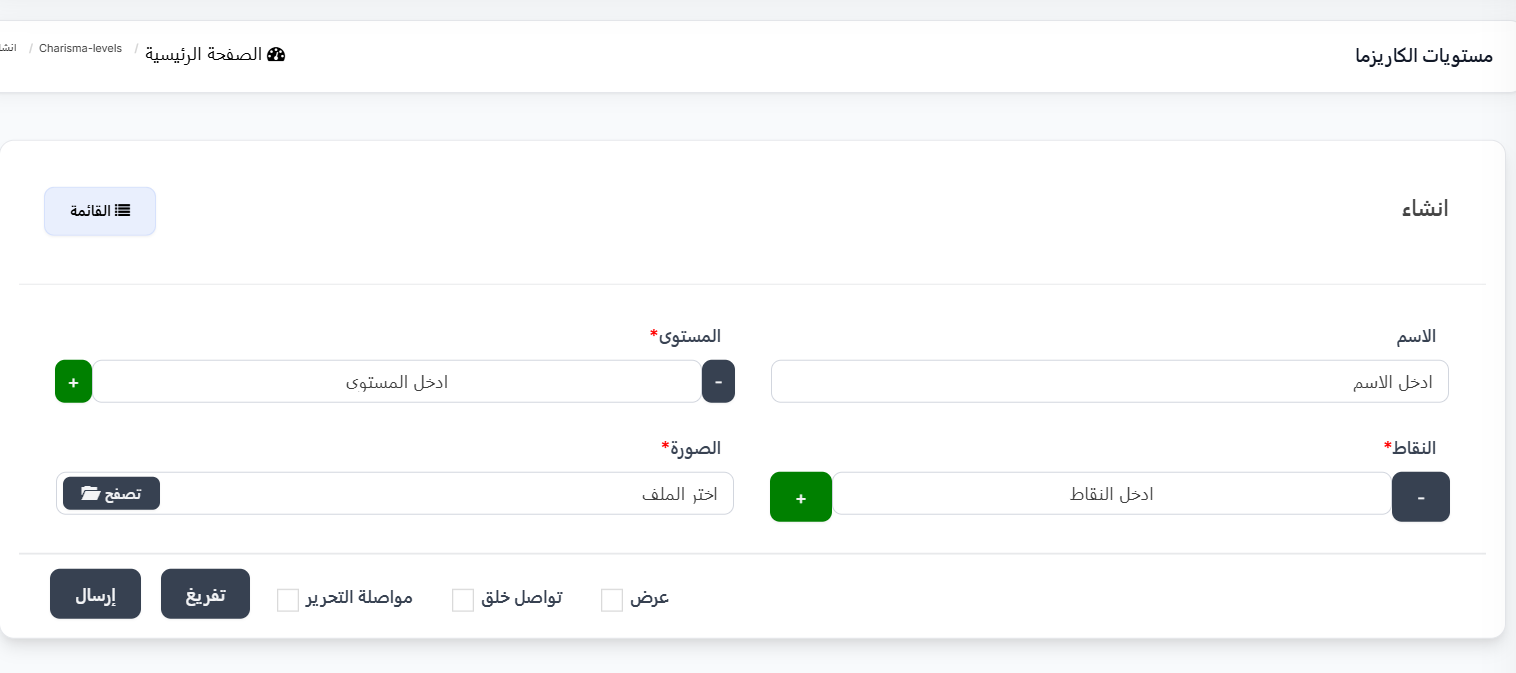
Form Fields:
| Field | Description |
|---|---|
| Name | Charisma level name — enter a descriptive name for the level (e.g., "Beginner", "Intermediate", "Expert") |
| Level ⭐ | Level number (required field) — use the (+) and (-) buttons to change the number, or enter it manually. The higher the number, the higher the level |
| Points ⭐ | Number of points required to reach this level (required field) — use the (+) and (-) buttons to change the number, or enter it manually |
| Image ⭐ | Charisma level icon/badge (required field) — click the 📁 Browse button to select an image from your device |
Tips for Creating Levels
- Arrange levels in ascending order — make Level 1 the lowest and higher numbers for higher levels.
- Increase points gradually — make the difference between required points for each level increasing (e.g., 5 → 500 → 5,000).
- Choose distinctive badges — use different colored images/badges for each level so users can easily distinguish between them.
- Choose clear names — use names that reflect the charisma level (e.g., Bronze, Silver, Gold, Diamond).
Form Buttons:
| Button | Function |
|---|---|
| Submit | Save the new level and return to the levels list |
| Reset | Clear all fields and reset them to default values |
| Continue Editing ☐ | When enabled, saves the level and stays on the edit page |
| Continue Creating ☐ | When enabled, after saving opens a new form to create another level |
| View ☐ | When enabled, after saving displays the level details |
| 📋 List | Return to the list of all levels |
Quick Summary for Charisma Levels:
| Action | Steps |
|---|---|
| View all levels | Rooms ← Charisma Levels |
| Add a new level | Click + New ← Enter name, level, points and upload image ← Submit |
| Add multiple levels | Click + New ← Enable Continue Creating ← Enter data for each level one by one |
| Edit a level | Click ⋮ next to the level ← Edit |
| Delete a level | Click ⋮ next to the level ← Delete |