👛 Wallet
The Wallet page allows you to view and manage all app wallets. The system contains 15 different wallets, each dedicated to a specific purpose (games, gifts, shipping agents, payment gateways, etc.). You can monitor balances and transfer coins between wallets.
How to Access:
Sidebar ← Wallet ← App Wallet
Overall Statistics:
| Card | Description |
|---|---|
| Total Balance | Sum of all wallet balances |
| Active Wallets | Number of currently active wallets |
| Average Balance | Average balance per wallet |
Wallet Types (15 Wallets):
| Wallet | Description |
|---|---|
| App Wallet 🪙 | Main app wallet — primary coin balance |
| Games Wallet 🎲 | Coins used in games |
| Lucky Box 🍀 | Lucky box wallet |
| Owner Wallet 👤 | App owner's wallet |
| Agency 🏢 | Agencies wallet |
| Host Agency 🎤 | Host agencies wallet |
| Lucky Gifts 🎁 | Lucky gifts wallet |
| Chinese Games 🀄 | Chinese games wallet |
| Games 🎮 | General games wallet |
| Shipping Agents 📦 | Shipping agents wallet |
| Payment Gateways 💳 | Payment gateways wallet |
| Store 🛒 | Store wallet |
| VIP 💎 | VIP operations wallet |
| Ads 📢 | Advertising wallet |
| Invitation Code Wallet 🔗 | Invitation codes wallet |
Transferring Coins Between Wallets:
Press ↔ Transfer on any wallet card to transfer coins.
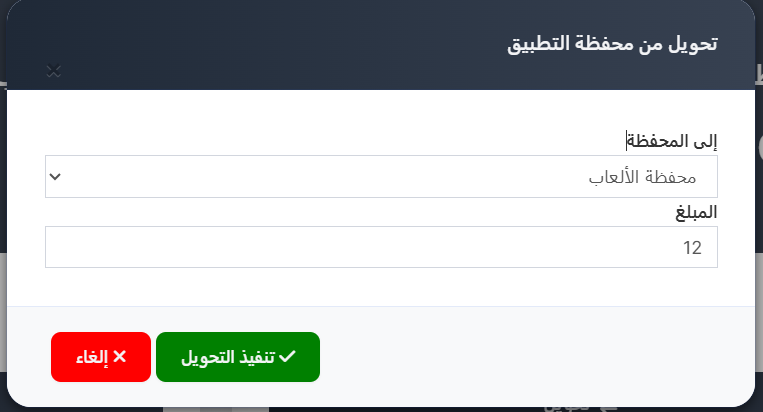
| Field | Description |
|---|---|
| Transfer From | Source wallet (shown in title) |
| To Wallet | Select target wallet from dropdown |
| Amount | Number of coins to transfer |
Buttons: ✅ Execute Transfer | ❌ Cancel
💳 E-Wallet (Withdrawal Methods)
The E-Wallet page manages withdrawal methods available to users in the app.
How to Access:
Sidebar ← Wallet ← E-Wallet
Withdrawal Methods Table:
| Column | Description |
|---|---|
| ID | Unique identifier |
| Name | Method name (e.g., Vodafone Cash, Binance, Bank Details) |
| Type | Digital Wallet or Bank Account |
| Minimum | Minimum withdrawal amount |
| Transfer Fees | Fees applied per withdrawal |
| Actions | Wallet Fields button |
| Operations | Edit/delete options (⋮) |
Creating a New Withdrawal Method:
Press ➕ New and enter: Name, Type (Digital Wallet/Bank Account), Minimum Amount.
Wallet Fields (Required User Data):
Press Wallet Fields to manage the fields users must fill when requesting withdrawal.
| Field Column | Description |
|---|---|
| Name | Field name shown to users |
| Placeholder | Hint text inside the field |
| Type | Data type: text, number, or email |
| Required | Whether the field is mandatory ✅ or optional ❌ |
| Order | Display order in the form |
📋 Transaction Log
The Transaction Log page shows all transfer operations between wallets.
How to Access:
Sidebar ← Wallet ← Transaction Log
Transaction Table:
| Column | Description |
|---|---|
| # | Sequential transaction number |
| From Wallet | Source wallet name |
| To Wallet | Target wallet name |
| Points | Number of coins transferred |
| By | User who executed the transfer |
| Transfer Time | Date and time of the transfer |
Quick Summary:
| Action | Steps |
|---|---|
| View wallets | Wallet ← App Wallet |
| Transfer coins | Press "↔ Transfer" ← Select target wallet ← Enter amount ← Execute |
| View withdrawal methods | Wallet ← E-Wallet |
| View transaction log | Wallet ← Transaction Log |