➕ Create New Target
How to Access
Side Menu → Agency System → Host Agencies → Target → + New
Target Creation Form
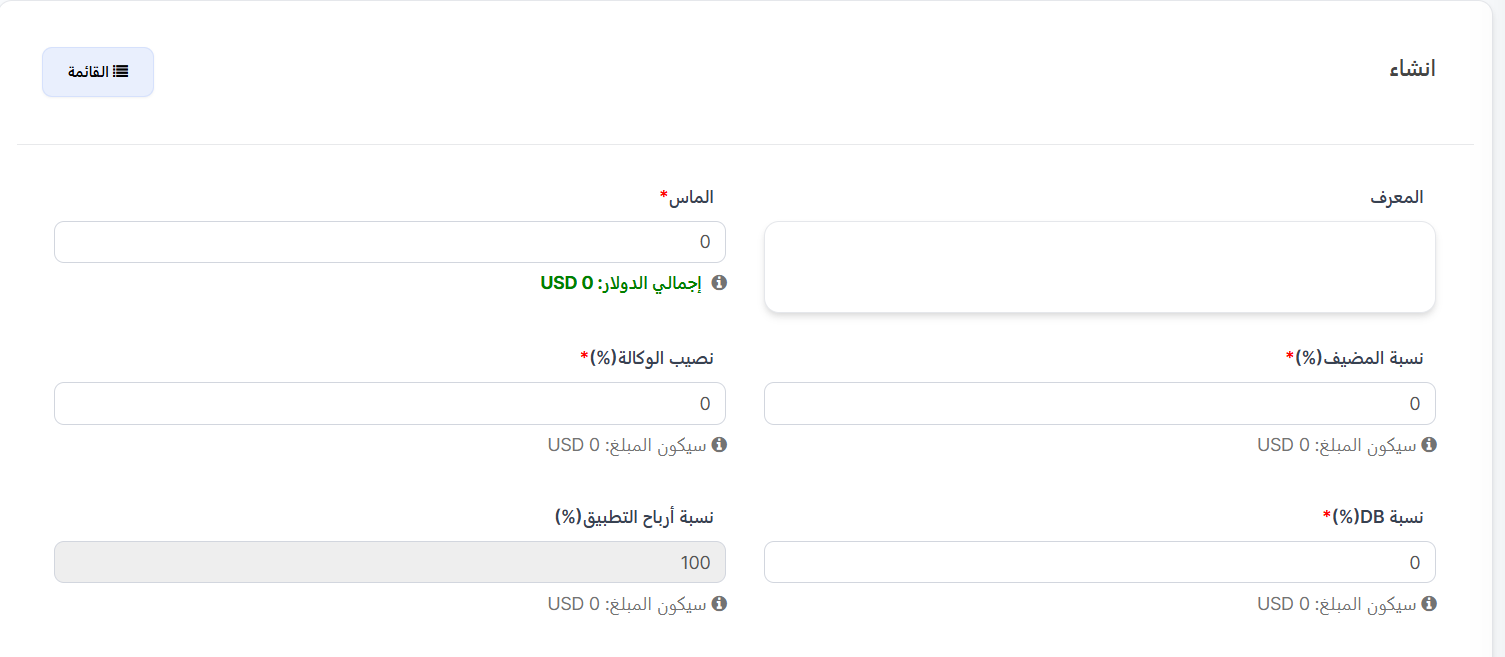
When clicking the "+ New" 🟢 button on the targets page, the creation form appears with the following sections:
Section 1: Basic Information & Percentages
| Field | Description | Required |
|---|---|---|
| Identifier | Unique identifier for the target | No |
| Diamonds* | Number of diamonds required to achieve this target. Shows Total USD (equivalent value in US dollars) below | ✅ Yes |
Percentage Fields:
| Field | Description | Required | Maximum |
|---|---|---|---|
| Host Percentage(%)* | The percentage the host receives. Shows the amount in USD below | ✅ Yes | 30% |
| Agency Share(%)* | The percentage the agency receives. Shows the amount in USD below | ✅ Yes | 30% |
| DB Percentage(%)* | The database percentage. Shows the amount in USD below | ✅ Yes | 30% |
| App Profit Percentage(%) | The remaining percentage retained by the app - calculated automatically | Auto | - |
Important Rule: Percentage Limit
Each of the three percentages (Host Percentage, Agency Share, DB Percentage) must not exceed 30%. This ensures the app retains an appropriate profit margin.
App Profit Percentage Calculation
App Profit Percentage = 100% - (Host Percentage + Agency Share + DB Percentage)
Example: If Host Percentage is 30% + Agency Share 5% + DB Percentage 15% = App Profit Percentage is 50%
Section 2: Days & Hours
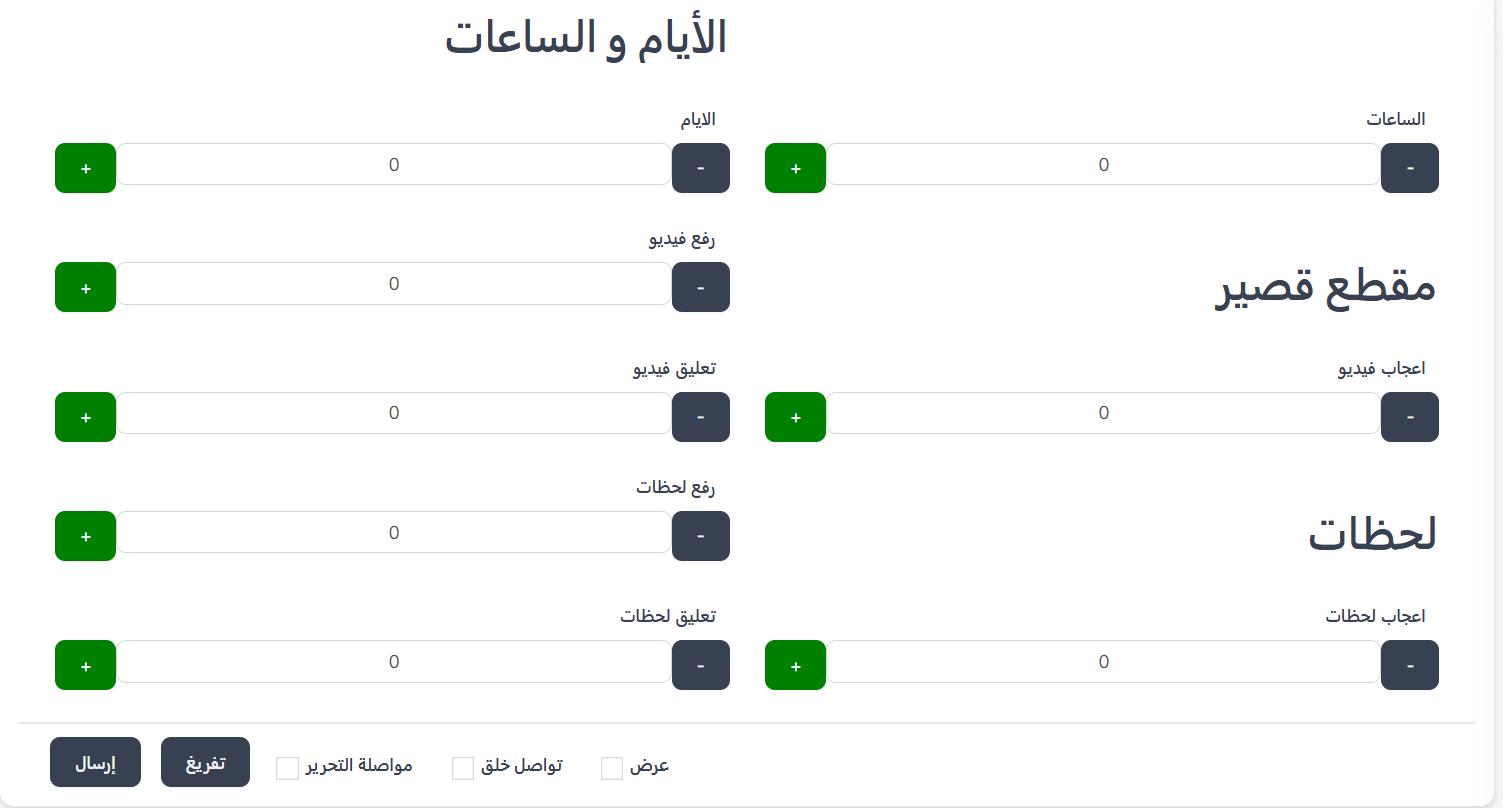
| Field | Description | Control |
|---|---|---|
| Hours | Number of hours required to spend in the room | (+) and (-) buttons |
| Days | Number of days required to be present | (+) and (-) buttons |
Section 3: Short Clips
Short clip (short video) requirements:
| Field | Description | Control |
|---|---|---|
| Upload Video | Number of short videos required to upload | (+) and (-) buttons |
| Video Like | Number of likes required on videos | (+) and (-) buttons |
| Video Comment | Number of comments required on videos | (+) and (-) buttons |
Section 4: Moments
Moments requirements:
| Field | Description | Control |
|---|---|---|
| Upload Moments | Number of moments required to upload | (+) and (-) buttons |
| Moments Like | Number of likes required on moments | (+) and (-) buttons |
| Moments Comment | Number of comments required on moments | (+) and (-) buttons |
Form Buttons
| Button | Description |
|---|---|
| Submit 🟢 | Save and create the new target |
| Clear ⬜ | Clear all fields and reset to default values |
Additional Options (Checkboxes):
| Option | Description |
|---|---|
| Continue Editing | After submission, stay on the edit page of the created target |
| Continue Creating | After submission, open a new target creation form immediately |
| View | After submission, navigate to the target details view page |
Steps to Create a New Target
- Go to Target and click the "+ New" 🟢 button.
- Enter the Identifier (optional) to identify the target.
- Enter the number of Diamonds required - the equivalent USD total will appear automatically.
- Enter the Host Percentage (maximum 30%).
- Enter the Agency Share (maximum 30%).
- Enter the DB Percentage (maximum 30%).
- The App Profit Percentage will be calculated automatically (remaining percentage).
- Set the number of Hours and Days required (optional).
- Set Short Clips requirements (upload, like, comment) (optional).
- Set Moments requirements (upload, like, comment) (optional).
- Choose additional options if needed (Continue Editing, Continue Creating, View).
- Click "Submit" to save the new target.
Practical Example
To create a target worth 66,000 diamonds:
| Field | Value |
|---|---|
| Identifier | 200 |
| Diamonds | 66000 (Total USD: $5.5) |
| Host Percentage | 30% (Amount: $1.65) |
| Agency Share | 5% (Amount: $0.27) |
| DB Percentage | 15% (Amount: $0.82) |
| App Profit Percentage | 50% (Amount: $2.75) - auto-calculated |
| Hours | 10 |
| Days | 0 |
Tip
Start by creating targets with low diamond values (e.g., 10,000) then gradually increase to motivate hosts to continue.
Warning
You cannot exceed 30% for any of the three percentages (Host, Agency, DB). If a value greater than 30% is entered, the form will not be accepted.