💕 CP Relationships
Introduction
The CP Relationships page allows managing relationship types between users in the application. Two users can create a CP relationship (such as friend, bro, lovely) and the relationship type and creation price are defined. Each relationship type has levels that users advance through by exchanging gifts and collecting experience points, and each level has its own gifts/rewards.
How to Access
Sidebar ← CP
💕 Open CP Relationships Page
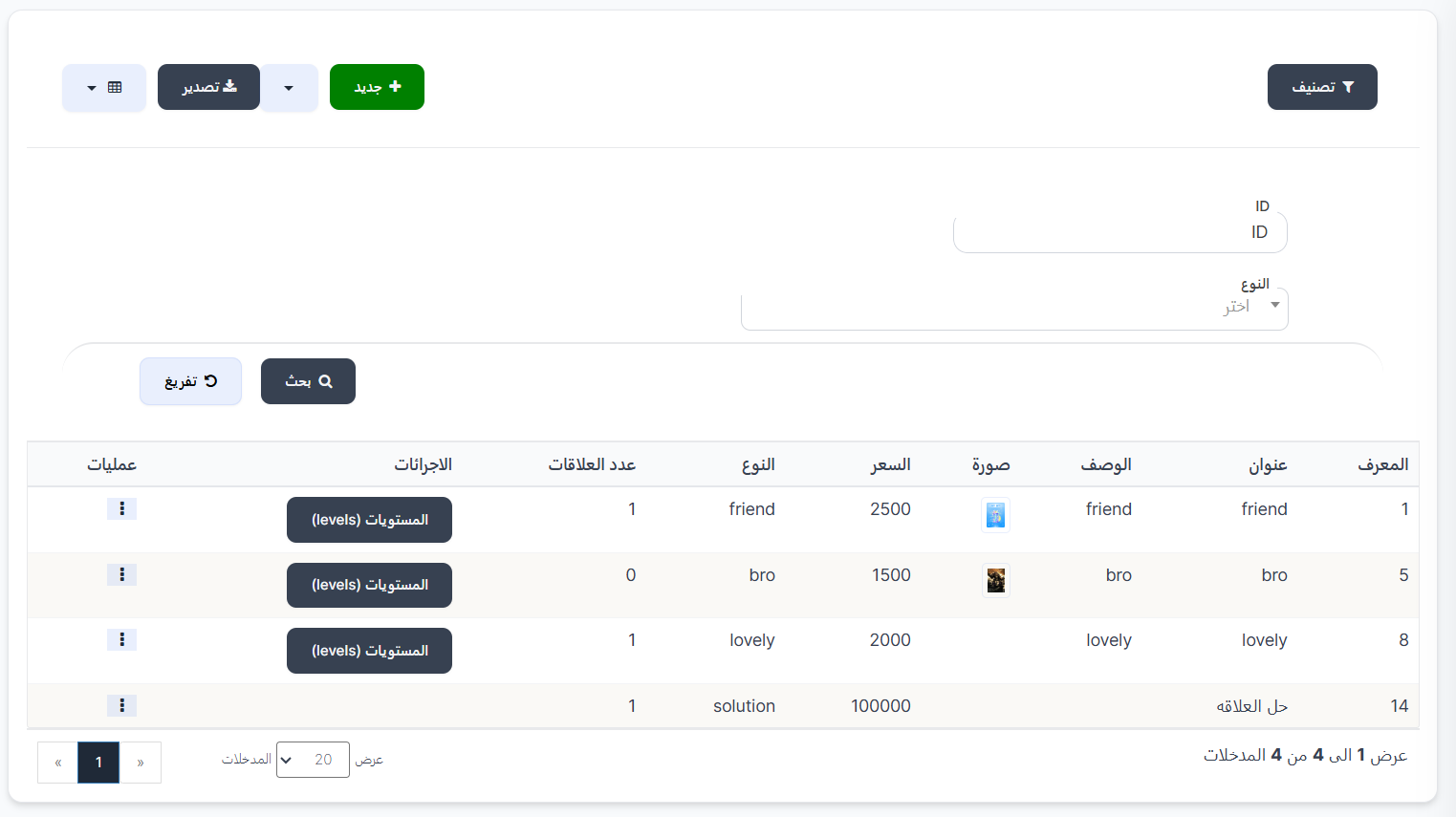
| Button |
Description |
| 🔘 Filter |
Open search and filter options |
| ➕ New |
Create a new CP relationship type |
| 📤 Export |
Export relationship data |
Search Filters
When clicking Filter, the following search fields appear:
| Field |
Description |
| ID |
Search by relationship type ID |
| Type |
Select relationship type from dropdown |
| 🔍 Search |
Execute search with specified filters |
| 🔄 Clear |
Clear all filters and reset |
Relationship Types Table
The table displays all available CP relationship types:
| Column |
Description |
| ID |
Relationship type identifier number |
| Title |
Relationship type name/title (example: friend, bro, lovely) |
| Description |
Relationship type description |
| Image |
Representative image for the relationship type |
| Price |
Price to create this type of relationship (in coins) |
| Type |
Relationship type (friend, bro, lovely, solution) |
| Number of Relationships |
Number of active relationships of this type |
| Actions |
Levels button to view levels for this type |
| Operations |
⋮ menu with edit and delete options |
Relationship Type Examples:
| Type |
Title |
Price |
Number of Relationships |
| friend |
friend |
2,500 |
1 |
| bro |
bro |
1,500 |
0 |
| lovely |
lovely |
2,000 |
1 |
| solution |
End Relationship |
100,000 |
1 |
Creating a New CP Relationship Type
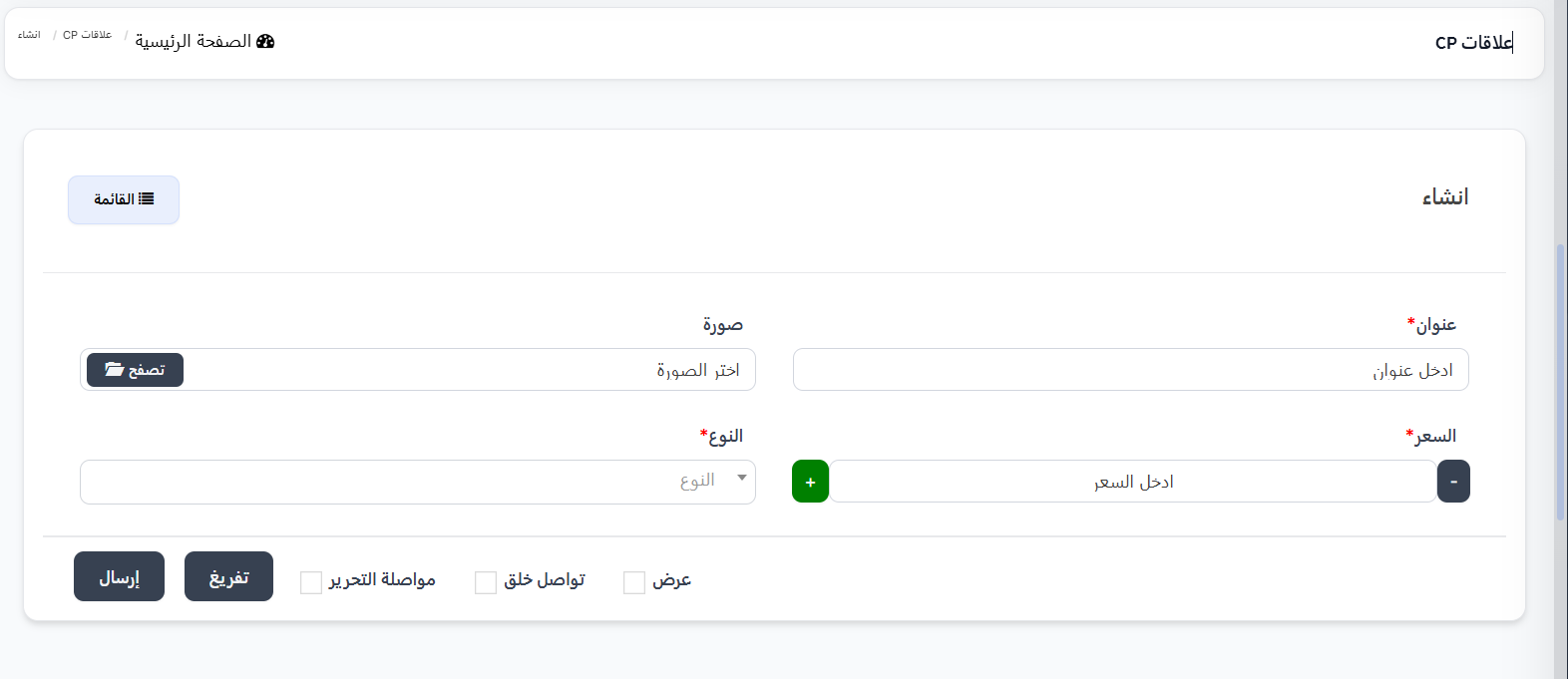
When clicking ➕ New, the creation page appears:
| Field |
Description |
| Title ⭐ |
Relationship type name/title (required) |
| Image |
Representative image (select image ← Browse) |
| Price ⭐ |
Price to create the relationship — use ➕/➖ buttons (required) |
| Type ⭐ |
Relationship type from dropdown (required) |
Available Relationship Types:
| Type |
Description |
| bro |
Brotherhood relationship |
| friend |
Friendship relationship |
| lovely |
Love relationship |
| solution |
End/dissolve relationship |
Levels
When clicking the Levels button next to any relationship type, the levels page for that type opens. Each level requires collecting a certain number of experience points through gift exchange between the two users.
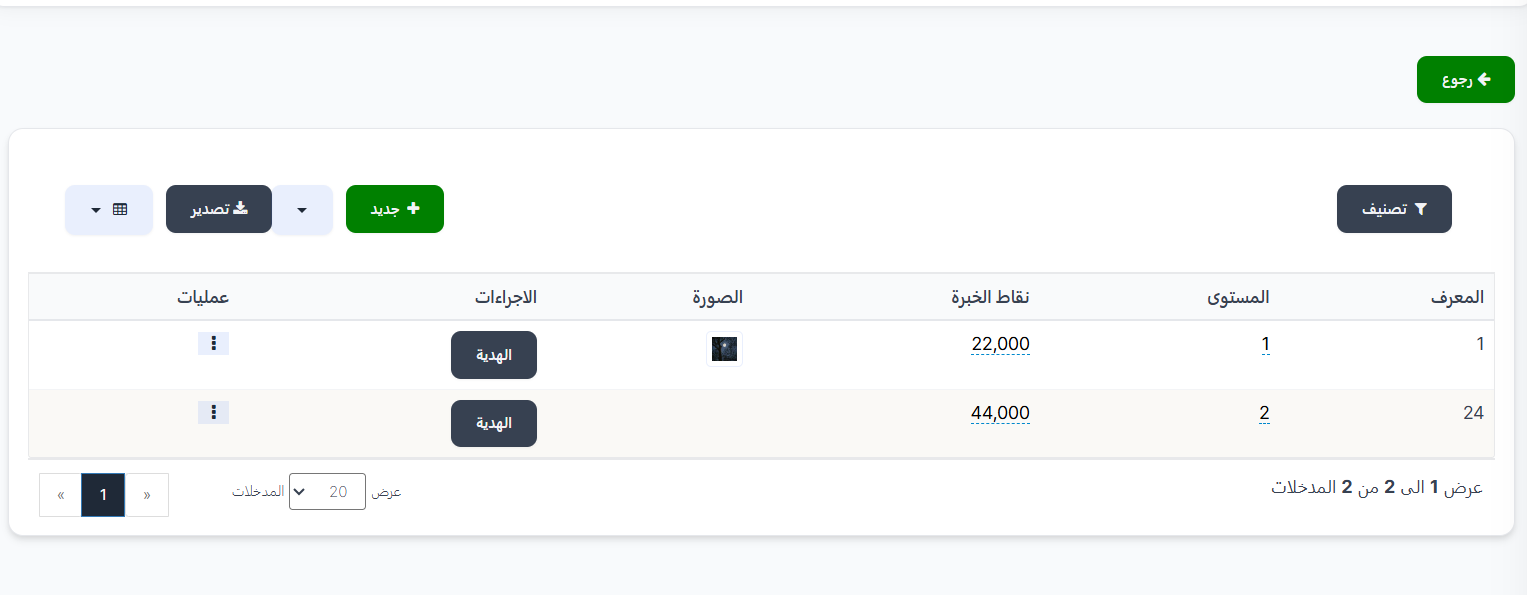
| Button |
Description |
| 🔘 Filter |
Open search filters |
| ➕ New |
Create a new level |
| 📤 Export |
Export data |
| ⬅️ Back |
Return to relationship types page |
Levels Table:
| Column |
Description |
| ID |
Level identifier number |
| Level |
Level number (example: 1, 2) |
| Experience Points |
Number of experience points required to reach this level (example: 22,000 / 44,000) |
| Image |
Level image |
| Actions |
Gift button to view gifts for this level |
| Operations |
⋮ menu with edit and delete options |
Experience Points System
Experience points are calculated based on exchanged gifts:
sender: 1 coin = 1 exp -- receiver: 1 coin = 1 exp
This means every coin sent as a gift = 1 experience point for the sender and 1 experience point for the receiver.
Creating a New Level
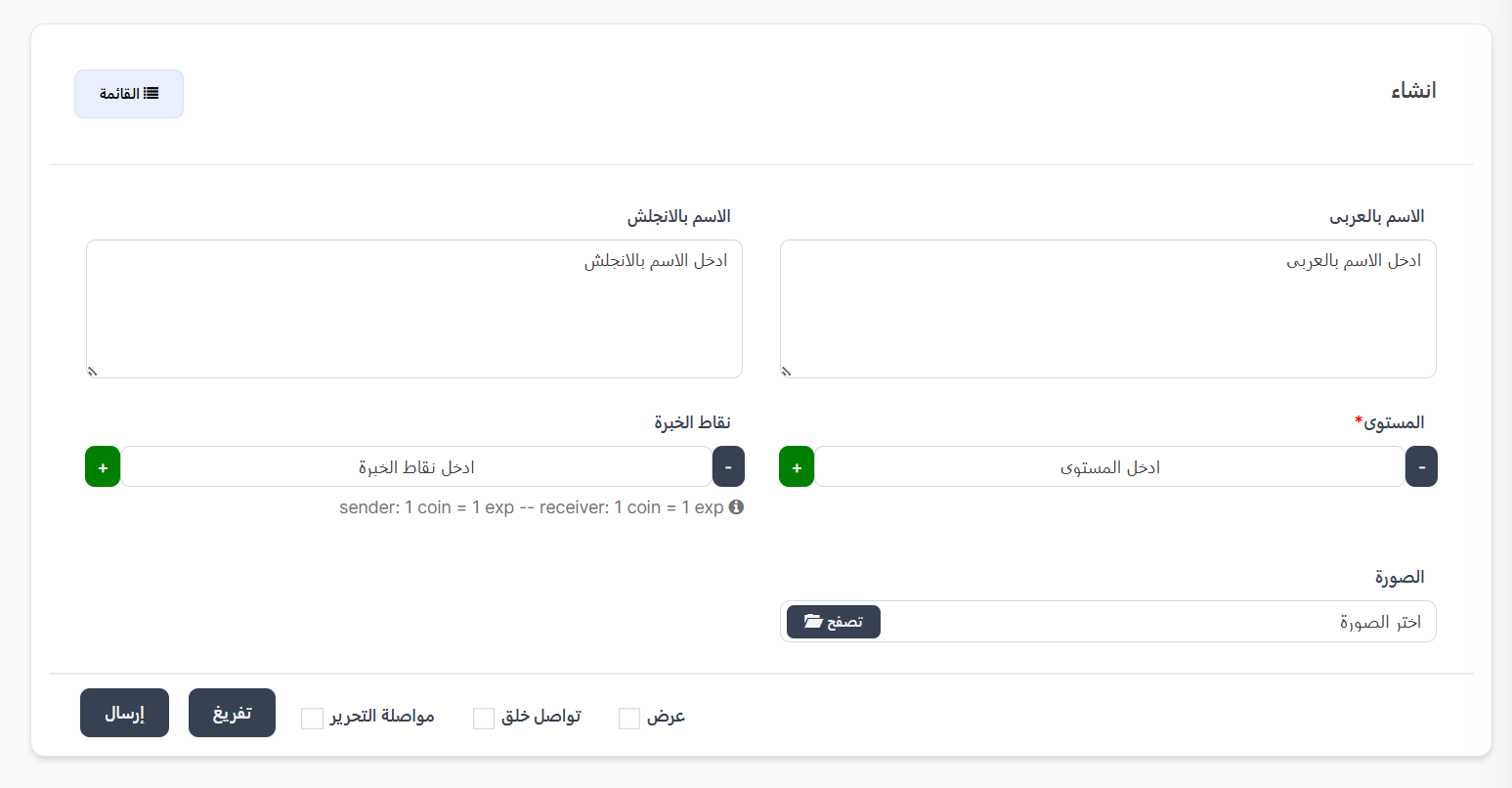
When clicking ➕ New on the levels page:
| Field |
Description |
| Arabic Name |
Level name in Arabic |
| English Name |
Level name in English |
| Level ⭐ |
Level number (required) — use ➕/➖ buttons |
| Experience Points |
Required experience points — use ➕/➖ buttons |
| Image |
Level image (select image ← Browse) |
| Button/Option |
Description |
| Submit |
Save the new level |
| Clear |
Clear all fields |
| View |
View the level |
| Continue Creating |
Continue creating other levels |
| Continue Editing |
Stay on the edit page after saving |
Level Gifts
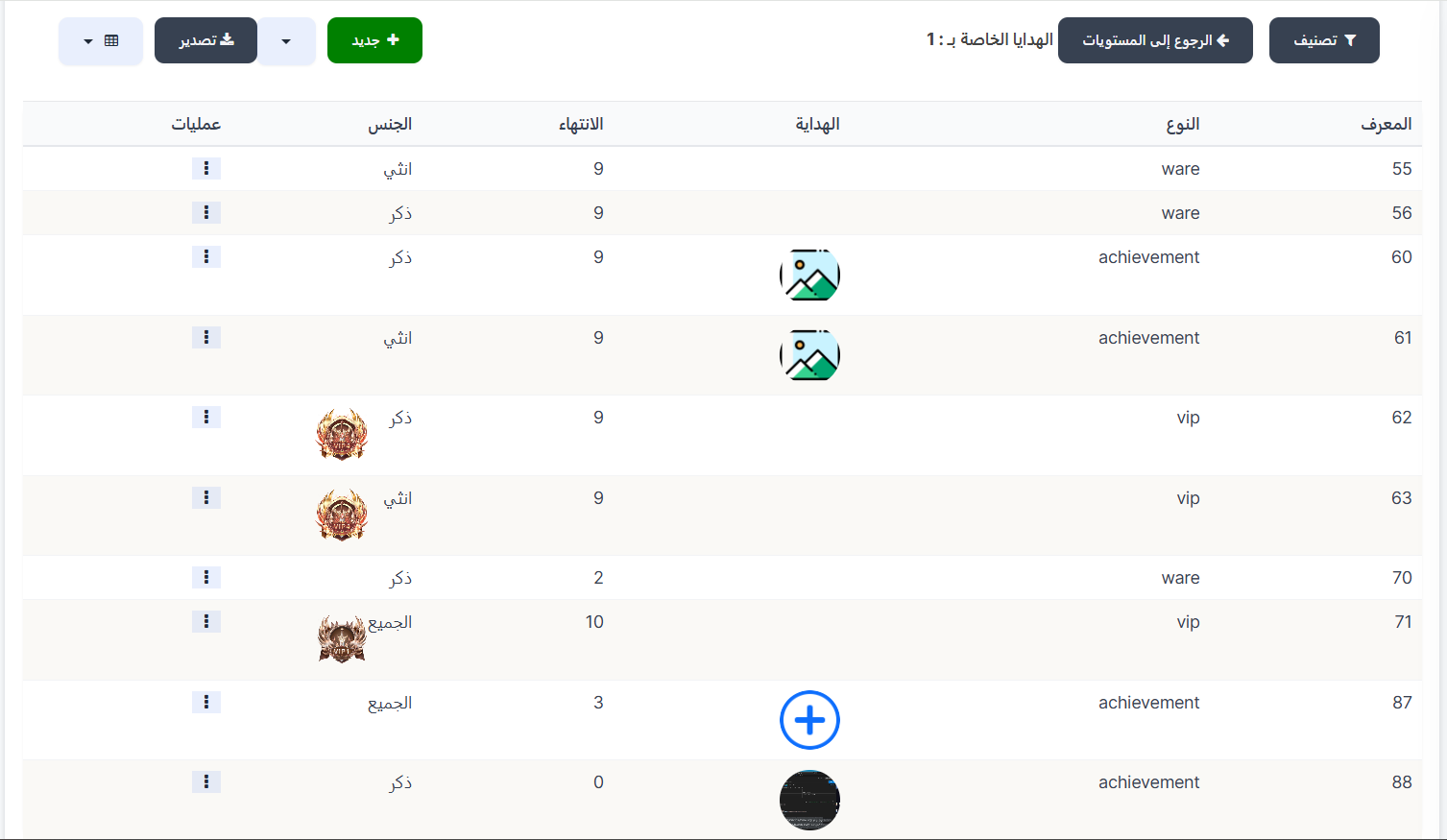
When clicking the Gift button next to any level, the gifts page for that level opens. These are the rewards that both users receive when reaching this level.
| Button |
Description |
| 🔘 Filter |
Open search filters |
| ➕ New |
Add a new gift for the level |
| 📤 Export |
Export data |
| ⬅️ Back to Levels |
Return to levels page |
Level Gifts Table:
| Column |
Description |
| ID |
Gift identifier number |
| Type |
Gift type (ware / achievement / vip) |
| Gift |
Gift image |
| Expiry |
Gift validity duration (in days) |
| Gender |
Target gender (Male / Female / All) |
| Operations |
⋮ menu with edit and delete options |
Gift Types:
| Type |
Description |
| ware |
Store item (merchandise from the store) |
| achievement |
Achievement |
| vip |
VIP membership |
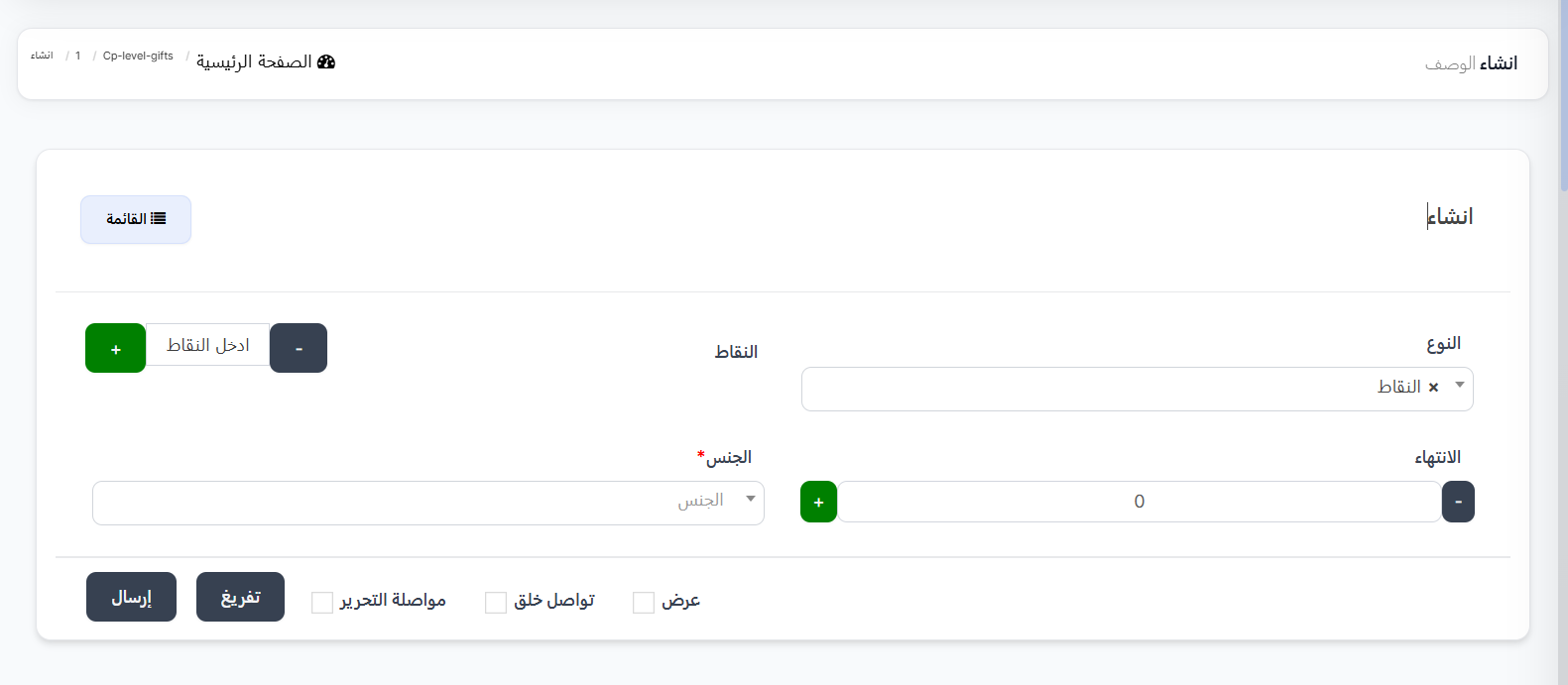
Creating a New Level Gift
When clicking ➕ New on the level gifts page:
| Field |
Description |
| Type |
Gift type from dropdown |
| Points |
Number of points (if type is "Points") — use ➕/➖ buttons |
| Expiry |
Gift validity duration (in days) — use ➕/➖ buttons |
| Gender ⭐ |
Target gender (required) |
Available Gift Types:
| Type |
Description |
| Ware |
Store merchandise |
| VIP Membership |
VIP membership |
| Points |
Additional points |
| Achievement |
Special achievement |
Gender Options:
| Option |
Description |
| All |
Gift for both genders |
| Male |
Gift for males only |
| Female |
Gift for females only |
Quick Summary
| Action |
Steps |
| View relationship types |
CP |
| Create relationship type |
➕ New ← Fill in data ← Submit |
| View levels |
Press Levels next to the type |
| Create level |
Levels ← ➕ New ← Fill in data ← Submit |
| View level gifts |
Levels ← Gift next to the level |
| Add level gift |
Level Gifts ← ➕ New ← Fill in data ← Submit |
Next Step
Weekly CP