👨👩👧👦 Families
The Families page allows you to manage families in the app. A family is a group of users united under one entity managed by the family owner and its admins. You can create new families, set the maximum number of members, track each family's level and experience, and assign an owner to each family.
How to Access:
Sidebar ← Families ← Families
Page Contents:
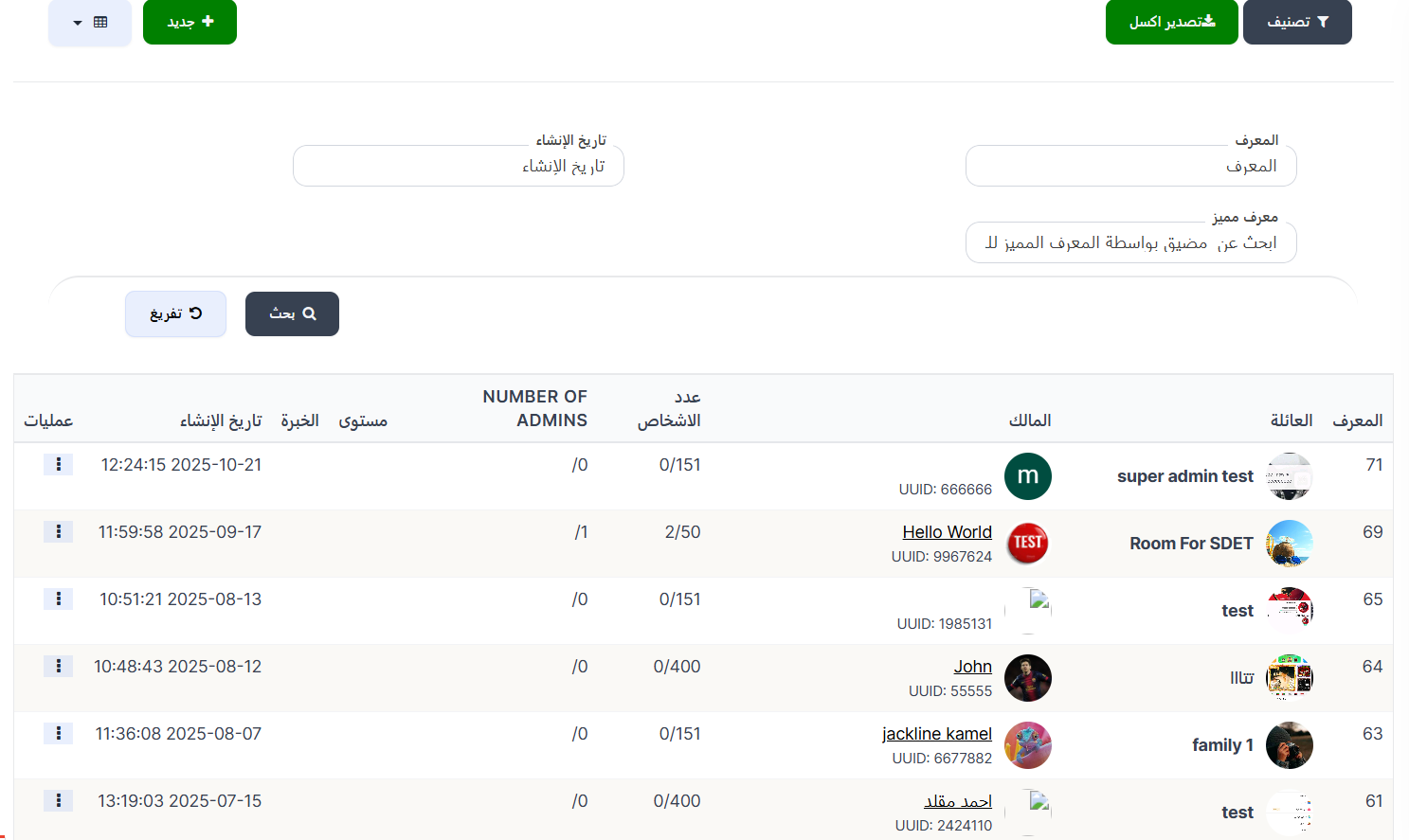
When opening the page, you'll find a toolbar at the top with filter, export, and add new family buttons, then search filters, and at the bottom the families table with details for each family.
Toolbar:
| Element | Description |
|---|---|
| 🔍 Filter | Filter button to filter families |
| 📤 Export Excel | Green button to export family data to an Excel file |
| + New | Green button to create a new family |
| 📊 View | Toggle display mode (table or grid) |
Search Filters:
You can search for a specific family using the following filters:
| Filter | Description |
|---|---|
| ID | Search by the family's unique ID number |
| Creation Date | Filter families by creation date (📅 Creation Date) |
| UUID | Search for a host/owner by UUID — Search for a host by UUID |
After entering search data, press the 🔍 Search button to display results, or the 🔄 Reset button to clear filters and show all families.
Families Table:
The table displays all available families with the following information:
| Column | Description |
|---|---|
| ID | The family's unique identification number in the system |
| Family | Family name with its thumbnail image |
| Owner | Family owner information: profile picture, name, and UUID |
| Number of People | Current members / maximum allowed (e.g., 0/151 or 2/50) |
| NUMBER OF ADMINS | Number of admins in the family (e.g., /0 or /1) |
| Level | Family's current level — increases based on experience points |
| Experience | Experience points the family has collected |
| Creation Date | Date and time the family was created (e.g., 2025-10-21 12:24:15) |
| Operations | Options menu (⋮) to edit or delete the family |
Understanding the Number of People Column:
This column shows current members vs. maximum allowed in the family:
| Example | Meaning |
|---|---|
| 0/151 | No current members, maximum 151 members |
| 2/50 | 2 members currently out of 50 maximum |
| 0/400 | No members, maximum 400 members |
Creating a New Family:
When pressing the green + New button, the Create new family form opens:
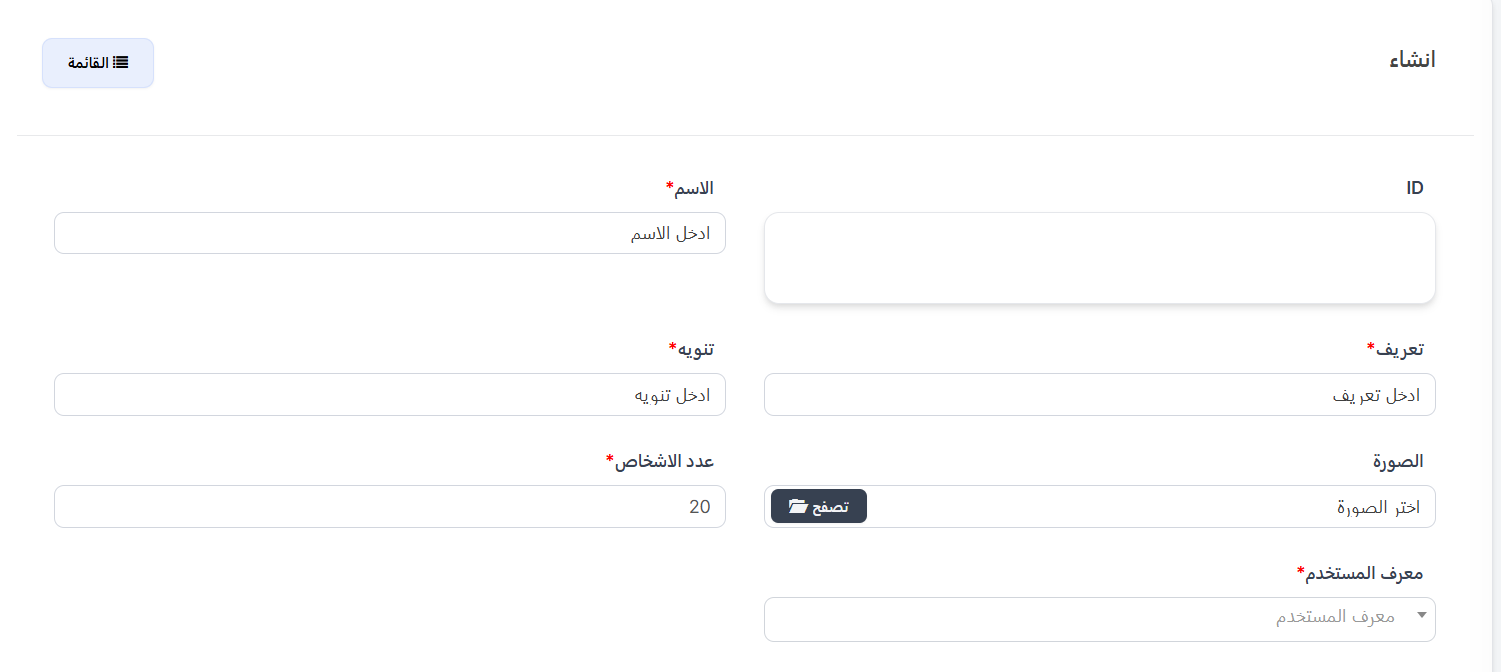
Creation Form Fields:
| Field | Description |
|---|---|
| ID | The family's unique ID — you can enter it manually or leave it to be auto-generated |
| Name ⭐ | Family name — required field |
| Description ⭐ | A short description of the family — required field |
| Notice ⭐ | A notice or note message shown to family members — required field |
| Image | Family image — press 📁 Browse to select an image from your device |
| Number of People ⭐ | Maximum number of members allowed in the family — default value 20. Required field |
| User ID ⭐ | Family owner — select the user from the dropdown by searching for their name or ID. Required field |
Note about Family Owner
- Family owner is the user with full permissions over the family (add/remove members, edit settings, assign admins).
- One owner must be selected when creating the family.
- You can change the owner later by editing the family.
Form Buttons:
| Button | Function |
|---|---|
| Submit | Save the new family and return to the families list |
| Reset | Clear all fields and reset to default values |
| Continue Editing ☐ | When enabled, save and stay on the edit page |
| Continue Creating ☐ | When enabled, after saving a new form opens to create another family |
| View ☐ | When enabled, after saving show the family details |
| 📋 List | Return to the full families list |
Available Operations:
When pressing the operations menu (⋮) next to any family:
| Operation | Description |
|---|---|
| Edit | Edit family settings (name, image, number of people, owner) |
| Delete | Permanently delete the family from the system |
Warning
When deleting a family, all members will be removed from it. Make sure you want to delete the family before confirming.
Quick Summary:
| Action | Steps |
|---|---|
| View all families | Families ← Families |
| Create a new family | Press + New ← Enter name, description, and notice ← Set number of people ← Select owner ← Submit |
| Search for a family | Enter ID or owner's UUID ← Search |
| Filter by date | Select creation date ← Search |
| Export data | Press 📤 Export Excel to download an Excel file |
| Edit a family | Press ⋮ next to the family ← Edit |
| Delete a family | Press ⋮ next to the family ← Delete |