⭐ VIP Privileges
Introduction
VIP privileges are the features and properties that a user receives when subscribing to any VIP level. These privileges are defined from the dashboard, and each privilege represents a specific feature that is activated for the user throughout their VIP subscription period.
From this page you can view all available privileges, create new privileges, or edit and delete existing ones.
How to Access:
Sidebar Menu ← 💎 VIP ← VIP Privileges
Privileges Page
This page displays all available VIP privileges in the system in a comprehensive table.
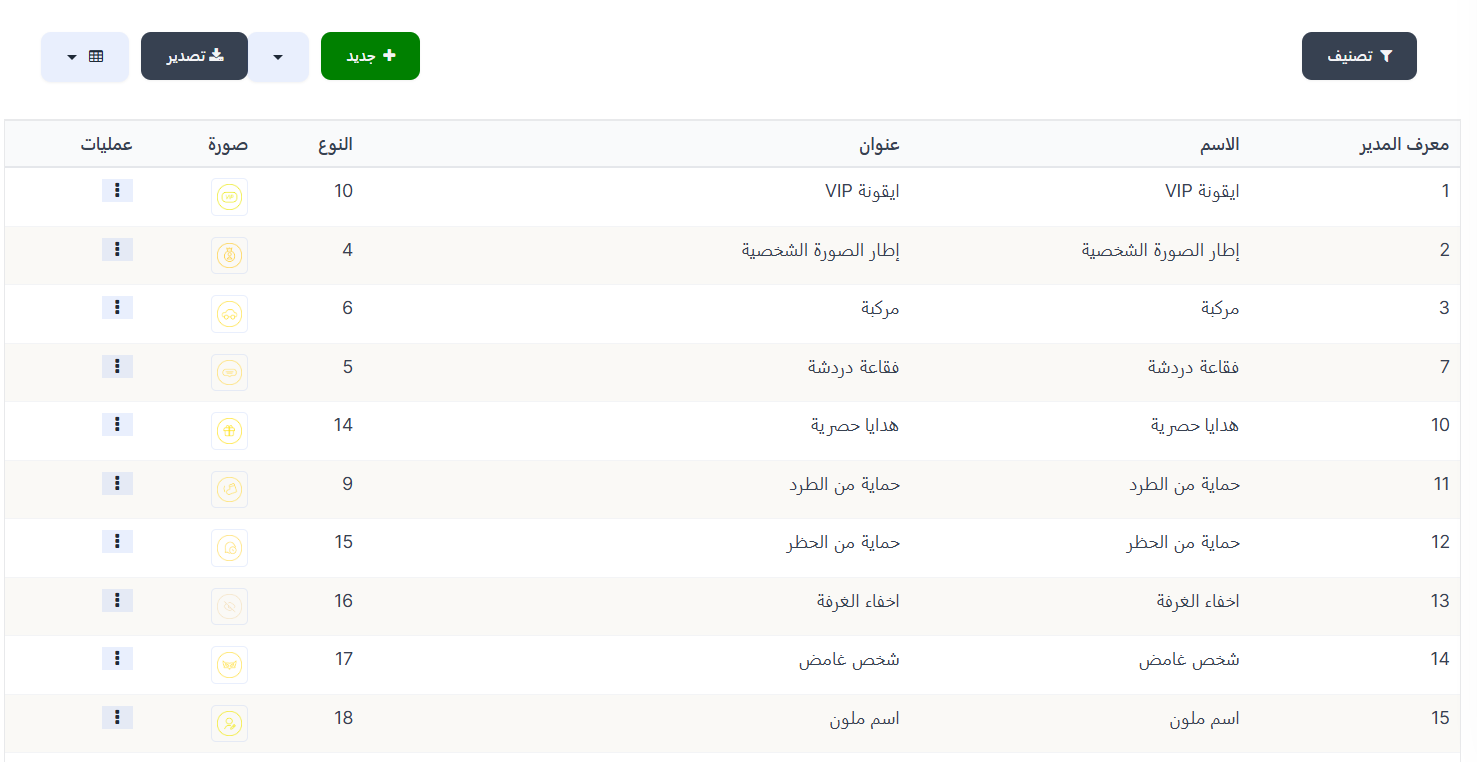
Table Columns:
| Column | Description |
|---|---|
| Manager ID | Unique privilege identifier |
| Name | Privilege name (e.g., VIP Icon, Profile Picture Frame... etc.) |
| Title | Privilege description/title displayed in the app |
| Type | Type number specific to the privilege in the system |
| Image | Privilege icon/image |
| Actions | Action menu (⋮) for editing and deleting |
Available Privileges
These are the basic privileges that come with the system:
| ID | Name | Title | Type | Description |
|---|---|---|---|---|
| 1 | VIP Icon | VIP Icon | 10 | A distinctive VIP badge/icon displayed next to the user's name |
| 2 | Profile Picture Frame | Profile Picture Frame | 4 | A distinctive frame around the user's profile picture |
| 3 | Vehicle | Vehicle | 6 | A distinctive vehicle that appears when entering rooms |
| 7 | Chat Bubble | Chat Bubble | 5 | A distinctive chat bubble shape in messages |
| 10 | Exclusive Gifts | Exclusive Gifts | 14 | Exclusive gifts available only to VIP members |
| 11 | Kick Protection | Kick Protection | 9 | Protects the user from being kicked from rooms |
| 12 | Ban Protection | Ban Protection | 15 | Protects the user from being banned |
| 13 | Hidden Room | Hidden Room | 16 | Ability to hide the user's room |
| 14 | Mystery Person | Mystery Person | 17 | Enter rooms invisibly (stealth mode) |
| 15 | Colored Name | Colored Name | 18 | Ability to color the user's name |
| 16 | GIF Image Upload | GIF Image Upload | 20 | Upload and use animated GIF images as profile picture |
| 17 | Hide Country | Hide Country | 8 | Hide user's country from profile and user lists |
Creating a New VIP Privilege
How to Access:
VIP Privileges ← + New
To create a new VIP privilege, click the "+ New" button at the top of the page.
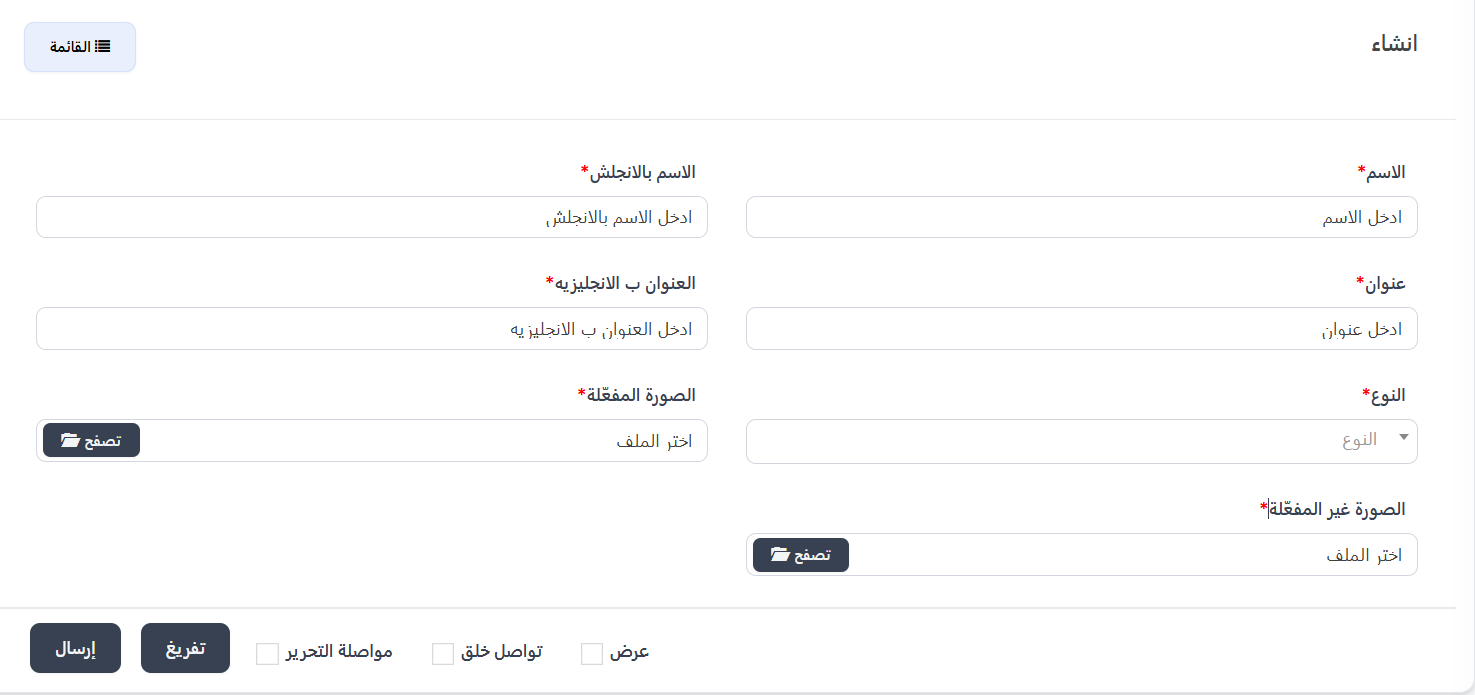
Creation Form Fields:
| Field | Description | Required |
|---|---|---|
| Name* | Privilege name in Arabic | ✅ Yes |
| Name in English* | Privilege name in English | ✅ Yes |
| Title* | Privilege description in Arabic (displayed to the user in the app) | ✅ Yes |
| Title in English* | Privilege description in English | ✅ Yes |
| Type* | Privilege type from the dropdown menu (determines the privilege function in the app) | ✅ Yes |
| Active Image* | Privilege icon/image when active for the user | ✅ Yes |
| Inactive Image* | Privilege icon/image when inactive | ✅ Yes |
Important Note
Type is the most important field in creation, as it determines the privilege function and what the user will actually receive in the app. You must select the correct type from the dropdown menu.
Creation Steps:
- From the VIP Privileges page, click "+ New".
- Enter the privilege name in Arabic and English.
- Enter the title/description in Arabic and English.
- Select the Type from the dropdown menu (refer to the types table below).
- Upload the Active Image by clicking "Browse" and selecting the file.
- Upload the Inactive Image by clicking "Browse" and selecting the file.
- Click "Submit" to save the new privilege.
Privilege Types
When creating a new privilege, you must select the Type from the dropdown menu. The type determines the actual function of the privilege within the app:

| Type | Function | Detailed Description |
|---|---|---|
| Profile Picture Frame | Frame around user's photo | The user gets a distinctive frame added around their profile picture |
| Bubble Frame | Chat bubble frame | The user gets a distinctive chat bubble shape when sending messages |
| Vehicle | Room entry vehicle | The user gets a distinctive vehicle as a visual effect when entering voice rooms |
| Anti-Kick | Kick protection | The user cannot be kicked from voice rooms |
| Icon | VIP badge/icon | The user gets a distinctive VIP icon displayed next to their name |
| Shower | Gift shower effect | The user gets a distinctive shower effect when sending gifts |
| Hide Country | Hide user's country | The user can hide their country from their profile |
| VIP Gifts | Exclusive gifts | The user can send exclusive gifts available only to VIP members |
| Profile Not Banned | Ban protection | The user's profile cannot be banned |
| Hidden Room | Hide room | The user can hide their voice room from the public list |
| Mystery Person | Stealth mode | The user can enter rooms invisibly |
| Colored Name | Color username | The user can change their name color to a distinctive color |
| Hide Profile Visitors | Hide visits | The user can visit other profiles without appearing in visitor lists |
| Last Activity Status | Hide last activity | The user can hide their last activity/appearance time |
| Sound Effects | Special sound effects | The user gets distinctive sound effects for voice rooms |
| GIF Image Upload | Upload GIF images | The user can upload and use animated GIF images as profile pictures |
How to Choose the Right Type?
- The type determines what the user will actually receive in the app when this privilege is activated.
- Example: If you want to create a privilege that gives the user a frame around their photo, choose "Profile Picture Frame".
- Example: If you want a privilege that protects the user from being kicked, choose "Anti-Kick".
Edit a Privilege
- From the Privileges page, click the Actions menu (⋮) next to the desired privilege.
- Select Edit.
- Change the required data (name, title, type, image).
- Click "Submit" to save changes.
Delete a Privilege
- From the Privileges page, click the Actions menu (⋮) next to the desired privilege.
- Select Delete.
- Confirm the deletion.
Warning
When deleting a privilege, it will be removed from all VIP levels that use it. Make sure you don't need this privilege before deleting.