📜 General Rules
Introduction
The General Rules page is used to create and manage rules for different events that are displayed to users inside the app. The admin can specify the event type, add a rules page link, and write rules descriptions in multiple languages (Arabic, Turkish, Hindi).
What is the Purpose of This Page?
- Unified Rules: Create a unified rules page for each event type
- Multi-language: Write rules in multiple languages to suit all users
- External Linking: Ability to link rules to an external web page
- Centralized Management: Manage all event rules from one place
How to Access
Sidebar Menu → Events → General Rules
Or via direct link:
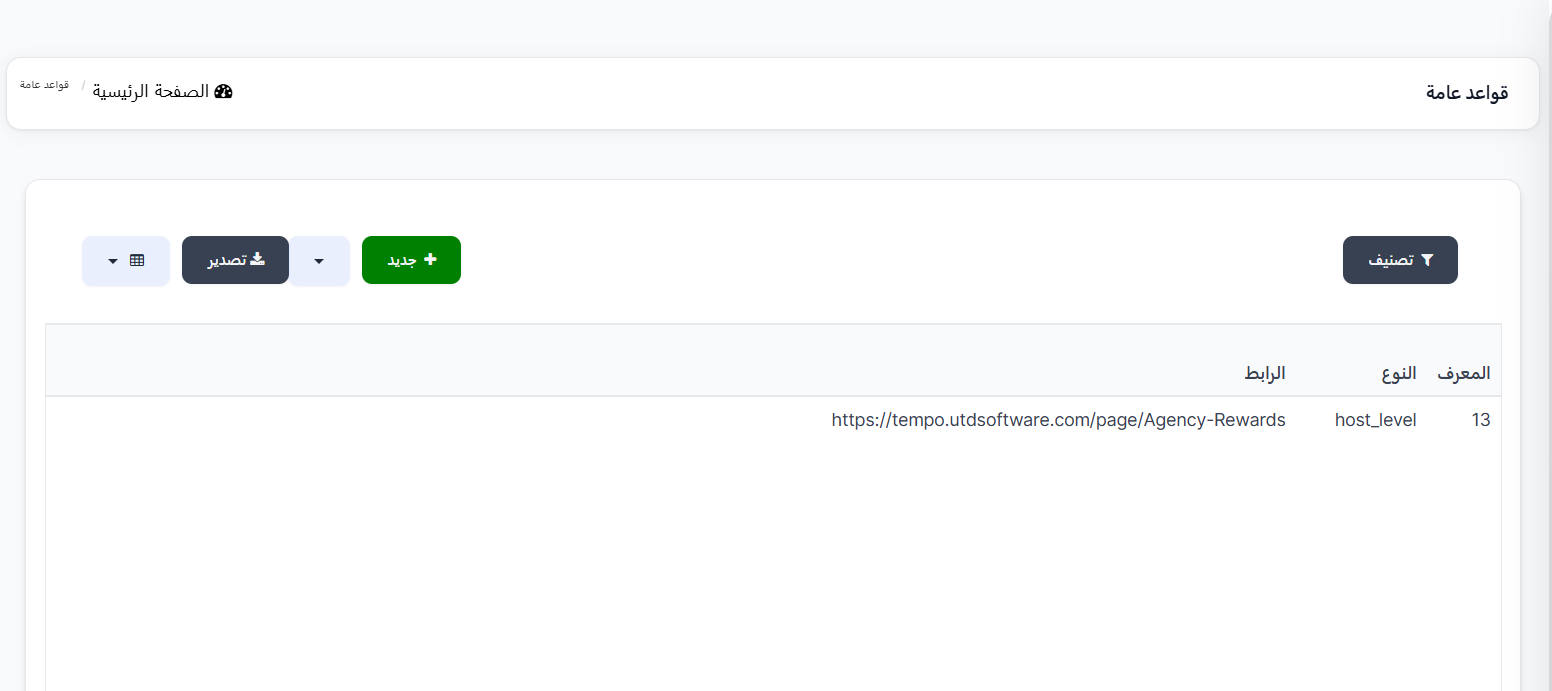
General Rules Page
Rules Table
The table displays all created rules:
| Column | Description |
|---|---|
| ID | Unique identifier for the rule (e.g., 13) |
| Type | Event type associated with the rule (e.g., host_level) |
| Link | External rules page link (e.g., https://tempo.utdsoftware.com/page/Agency-Rewards) |
Main Control Buttons
| Button | Description |
|---|---|
| + New 🟢 | Create a new rule |
| Filter 🔘 | Filter and sort displayed rules |
| Export 🔵 | Export rules data as a file |
Create New Rule
To create a new rule:
- Click the "+ New" 🟢 button
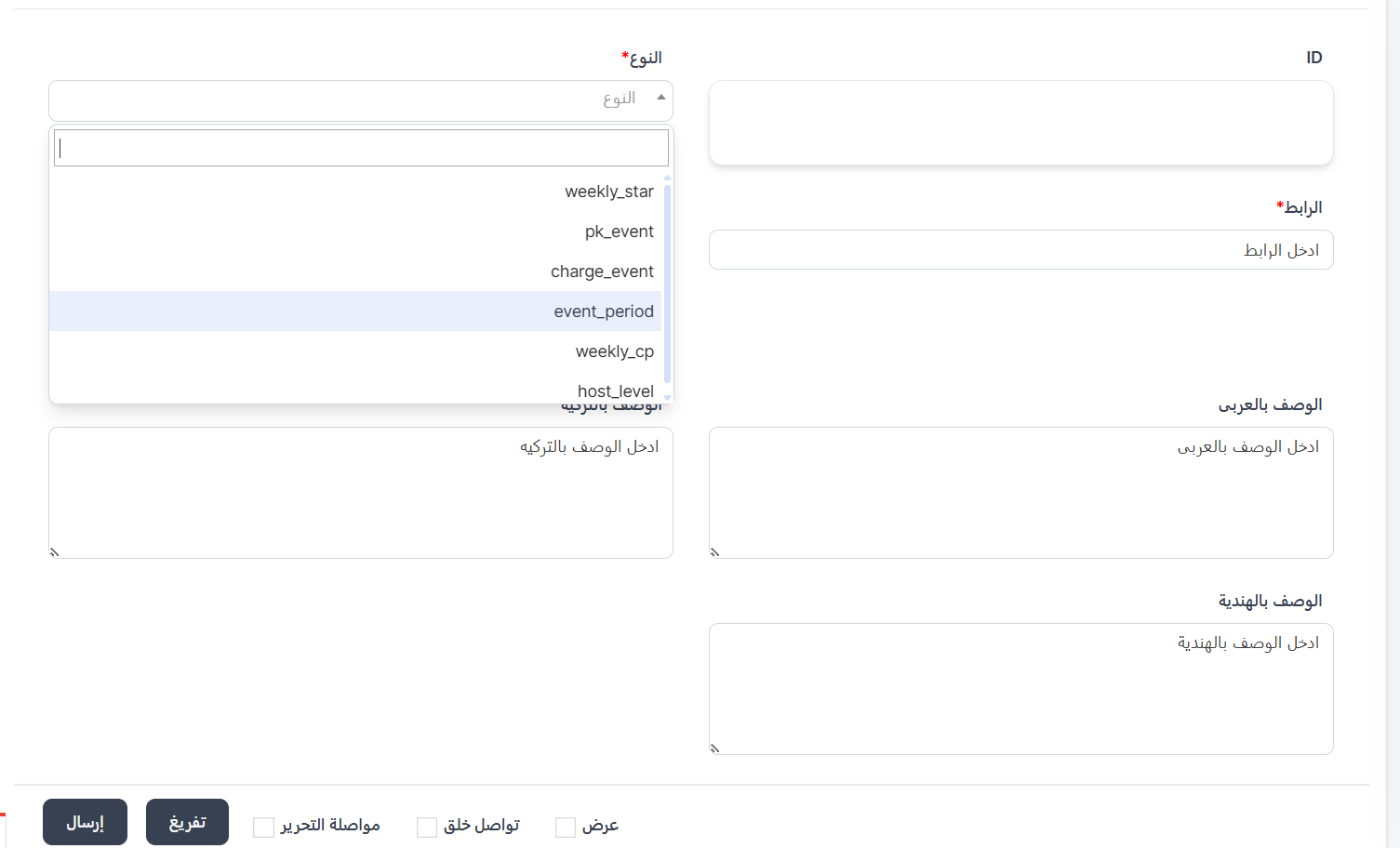
- The creation page will appear with the following fields:
ID Field
| Field | Description |
|---|---|
| ID | Identifier number (auto-generated or manually entered) |
Type Field ★
This field is required - choose the event type from the dropdown:
| Type | Description |
|---|---|
| weekly_star | Weekly Star event rules |
| pk_event | PK Events rules |
| charge_event | Charge Events (Target Events) rules |
| event_period | Event Period rules |
| weekly_cp | Weekly CP rules |
| host_level | Host level rules (Agency Rewards) |
Link Field ★
| Field | Description | Example |
|---|---|---|
| Link | External rules page link displayed to users | https://tempo.utdsoftware.com/page/Agency-Rewards |
Description Fields (Multi-language)
| Field | Description |
|---|---|
| Arabic Description | Rules text in Arabic |
| Turkish Description | Rules text in Turkish |
| Hindi Description | Rules text in Hindi |
- Click "Submit" to save the rule
Practical Example
Scenario: Creating Agency Rewards Rules
| Field | Value |
|---|---|
| Type | host_level |
| Link | https://tempo.utdsoftware.com/page/Agency-Rewards |
| Arabic Description | Agency rewards rules: The higher the host level... |
| Turkish Description | Ajans ödülleri kuralları: Sunucu seviyesi yükseldikçe... |
| Hindi Description | एजेंसी पुरस्कार नियम: होस्ट स्तर जितना अधिक होगा... |
Important Notes
Tip
Write rules in all available languages to ensure all users understand the rules in their preferred language.
Warning
- Type and Link fields are required (★) and cannot be left empty.
- Make sure the link is correct and working before saving.
- Each event type should have only one rule.
Information
Rules created here are displayed to users when they click on the rules link in the relevant event page inside the app.
📊 Event Reports
Introduction
The Event Reports page displays a record of winners and distributed prizes in all events. You can review who received prizes in each event, the prize type, and winning level (1st, 2nd, 3rd), with the ability to refund a prize if necessary.
How to Access
Sidebar Menu → Events → Event Reports
Or via direct link:
Event Reports Page
Labels (Filter by Event Type)
On the right side of the page, there's a "Labels" section to navigate between event types:
| Tab | Description |
|---|---|
| Weekly Star | View winners of Weekly Star events |
| Temporary Event | View winners of Event Period events |
| PK Event | View winners of PK events |
| Charge Reports | View winners of Charge Events (Target Events) |
Click any tab to view reports for that event type.
Reports Table
The table displays winner and prize distribution details:
| Column | Description |
|---|---|
| ID | Unique record identifier (e.g., 1, 2, 3...) |
| Name | Winning user's name + their UID number (e.g., John - UID: 55555) |
| Level | Winning rank: 1 = 1st 🥇, 2 = 2nd 🥈, 3 = 3rd 🥉 |
| Type | Prize type (ware - item, coins - coins, vip - VIP membership) |
| Gifts | Prize details (e.g., 1000 coins, VIP 1, item name) |
| Image | Prize image |
| Refund | "Refund" 🔴 button to retrieve the prize from the user |
Control Buttons
| Button | Description |
|---|---|
| Filter 🔘 | Filter and sort displayed reports |
Refund Prize Button
The "Refund" 🔴 button is used to retrieve a distributed prize from a user. Use cases:
- Discovering cheating or violations by the winning user
- Error in prize distribution
- Administrative request to cancel a specific prize
Warning
When clicking the "Refund" button, the prize will be withdrawn from the user immediately. Make sure before executing this action.
Report Example
Weekly Star Report
| ID | Name | Level | Type | Gifts |
|---|---|---|---|---|
| 1 | John (UID: 55555) | 3 | ware | Item |
| 2 | John (UID: 55555) | 1 | coins | 1000 |
| 3 | Ahmed (UID: 2424110) | 2 | coins | 500 |
| 4 | Ahmed (UID: 2424110) | 2 | vip | VIP 1 |
| 5 | John (UID: 55555) | 1 | coins | 1000 |
| 6 | Rafif sy (UID: 5312145) | 2 | coins | 500 |
Note
- Level 1 = 1st Winner 🥇
- Level 2 = 2nd Winner 🥈
- Level 3 = 3rd Winner 🥉
- The same user may appear more than once if they received multiple prizes in the same event.
Important Notes
Warning
- The "Refund" button cannot be undone after execution.
- Make sure to review the data carefully before refunding any prize.
- Reports are updated automatically after each prize distribution.
Tip
Use the label tabs to easily navigate between event types and review each type's reports separately.