⚙️ Configurations
The Configurations page displays all core system settings that control the application's behavior. Each configuration has a programmatic name, a value, and a description explaining its function. Configurations are divided into different categories.
Access:
Sidebar → Settings → System Settings → Configurations
🔗 Open Configurations Page
| Button |
Description |
| 🔽 Sort |
Sorting and classification options |
| ➕ New |
Create a new configuration |
| 📊 Export |
Export data |
Configurations Table:
| Column |
Description |
| ID |
Unique identifier number for the configuration |
| Name |
Programmatic name of the configuration (e.g., one_usd_value_in_coins) |
| Value |
Current value of the configuration (number / text / true/false) |
| Description |
Explanation of the configuration's function |
| Actions |
Additional actions (⋮) to modify the value |
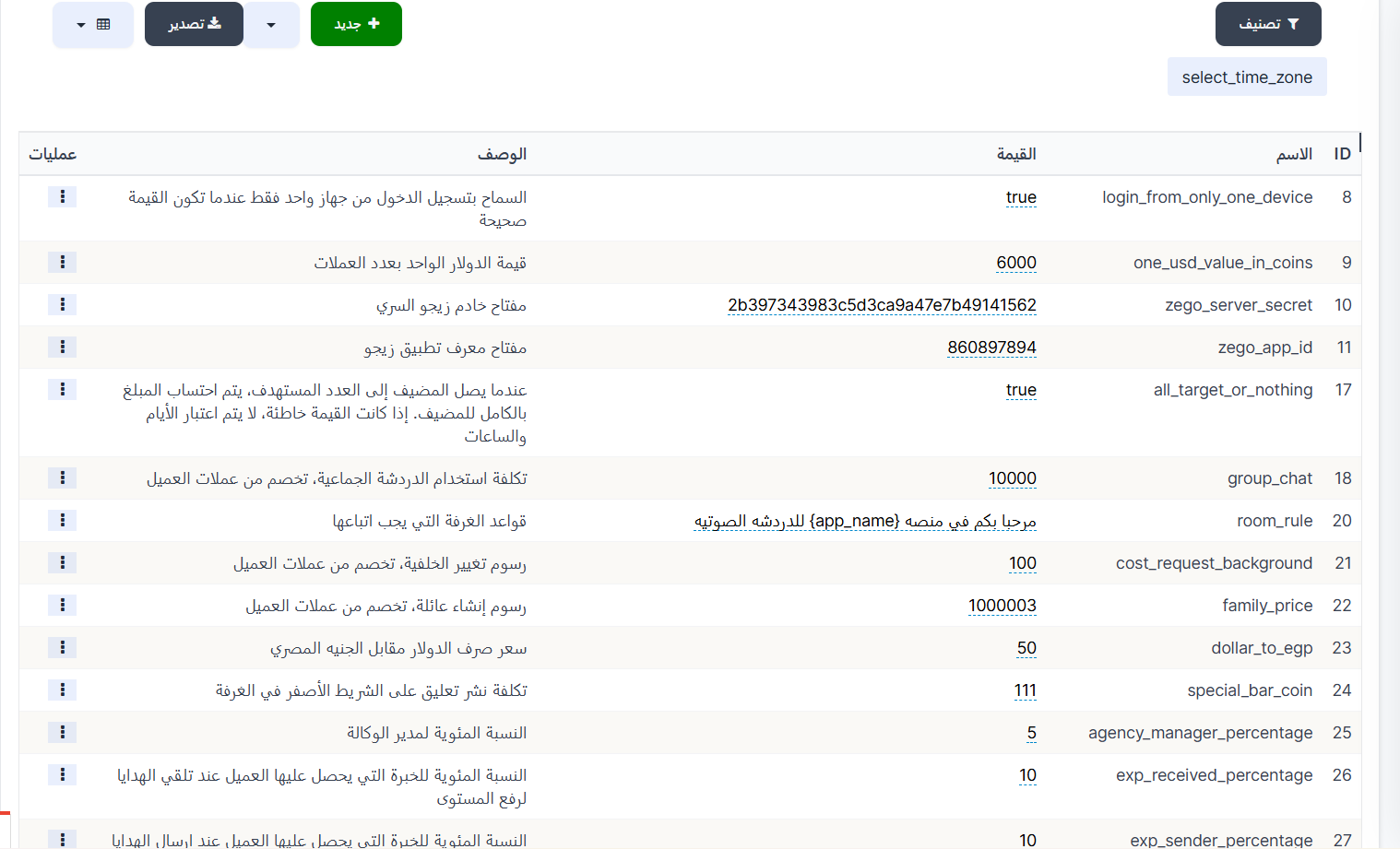
Available Configurations:
| ID |
Name |
Value |
Description |
| 8 |
login_from_only_one_device |
true |
Allow login from only one device when the value is true |
| 9 |
one_usd_value_in_coins |
6000 |
Value of one US dollar in coins |
| 10 |
zego_server_secret |
— |
Zego server secret key |
| 11 |
zego_app_id |
860897894 |
Zego application ID key |
| 17 |
all_target_or_nothing |
true |
When the host reaches the target number, the full amount is calculated. If the value is false, days and hours are not considered |
| 18 |
group_chat |
10000 |
Cost of using group chat, deducted from the client's coins |
| 20 |
room_rule |
— |
Room rules that must be followed |
| 21 |
cost_request_background |
100 |
Background change fee, deducted from the client's coins |
| 22 |
family_price |
1000003 |
Family creation fee, deducted from the client's coins |
| 23 |
dollar_to_egp |
50 |
USD to Egyptian Pound exchange rate |
| 24 |
special_bar_coin |
111 |
Cost of posting a comment on the yellow bar in the room |
| 25 |
agency_manager_percentage |
5 |
Agency manager percentage |
| 26 |
exp_received_percentage |
10 |
Experience percentage the client receives when receiving gifts for leveling up |
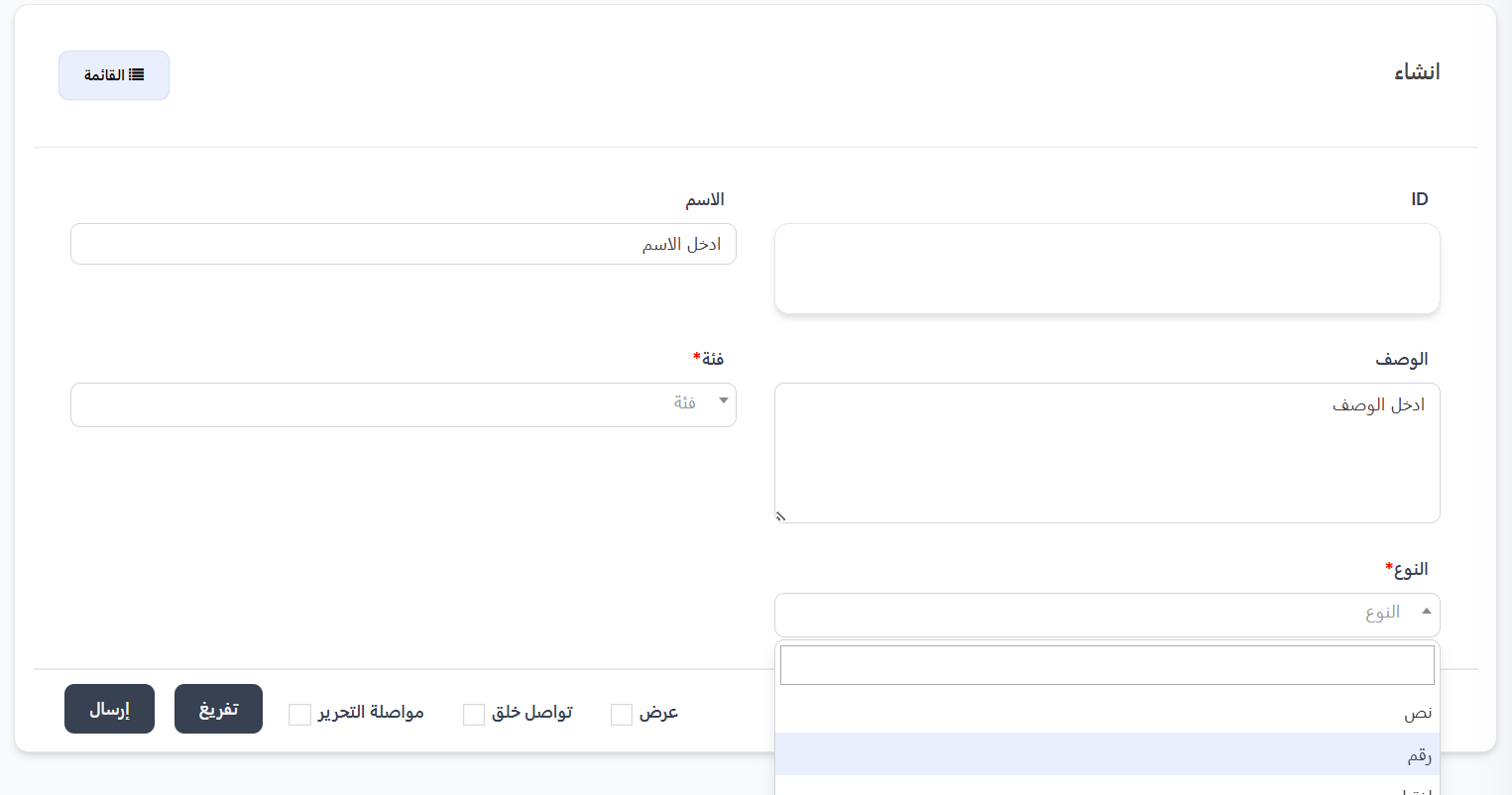
Create a New Configuration:
Click ➕ New to create a new configuration.
Fields:
| Field |
Description |
Required |
| ID |
Configuration identifier (automatic) |
— |
| Name |
Programmatic name of the configuration |
❌ No |
| Description |
Explanation of the configuration's function |
❌ No |
| Category |
Category the configuration belongs to — dropdown list |
✅ Yes |
| Type |
Value type — dropdown list |
✅ Yes |
Available Categories:
| Category |
Description |
| System Settings |
General system settings |
| Target Settings |
Target and goals settings |
| Zego Settings |
Zego server settings for streaming |
| SMS Settings |
SMS settings |
| Family Settings |
Family settings |
| Payment Settings |
Payment and currency settings |
Value Types:
| Type |
Description |
| Text |
Text value (e.g., key, link, rule) |
| Number |
Numeric value (e.g., price, percentage, cost) |
| Select |
Selection value (e.g., true/false) |
Quick Summary:
| Action |
Steps |
| View Configurations |
Settings → System Settings → Configurations |
| Edit a Configuration Value |
⋮ → Edit → Change the value → Save |
| Create a New Configuration |
➕ New → Name + Description + Category + Type → Submit |
| Search for a Configuration |
Use the search field with the programmatic name |
🔗 Open Configurations Page
Next Step
Employees