🆔 Special IDs
Introduction
The Special IDs page displays premium identifiers (special numbers) that users can purchase in the application. Each special ID is a unique number that users can buy to use as their personal identifier. Once an ID is purchased by a user, no other user can purchase it until the first user's purchase period expires.
How to Access
Sidebar ← Special ID ← Special IDs
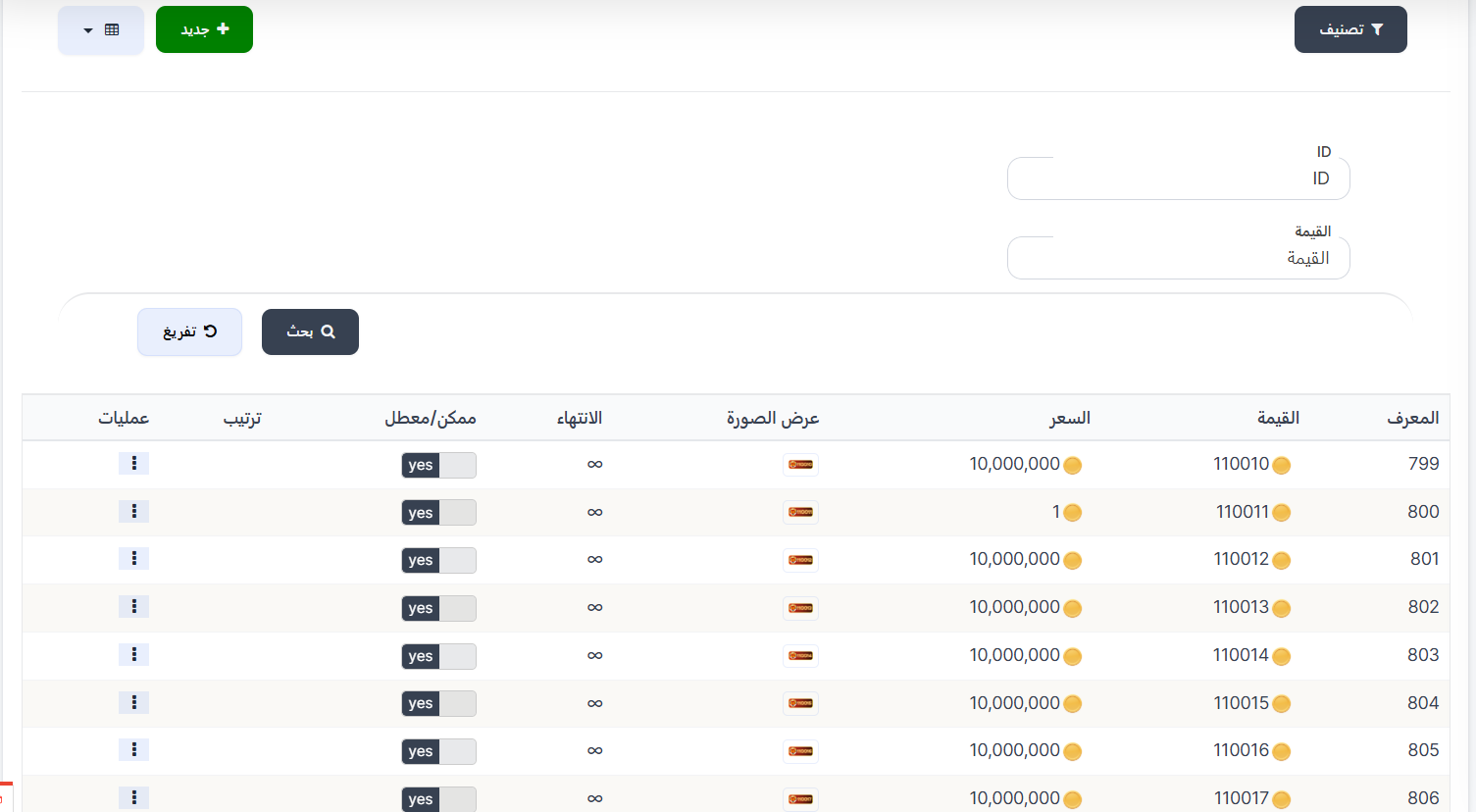
Top Page Buttons
| Button | Description |
|---|---|
| 🔘 Filter | Open search and filter options |
| ➕ New | Create a new special ID |
Search Filters
| Filter | Description |
|---|---|
| ID | Search by specific ID value |
| Value | Search by ID value (displayed number) |
| Button | Description |
|---|---|
| 🔍 Search | Apply filters and display results |
| 🔄 Clear | Clear filters and re-display all IDs |
Special IDs Table
| Column | Description |
|---|---|
| ID | Unique record identifier (example: 799, 800, 801) |
| Value | The special number displayed to the user for purchase (example: 110010 🪙) |
| Price | Purchase price in coins (example: 10,000,000 🪙 or 1 🪙) |
| Image | Thumbnail representing the special ID |
| Expiry | Purchase validity: ∞ (no expiry / permanent) or specific duration |
| Enabled/Disabled | ID status: yes (available for purchase) or no (disabled) |
| Order | Display order of the ID in the list |
| Operations | Options menu (⋮) to edit or delete |
Creating a New Special ID
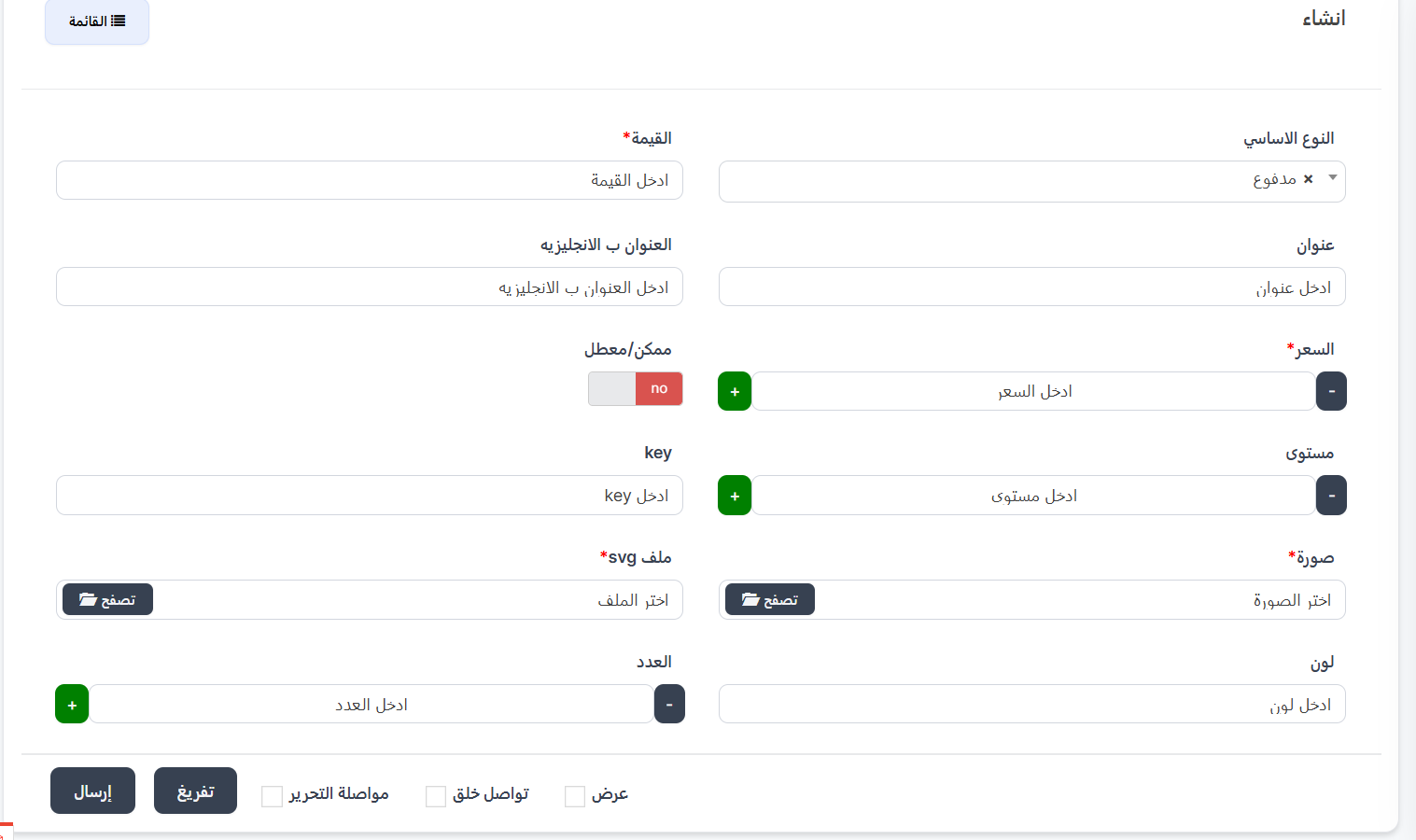
When clicking ➕ New, the create page appears.
Creation Fields:
| Field | Description |
|---|---|
| Basic Type | ID type from dropdown (example: Paid) |
| Value * | The special number to be displayed and purchased |
| Title (Arabic) | ID title in Arabic |
| Title (English) | ID title in English |
| Price * | Purchase price in coins (➕/➖ buttons) |
| Enabled/Disabled | Toggle — yes (available) or no (disabled) |
| Level | Required user level to purchase (➕/➖ buttons) |
| Key | Special key for the ID |
| Image * | ID image (click "📁 Browse" to select) |
| SVG File * | SVG file for the ID (click "📁 Browse" to select) |
| Color | Special ID color |
| Count | Number of available IDs of this type (➕/➖ buttons) |
Purchase and Reservation Mechanism
Important Rule
- When a user purchases a special ID, it is reserved exclusively for them.
- No other user can purchase the same ID as long as the first user still owns it.
- If the ID has a specific expiry duration, after the period ends, the ID becomes available for purchase again.
- If the expiry is ∞ (permanent), the ID remains reserved for the user permanently.
📜 Special ID History (Purchase Log)
Introduction
The Special ID History page displays the log of all special ID purchases by users.
How to Access
Sidebar ← Special ID ← Special ID History
📜 Open Special ID History Page
Purchase Log Table
| Column | Description |
|---|---|
| ID | Sequential record number |
| User | Username who purchased the ID with image and UUID |
| Value | The special ID number purchased (🪙 icon) |
| Image | Special ID image |
| Basic Type | ID type (example: Paid) |
| Status | Purchase status: 🟢 (Active) or 🟡 (Expired/Suspended) |
| Start Date | Date of ID ownership start |
| End Date | Expiry date: specific date or - (no expiry / permanent) |
| Operations | Options menu (⋮) for details or edit |
Quick Summary
| Action | Steps |
|---|---|
| View special IDs | Special ID ← Special IDs |
| Create new ID | ➕ New ← Enter value, price, and image ← Submit |
| Search for an ID | Use ID or Value filters ← Search |
| View purchase history | Special ID ← Special ID History |