📊 Family Levels
The Family Levels page allows you to manage family levels in the app. Each level determines the maximum number of members and number of admins allowed in the family, as well as the experience points required to reach that level. The higher the family's level, the more features available to it.
How to Access:
Sidebar ← Families ← Family Levels
Page Contents:
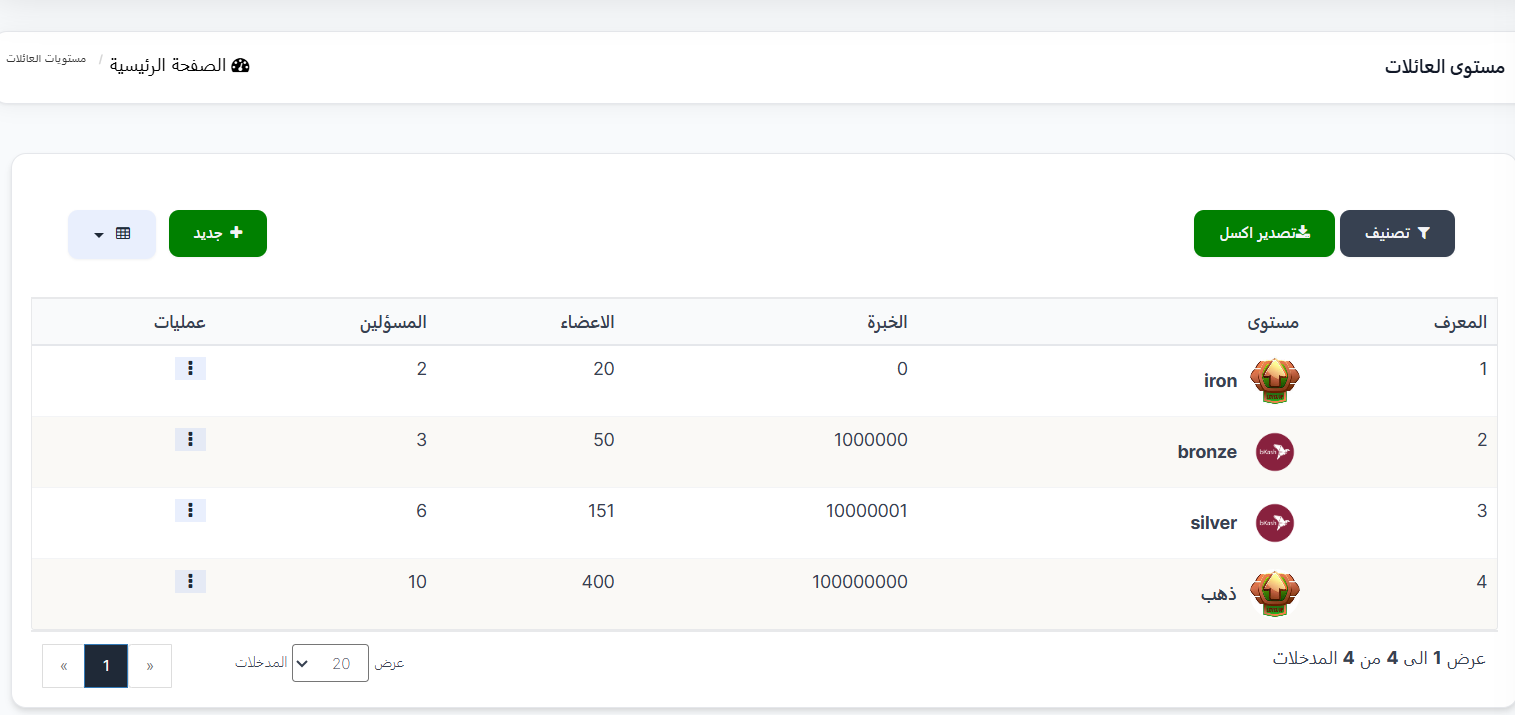
When opening the page, you'll find a toolbar at the top with filter, export, and add new level buttons, and at the bottom the levels table with details for each level.
Toolbar:
| Element | Description |
|---|---|
| 🔍 Filter | Filter button to filter levels |
| 📤 Export Excel | Green button to export level data to an Excel file |
| + New | Green button to create a new level |
| 📊 View | Toggle display mode (table or grid) |
Levels Table:
The table displays all available family levels with the following information:
| Column | Description |
|---|---|
| ID | The level's unique identification number in the system |
| Level | Level name with its distinctive icon (e.g., iron 🛡️, bronze 🥉, silver 🥈, gold 🥇) |
| Experience | Experience points required to reach this level |
| Members | Maximum number of members allowed in the family at this level |
| Admins | Maximum number of admins allowed in the family at this level |
| Operations | Options menu (⋮) to edit or delete the level |
Understanding the Levels System:
Each family starts at the first level and automatically upgrades when enough experience points are collected:
| ID | Level | Experience Required | Members | Admins |
|---|---|---|---|---|
| 1 | iron 🛡️ | 0 | 20 | 2 |
| 2 | bronze 🥉 | 1,000,000 | 50 | 3 |
| 3 | silver 🥈 | 10,000,001 | 151 | 6 |
| 4 | gold 🥇 | 100,000,000 | 400 | 10 |
How the Levels System Works
- First Level (iron): Every new family starts at this level — maximum 20 members and 2 admins.
- Automatic upgrade: When a family collects enough experience points, it automatically upgrades to the next level.
- With each upgrade: The allowed number of members and admins increases.
- Experience points: Earned from family members' activity within the app (sending gifts, broadcasting, etc.).
Creating a New Level:
When pressing the green + New button, the Create new level form opens:
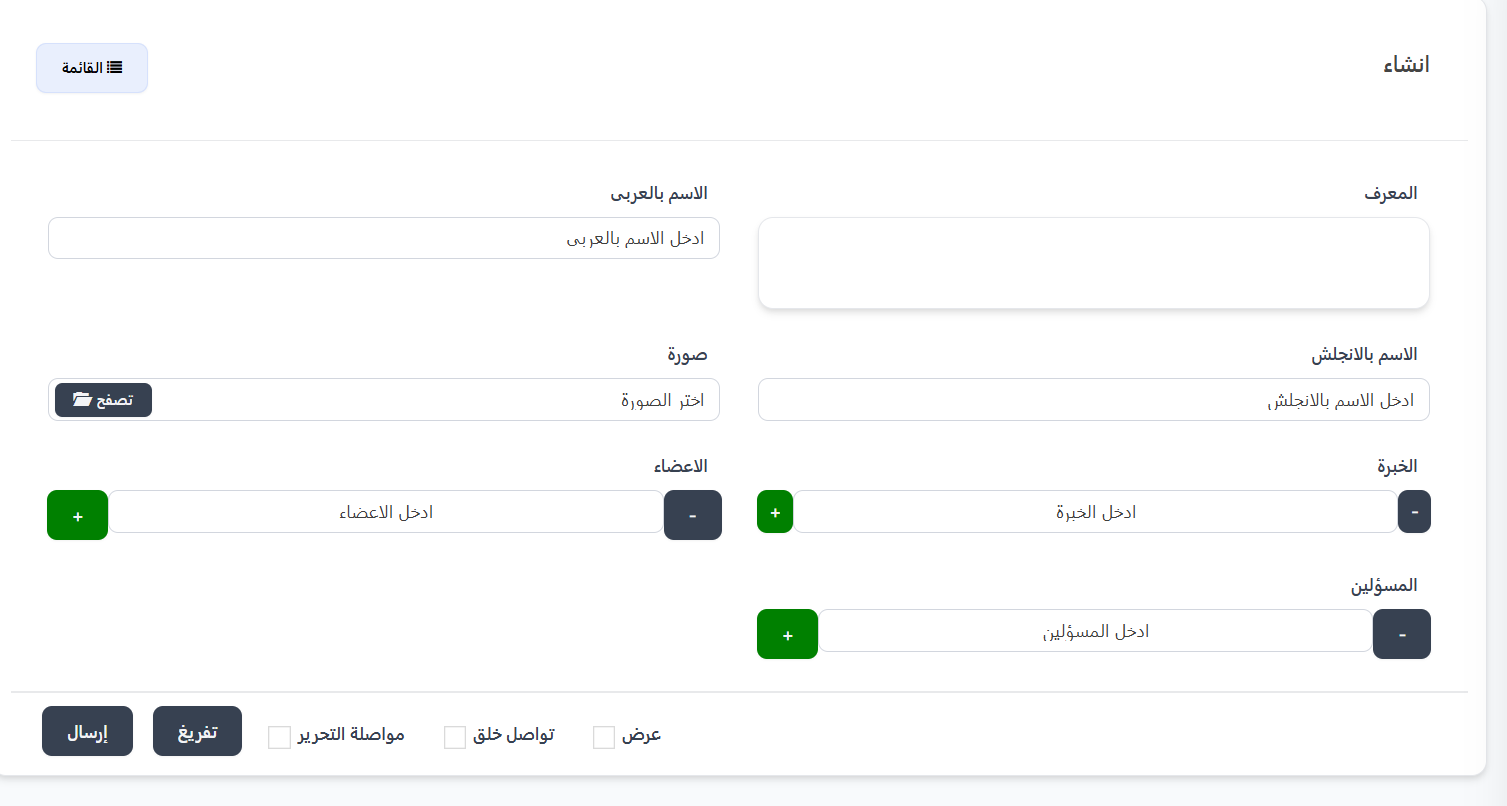
Creation Form Fields:
| Field | Description |
|---|---|
| ID | The level's unique ID — you can enter it manually or leave it to be auto-generated |
| Arabic Name ⭐ | Level name in Arabic (e.g., ذهب, فضة, برونز) — required field |
| English Name | Level name in English (e.g., gold, silver, bronze) |
| Image | Level icon — press 📁 Browse to select an image from your device |
| Experience ⭐ | Experience points required to reach this level — use (+) and (-) buttons to change. Required field |
| Members ⭐ | Maximum number of members allowed at this level — required field |
| Admins ⭐ | Maximum number of admins allowed at this level — required field |
Form Buttons:
| Button | Function |
|---|---|
| Submit | Save the new level and return to the levels list |
| Reset | Clear all fields and reset to default values |
| Continue Editing ☐ | When enabled, save and stay on the edit page |
| Continue Creating ☐ | When enabled, after saving a new form opens to create another level |
| View ☐ | When enabled, after saving show the level details |
| 📋 List | Return to the full levels list |
Available Operations:
When pressing the operations menu (⋮) next to any level:
| Operation | Description |
|---|---|
| Edit | Edit level settings (name, experience, members, admins, image) |
| Delete | Permanently delete the level from the system |
Warning
When deleting a level, make sure no families are currently using this level. Deleting a level in use may affect the families linked to it.
Quick Summary:
| Action | Steps |
|---|---|
| View all levels | Families ← Family Levels |
| Create a new level | Press + New ← Enter name, experience, members, and admins ← Submit |
| Edit a level | Press ⋮ next to the level ← Edit |
| Delete a level | Press ⋮ next to the level ← Delete |
| Export data | Press 📤 Export Excel to download an Excel file |