🪙 Coins (Dollar to Coins Conversion Methods)
The Coins page allows you to manage payment gateways available in the app and define conversion packages (how many coins the user gets per dollar amount) for each payment gateway.
How to Access:
Sidebar ← Settings ← Business Settings ← Coins
Payment Gateways Table:
| Column | Description |
|---|---|
| ID | Unique gateway identifier |
| Title | Gateway name (fawry, google_pay, strip, opay, etc.) |
| Image | Gateway logo |
| Actions | Points button — manage conversion packages |
| Status | Toggle on/off (open = active) |
| Custom Message | Custom message shown to users |
| Operations | Additional options menu (⋮) |
Available Gateways:
fawry, google_pay, strip, opay, skyPay, cashfree, applepay, paytabs, paypal, utdFawry, codapay
Managing Conversion Packages:
Press Points next to any gateway to manage its packages.
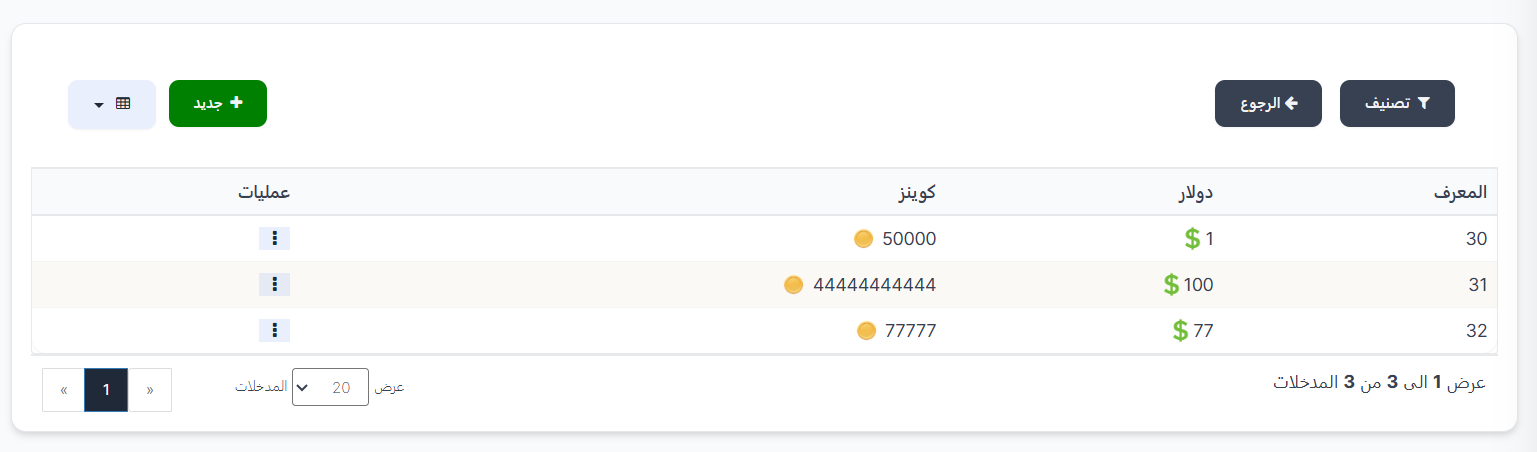
Package Table:
| Column | Description |
|---|---|
| ID | Package identifier |
| Dollars | Amount in USD ($) the user pays |
| Coins | Number of coins (🪙) the user receives |
| Operations | Edit or delete options (⋮) |
Creating a New Package:
Press ➕ New and fill in:
| Field | Description |
|---|---|
| Dollars | Amount in USD the user pays |
| Coins | Number of coins the user receives |
💎 Currency Exchange (Diamond to Coins Conversion)
The Currency Exchange page manages diamond (💎) to coin (🪙) conversion rates.
How to Access:
Sidebar ← Settings ← Business Settings ← Currency Exchange
Exchange Packages Table:
| Column | Description |
|---|---|
| ID | Package identifier |
| Diamond 💎 | Number of diamonds required |
| Value 🪙 | Number of coins received |
| Type | Package type |
| Operations | Edit/delete options (⋮) |
Creating a New Exchange Package:
Press ➕ New and fill in:
| Field | Description |
|---|---|
| Diamond 💎 | Number of diamonds required |
| Value 🪙 | Number of coins the user receives |
| Type | Select: Coins (gold coins 🪙) or Silver Coins |
Quick Summary:
| Action | Steps |
|---|---|
| View payment gateways | Settings ← Business Settings ← Coins |
| Toggle gateway on/off | Change the status switch (open/close) |
| Create conversion package | Press "Points" ← Press "➕ New" ← Enter dollars and coins ← Submit |
| Create exchange package | Currency Exchange ← Press "➕ New" ← Enter diamond, value, type ← Submit |