📩 Agency Join Requests
The Agency Join Requests page allows you to manage all join requests submitted by users to join agencies. You can view requests, accept them, or reject them by editing the request status.
Access:
Sidebar → Agency System → Host Agencies → Agency Join Requests
Page Content:
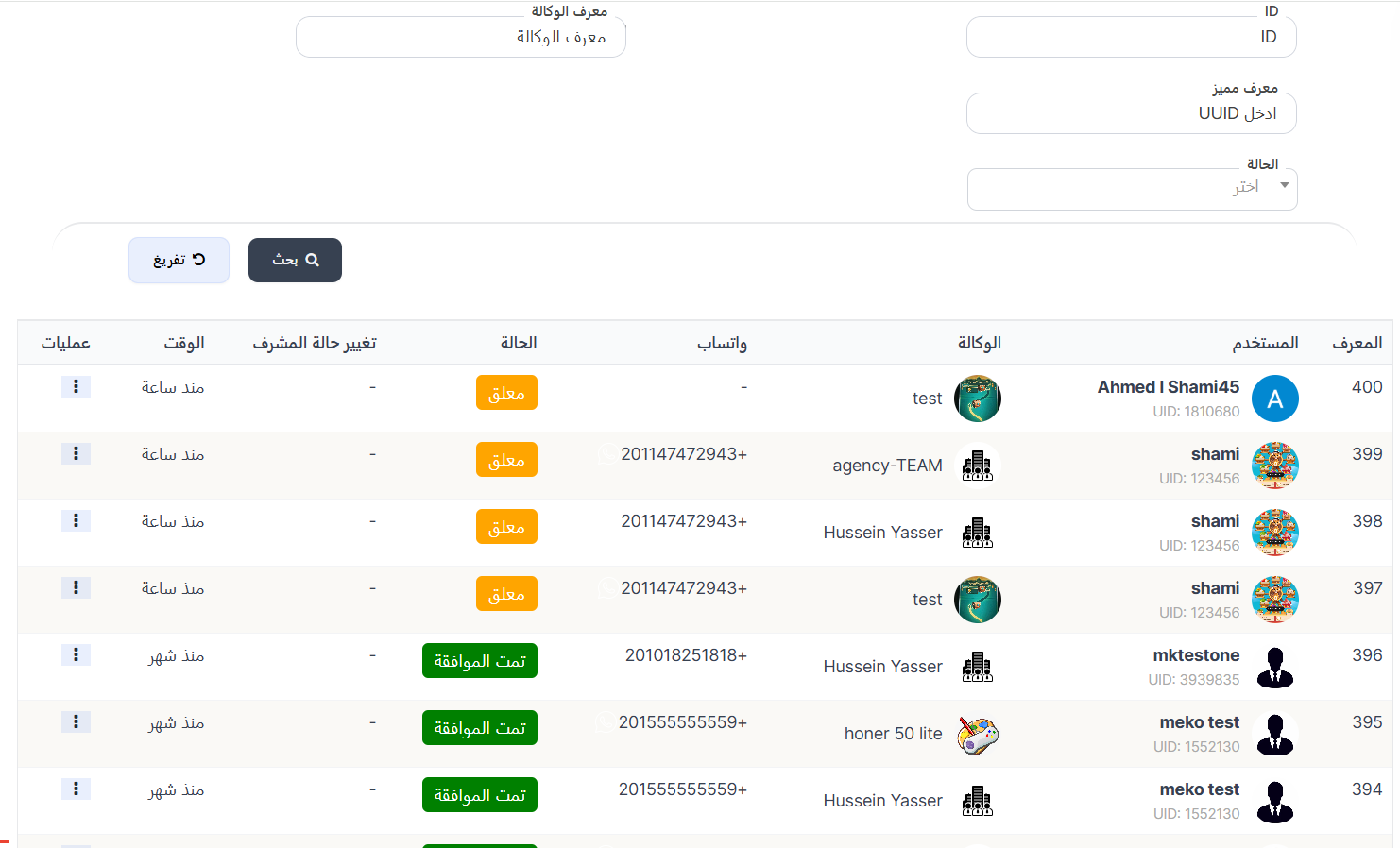
When opening the page, you'll find a search filter at the top and the requests table below displaying all registered join requests.
Search Filter:
| Filter | Description |
|---|---|
| ID | Search by request ID |
| Agency ID | Search by the agency ID to join |
| Unique ID | Search by user's UUID |
| Status | Filter requests by status (pending, approved, rejected) |
After entering data, press 🔍 Search to display results, or 🔄 Clear to reset the filter.
Requests Table:
| Column | Description |
|---|---|
| ID | Request identification number (ID) |
| User | Applicant's image, name, and UID |
| Agency | Agency image and name |
| Applicant's WhatsApp number with country code | |
| Status | Current request status |
| Admin Status Change | Admin permission change status (if any) |
| Time | Time elapsed since request submission (e.g., 1 hour ago, 1 month ago) |
| Actions | Available actions |
Request Status:
| Status | Color | Description |
|---|---|---|
| Pending | 🟡 Yellow | Request is awaiting review and decision |
| Approved | 🟢 Green | Request approved and user joined the agency |
| Rejected | 🔴 Red | Join request was rejected |
Edit Join Request:
To change the join request status (accept or reject), click the ⋮ icon in the Actions column and select Edit.
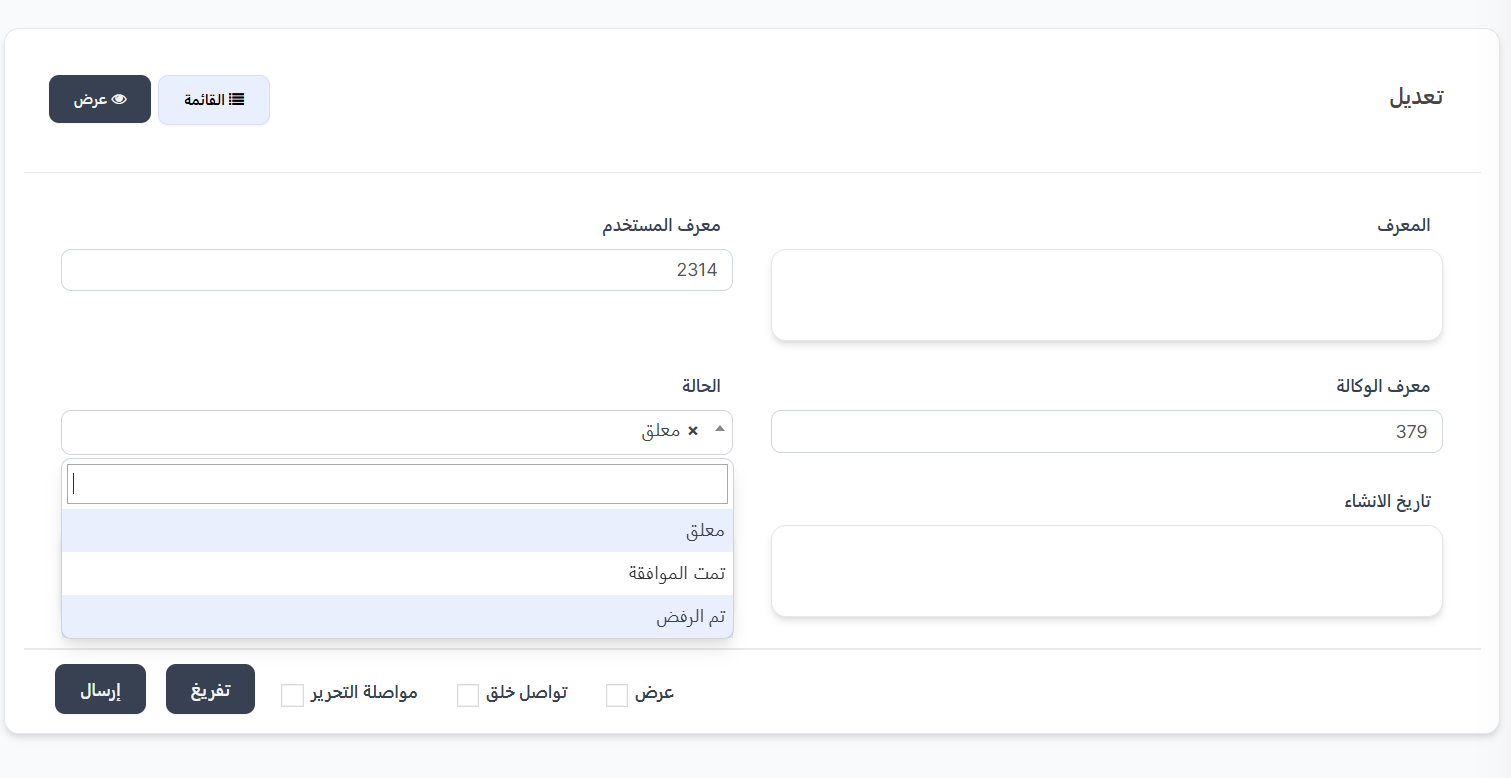
Edit Fields:
| Field | Description | Editable |
|---|---|---|
| ID | Request identification number (ID) | ❌ View only |
| User ID | Applicant's user ID (UID) | ❌ View only |
| Agency ID | ID of the agency to join | ❌ View only |
| Status | Request status | ✅ Yes |
| Created At | Request submission date | ❌ View only |
Status Options:
| Option | Description |
|---|---|
| Pending | Keep the request pending awaiting decision |
| Approved | Accept the request and add the user as an agency member |
| Rejected | Reject the join request |
Status Edit Steps:
- From the Actions column in the table, click the ⋮ icon next to the request to edit
- Select Edit from the menu
- The edit page will open showing request data
- Change the Status from the dropdown (Pending / Approved / Rejected)
- Click Submit to save the change
Note
- When selecting Approved, the user will be automatically added as a member of the agency.
- When selecting Rejected, the user will be notified of the rejection.
- The status can be changed at any time even after acceptance or rejection.
Quick Summary:
| Action | Steps |
|---|---|
| View all requests | Agency System → Host Agencies → Agency Join Requests |
| Search for a request | Enter ID or Agency ID or UUID or select Status → Search |
| Accept request | Click ⋮ → Edit → Change status to "Approved" → Submit |
| Reject request | Click ⋮ → Edit → Change status to "Rejected" → Submit |